
Last Updated on October 25, 2026
Car owners often face challenges when their vehicles develop problems, especially when trying to identify the exact cause. Many turn to diagnostic tools to troubleshoot issues themselves. However, with so many OBD2 scanners available, finding one that is both reliable and affordable can be confusing.
That’s where the Autel AP200 comes in. This compact Bluetooth diagnostic tool allows you to scan your vehicle using an Android or iOS smartphone. It supports standard OBD2 diagnostics, vehicle-specific system scanning, and several maintenance functions.
In this Autel AP200 review 2026, we’ll explore its features, compatibility, performance, and limitations. We’ll also compare it with other Bluetooth scanners to help you decide whether it is still worth buying.
Technical Specifications of the Autel AP200 MaxiAP OBD2 Scanner
| Specification | Details |
|---|---|
| Product Type | Bluetooth OBD2 diagnostic adapter |
| Communication | Bluetooth 4.2 Dual-Mode |
| Wireless Frequency | 2.4 GHz |
| Input Voltage Range | 9 VDC to 26 VDC |
| Supply Current | 100 mA at 12V |
| Sleep Mode Current | 3 mA at 12V |
| Operating Temperature | 0°C to 50°C (32°F to 122°F) |
| Storage Temperature | -20°C to 70°C (-4°F to 158°F) |
| Dimensions | 59.2 x 48.5 x 24.6 mm |
| Weight | Approximately 35g |
| Vehicle Compatibility | Most compatible European, Asian, and North American OBD2 vehicles; US-market coverage generally starts in 1996 |
| OBD2 Protocol Support | All 10 standard OBD2 diagnostic modes |
| Diagnostic Functions | Read and clear DTCs, live data, freeze frame, O2 sensor tests, on-board monitoring, I/M readiness, vehicle information, and EVAP tests |
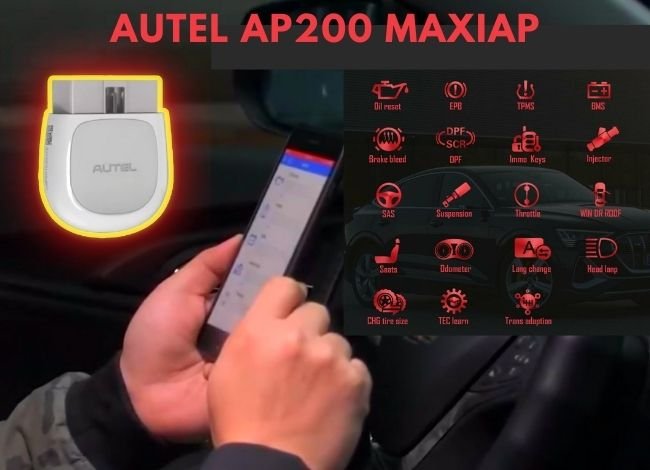
| Advanced Service Functions | Oil Reset, EPB, BMS, SAS, DPF, throttle adaptation, TPMS-related services, and IMMO functions on supported vehicles |
| AutoVIN Technology | Yes, where supported |
| Diagnostic Reports | PDF report generation and sharing |
| Vehicle History | Stores previously tested vehicle records |
| Multilingual Support | 14 languages advertised by Autel |
| Mobile App Compatibility | Android and iOS; check current app requirements |
| Software Updates | Lifetime updates for the included vehicle-brand software, according to Autel’s support policy |
| Subscription Model | One vehicle brand included; additional vehicle brands require separate purchases, generally with one-year validity |
| App Name | MaxiAP200 |
| Power Source | Vehicle’s OBD2 diagnostic port; no AA battery required |
| Product Status | Discontinued in Autel’s US product catalog |
| Price |  Check Today’s Price on Amazon Check Today’s Price on Amazon |
Autel AP200 Review 2026: MaxiAP Bluetooth OBD2 Scanner
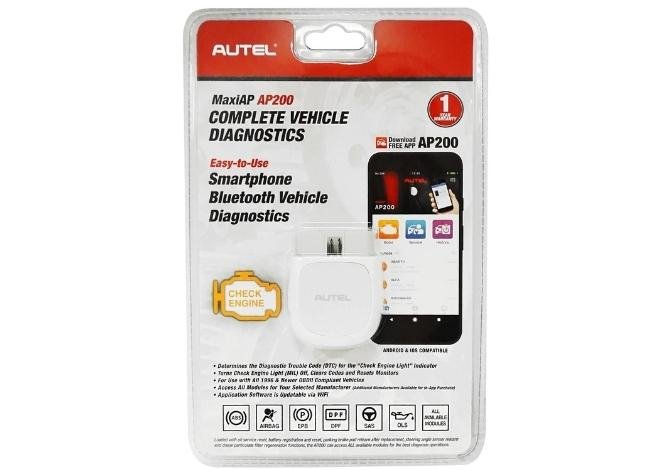
The Autel AP200 is a small wireless diagnostic adapter that connects to your vehicle’s OBD2 port and sends diagnostic information to your smartphone.
Compatible with Android and iOS devices, it turns your phone into a capable diagnostic tool through the MaxiAP200 app. Unlike basic code readers, the AP200 can access multiple vehicle systems when the appropriate manufacturer software is installed.
Its compact design and affordable price make it attractive to DIY car owners. However, the AP200 is now a legacy product in Autel’s US catalog, and its software purchasing system is an important consideration.
Another useful feature is its wireless connection. The Bluetooth adapter communicates with your mobile device without requiring a cable between the scanner and phone.
Its typical Bluetooth operating range is approximately 10 meters (33 feet) in favorable conditions. Actual range depends on interference, nearby objects, and the vehicle’s location.
The scanner receives power through the OBD2 diagnostic port. You don’t need to charge the adapter separately.
Related: Innova 1000 vs BlueDriver Bluetooth Scanner Comparison
Some Limitations of the Autel AP200 You Need to Know
Although the AP200 is a capable diagnostic tool, communication errors can occasionally occur when connecting to a vehicle’s control modules.
If your scanner fails to communicate, follow these steps:
- Make sure the ignition is in the correct position for the selected diagnostic procedure.
- Check whether the adapter is securely connected to the vehicle’s OBD2 diagnostic port.
- Confirm that Bluetooth is enabled and the correct adapter is connected through the MaxiAP200 app.
- Switch the ignition off, wait briefly, and restart the connection.
- Check whether the correct vehicle-specific software is installed.
- Verify that your vehicle supports the diagnostic function you selected.
If communication problems continue, check the OBD2 port’s power supply and contact Autel support.
Vehicle Compatibility
Compatibility is an important factor when choosing a car scanner. Fortunately, the Autel AP200 supports a wide range of vehicles from manufacturers such as Toyota, Honda, Hyundai, BMW, Nissan, and many others.
It supports most OBD2-compliant vehicles sold in the United States from 1996 onward. European and Asian vehicle compatibility depends on the market, model year, and diagnostic protocol.
Standard OBD2 functions are available across compatible vehicle brands. However, manufacturer-specific diagnostics and maintenance functions depend on the software package installed and the vehicle’s capabilities.
Before buying, check whether your exact vehicle model supports the functions you need.
Advanced Features of the Autel MaxiAP AP200 Full-System Diagnostic Scan Tool
The Autel AP200 offers several advanced functions that are not usually available on basic OBD2 code readers. These features can help you diagnose problems and perform certain maintenance procedures without purchasing a more expensive scanner.
Complete System Diagnosis
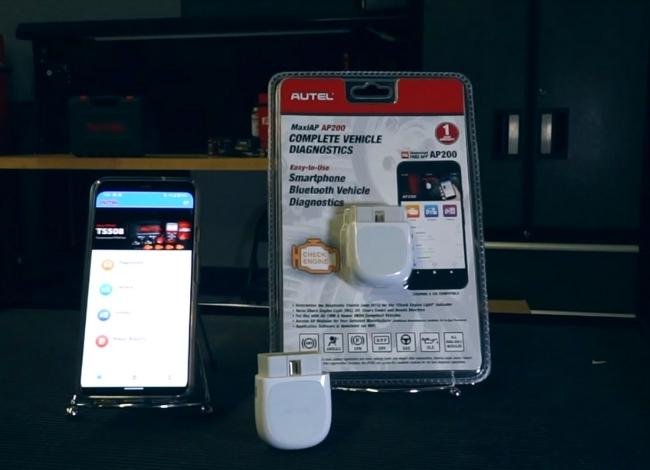
The Autel AP200 can scan multiple vehicle systems, including the engine, transmission, ABS, SRS, and other electronic modules supported by the vehicle.
Unlike basic OBD2 scanners that focus primarily on engine-related faults, the AP200 can retrieve and clear manufacturer-specific trouble codes when the appropriate vehicle-brand software is installed.
However, not every electronic module is accessible on every vehicle. The available functions depend on the manufacturer, model, year, and installed software.
Mobile App Support
The MaxiAP200 app is available for compatible Android and iOS devices. It provides the interface for scanning vehicle systems, reading trouble codes, viewing live data, and accessing maintenance functions.
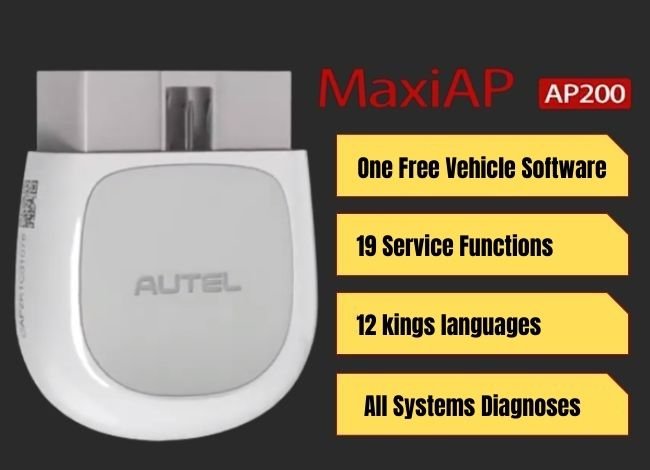
The standard OBD2 functions are free, and one vehicle-brand diagnostic software package is included with the initial purchase.
Additional vehicle brands require in-app purchases. According to Autel’s support information, the included vehicle-brand software receives lifetime updates, while separately purchased brands generally have one-year software validity.
Check current app compatibility and software purchasing terms before buying, especially if you plan to diagnose vehicles from several manufacturers.
EPB Reset Function
EPB stands for Electronic Parking Brake. This system controls the electronic parking brake mechanism used in many modern vehicles.
The AP200 can perform supported EPB service procedures, including placing certain vehicles into maintenance mode when replacing rear brake pads.
After completing the repair, the scanner can help return the parking brake system to normal operation.
Always follow the vehicle manufacturer’s service instructions. Incorrect EPB operation can damage components or create a safety risk.
Oil Service Reset
The Autel AP200 supports oil service reset functions on compatible vehicles.
After changing the engine oil, you may need to reset the vehicle’s oil-life monitoring system. This allows the maintenance reminder to calculate the next service interval correctly.
The oil reset function does not test oil quality or diagnose a faulty oil control valve. It simply resets the supported maintenance reminder.
SRS Service
SRS stands for Supplemental Restraint System, which includes airbags, crash sensors, and related safety components.
The AP200 can read and clear certain airbag system trouble codes when the vehicle-specific software supports SRS diagnostics.
If an airbag warning light appears, scanning the system can help identify a stored fault.
However, clearing the code does not repair defective airbags, sensors, wiring, or other safety components. Airbag repairs should follow the manufacturer’s procedures.
 Check Today’s Price on Amazon
BMS Battery Management Functions
BMS stands for Battery Management System. On some vehicles, this system monitors battery condition, charging behavior, and battery replacement information.
The Autel AP200 supports battery registration and reset functions on certain compatible vehicles.
For example, when replacing a vehicle’s battery, the system may need to be informed that a new battery has been installed. Some vehicles also require coding when changing battery capacity or type.
The supported BMS functions vary between manufacturers. The AP200 is not a substitute for a dedicated battery load tester.
TPMS Functions
The Tire Pressure Monitoring System (TPMS) helps warn drivers when tire pressure falls below the recommended level or when a monitoring fault occurs.
The Autel AP200 supports certain TPMS-related service functions on compatible vehicles.
However, TPMS reset capability does not mean it can activate, program, or relearn every tire pressure sensor. Some procedures require dedicated TPMS equipment.
Before purchasing, verify that your vehicle’s required TPMS procedure is supported.
DPF System Support
A Diesel Particulate Filter (DPF) helps reduce soot emissions from diesel engines.
Over time, soot can accumulate inside the filter. Some vehicles require a controlled regeneration procedure to burn off the accumulated soot.
The Autel AP200 supports DPF service functions on selected diesel vehicles, including regeneration requests where supported.
DPF regeneration can produce extremely high exhaust temperatures. Follow the manufacturer’s safety instructions and never perform a stationary regeneration in an enclosed area.
IMMO Service
IMMO refers to the vehicle’s immobilizer system, which helps prevent unauthorized engine starting.
When the correct programmed key is detected, the immobilizer allows the engine management system to start the vehicle.
The AP200 includes certain immobilizer-related service functions for supported vehicles. However, advanced key programming, immobilizer replacement, and security authorization procedures may require professional equipment.
AutoVIN Retrieval
AutoVIN technology allows the scanner to identify supported vehicles using their Vehicle Identification Number.
This feature can simplify vehicle selection and reduce the need to enter make, model, and year manually.
The MaxiAP200 app also stores vehicle history, making it easier to review previous diagnostic sessions.
SAS Calibration
SAS stands for Steering Angle Sensor. This sensor helps electronic stability control and related systems determine the steering wheel’s position.
After certain steering, suspension, or wheel alignment repairs, some vehicles require steering angle sensor calibration.
The Autel AP200 supports SAS calibration on compatible vehicles. Always follow the recommended procedure for your specific model.
Scan Live Data
Live data is one of the most useful features of the AP200. It allows you to view real-time engine information, including RPM, coolant temperature, vehicle speed, fuel trims, and supported sensor readings.
The scanner can also record available data for later review. This is useful when investigating intermittent problems that do not always trigger a check engine light.
If you’re unfamiliar with diagnostic readings, our guide on reading OBD2 live data explains how to interpret common values.
Autel AP200 vs AP200H vs AP200C vs AP200M Comparison
Although these scanners look similar, their software packages and diagnostic capabilities differ. The table below highlights their main differences.
| Feature | Autel AP200H | Autel AP200C | Autel AP200M | Autel AP200 |
|---|---|---|---|---|
| Primary Focus | Four-system diagnostics | Common service functions | Full-system diagnostics and maintenance | Vehicle-brand full-system diagnostics |
| Standard OBD2 Functions | Yes | Yes | Yes | Yes |
| Advanced Diagnostics | Engine, transmission, ABS, and SRS | Selected systems and service functions | Multiple vehicle systems | Multiple systems for licensed vehicle brands |
| Special Features | Oil reset and battery maintenance | EPB, BMS, SAS, DPF, and other supported services | Oil reset, battery reset, EPB, and SAS | Oil reset, EPB, BMS, SAS, DPF, TPMS-related services, and more |
| Mobile Platform | Android and iOS | Android and iOS | Android and iOS | Android and iOS |
| Bluetooth Connection | Yes | Yes | Yes | Yes |
| Software Model | Vehicle-brand software | Function-based purchases | Vehicle-brand software | One included vehicle brand; additional brands purchased separately |
| Best For | Common system diagnostics | Specific maintenance tasks | More extensive DIY diagnostics | Owners working mainly on one vehicle brand |
Is the Autel AP200 Better Than the AP200C?
| Similarities | Differences |
|---|---|
|
|
Recommendation: Choose the Autel AP200 if you want broader diagnostics for one vehicle brand. The AP200C can be more practical if you mainly need selected maintenance services across different vehicles.
Autel AP200 vs BlueDriver: Key Differences
| Similarities | Differences |
|---|---|
|
|
Recommendation: I prefer the Autel AP200 for owners who need supported maintenance functions and mainly work on one vehicle brand. However, the BlueDriver Bluetooth scanner can be a better option if you want straightforward diagnostics without purchasing separate vehicle-brand software.
Is the Autel AP200 Still Worth Buying in 2026?
The Autel AP200 remains a capable Bluetooth scanner for everyday diagnostics. It provides standard OBD2 functions, full-system scanning for supported vehicles, live data, and several useful maintenance features.
However, Autel’s US catalog now identifies the AP200 as a discontinued product. This does not automatically make the scanner unusable, but app compatibility, software licensing, and future support deserve attention.
If you find the AP200 at a reasonable price and mainly work on one supported vehicle brand, it can still be a practical purchase.
For buyers who want longer-term software support or regularly diagnose several vehicle brands, comparing newer models may be worthwhile.
Overall, this Autel AP200 review shows that the device offers good diagnostic capability for its size and original price category, provided its software arrangement suits your needs.
Autel AP200 Review: Frequently Asked Questions
Does the Autel AP200 software have an expiration date?
According to Autel’s support information, the included vehicle-brand software receives lifetime updates. Standard OBD2 functions are also free. However, additional vehicle-brand software purchases generally have one-year validity and may require renewal.
Is the Autel AP200 compatible with both iOS and Android?
Yes. The MaxiAP200 application supports compatible Android and iOS devices. Check the current operating system requirements before buying because older diagnostic apps may not support every new phone or operating system version.
Is the Autel AP200 compatible with Toyota vehicles?
Yes. The scanner supports many Toyota vehicles equipped with compatible OBD2 systems. However, full-system diagnostics and special functions depend on the model, year, and installed vehicle-brand software.
Can the Autel AP200 reset the oil service light?
Yes, it supports oil service reset functions on compatible vehicles. The procedure and availability vary by manufacturer and model.
Does the Autel AP200 require a separate battery?
No. The Bluetooth adapter receives power through the vehicle’s OBD2 diagnostic port and does not require AA batteries or separate charging.
Can the Autel AP200 diagnose ABS and airbag problems?
Yes, on supported vehicles with the appropriate manufacturer software. It can read and clear certain ABS and SRS trouble codes, but available functions depend on vehicle compatibility.
Still have questions after reading this Autel AP200 review? Comment below.