
Last Updated on October 15, 2026
Innova 5610 Review (2026 Edition): Is This Bidirectional Scanner Worth It?
The Innova 5610 OBD2 scanner, also known as the CarScan Pro 5610, is designed for vehicle owners who need more than a basic code reader.
Unlike entry-level scanners that primarily read engine trouble codes, the 5610 provides enhanced diagnostic access to systems such as the engine, transmission, ABS, and SRS, depending on the vehicle.
Its biggest advantage is bidirectional control. This means the scanner can send commands to certain vehicle components, allowing you to test how those components respond.
For example, on a compatible vehicle, you may be able to command a cooling fan or fuel pump to operate. This can help determine whether the problem involves the component itself, its wiring, or the control system.
However, it’s important to understand that the availability of advanced functions depends on the vehicle’s year, make, model, and installed control modules.
Key Features of the Innova 5610
- OBD2 diagnostics: Reads and clears supported diagnostic trouble codes, including engine-related faults.
- Enhanced system scanning: Provides access to supported ABS, SRS, transmission, and other vehicle systems.
- Bidirectional controls: Performs supported active tests by sending commands to vehicle components.
- OEM live data: Displays real-time information from supported engine and vehicle systems.
- Emissions readiness: Checks OBD2 readiness monitors before an emissions inspection.
- Service functions: Offers supported maintenance resets, relearns, and calibration procedures.
- TPMS diagnostics: Can read supported tire pressure information and related fault codes.
- RepairSolutions2: Works with Innova’s companion app for repair information and diagnostic reports.
- Software updates: Supports manufacturer-provided updates without a recurring software subscription.
If you’re comparing advanced scanners, our guide to the best bidirectional scan tools explains how active testing differs between products.

How to Use the Innova 5610 OBD2 Scanner: Step-by-Step Guide
Using the Innova 5610 is relatively straightforward. Even if you’re new to vehicle diagnostics, its on-screen menus make the basic functions easier to understand.
Before getting started, locate your vehicle’s OBD2 diagnostic port. On most vehicles, it’s under the dashboard on the driver’s side, although the exact position can vary.
For a more detailed walkthrough, see our guide explaining how to use the Innova 5610 scanner.
Step 1: Connect the Scanner
Turn the ignition off before connecting the scanner. Locate the vehicle’s 16-pin OBD2 diagnostic connector and plug in the Innova 5610 securely.
Never force the connector into place. If it doesn’t fit, check the alignment and inspect the port for damage.
Step 2: Turn On the Ignition
Switch the ignition to the ON position without starting the engine, unless the selected diagnostic procedure requires the engine to run.
The scanner normally receives power through the diagnostic connector and begins its startup process.
Step 3: Identify the Vehicle
Follow the on-screen instructions to identify your vehicle. The scanner may retrieve the VIN automatically or ask you to enter the vehicle’s year, make, model, and other details.
Correct vehicle identification matters because enhanced diagnostics and service procedures are often manufacturer-specific.
Step 4: Run a Diagnostic Scan
Select the appropriate diagnostic function and allow the scanner to communicate with the vehicle’s computer.
Depending on the menu and vehicle, you may be able to scan the engine, transmission, ABS, SRS, or other supported modules.
Step 5: Read and Interpret Trouble Codes
Once the scan finishes, review the displayed diagnostic trouble codes (DTCs).
Remember that a trouble code identifies a detected condition or affected circuit. It doesn’t always mean the component mentioned in the code needs replacement.
For example, an oxygen sensor-related code may be caused by an exhaust leak, wiring problem, or fuel mixture issue rather than a failed oxygen sensor.
You can use our OBD2 trouble code reference to understand common fault codes and possible causes.
Step 6: Review Live Data and Freeze Frame Information
When available, examine live sensor readings and freeze frame data before clearing codes.
This information helps you understand the operating conditions when the problem occurred.
Step 7: Clear Codes After Repairing the Problem
Once the underlying issue has been identified and repaired, follow the scanner’s instructions to erase applicable trouble codes.
Avoid clearing codes before recording the diagnostic information. Erasing codes can also reset emissions readiness monitors, which may delay an upcoming inspection.
Step 8: Confirm the Repair
After completing the repair, restart the vehicle and perform an appropriate test drive if it’s safe to do so.
Scan the vehicle again to check whether the fault returns. Keep in mind that some problems require specific driving conditions before the vehicle’s computer can detect them again.
What Comes with the Innova 5610 Package?
The standard Innova 5610 package typically provides the equipment needed to begin basic diagnostics.
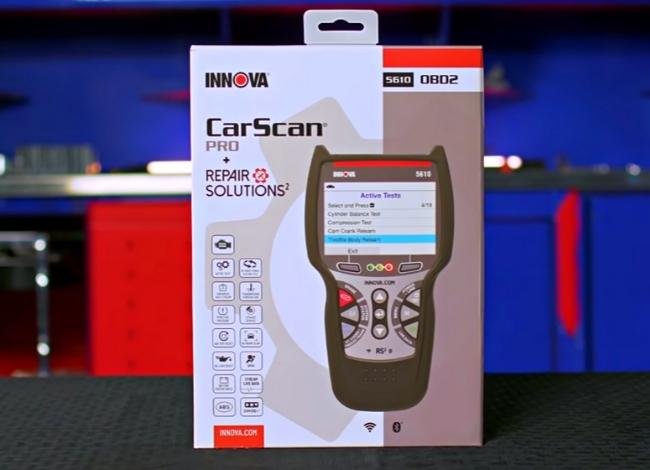
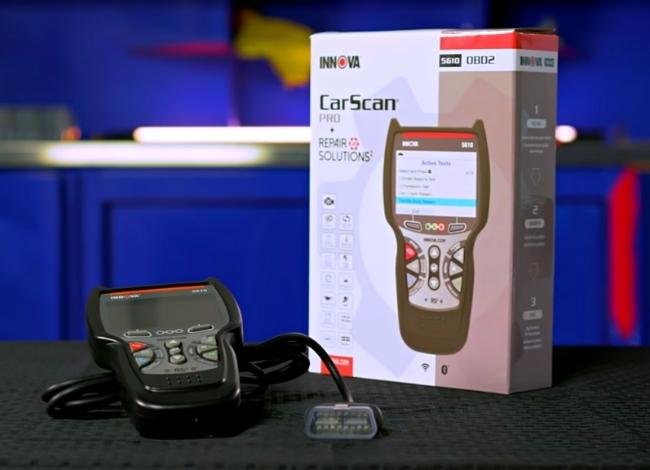
- Innova CarScan Pro 5610: The handheld diagnostic scanner.
- OBD2 connection cable: Used to connect the tool to the vehicle’s diagnostic port.
- Product instructions: Quick-start or operating information, depending on the package.
Package contents can vary by retailer and promotion. Some bundles may include additional accessories, so check the seller’s listing before purchasing.
The tool is designed to operate through the vehicle’s diagnostic connection. It doesn’t rely on a large internal rechargeable battery like some tablet-style scanners.
Innova 5610 Review: Key Diagnostic Features Explained
The Innova 5610 offers several features that make it useful for diagnosing problems beyond a standard check engine light.
Let’s look at what these functions actually do and where they can help.
1. Live Data Streaming and Customization
The Innova 5610 can display live information from supported sensors and vehicle control modules.
Depending on the vehicle, available parameters may include:
- Engine RPM
- Engine coolant temperature
- Mass airflow readings
- Throttle position
- Short-term and long-term fuel trims
- Intake air temperature
- Oxygen sensor information
- Battery and charging voltage
- Transmission temperature
The scanner also offers data graphing and recording options, making it easier to identify readings that change unexpectedly.
For example, if your engine hesitates during acceleration, you can examine supported airflow, throttle, and fuel trim data rather than immediately replacing sensors.
This is especially useful for intermittent problems that don’t always trigger a diagnostic trouble code.
2. Anti-Lock Braking System (ABS) Diagnostics
The Anti-lock Braking System (ABS) helps prevent wheel lockup during hard braking by controlling hydraulic brake pressure.
On compatible vehicles, the Innova 5610 can retrieve ABS-related diagnostic information and display available system data.
Common ABS components include:
- Wheel speed sensors: Monitor wheel rotation.
- ABS control module: Processes sensor information and controls the system.
- Hydraulic control unit: Adjusts braking pressure when ABS intervention is required.
- Solenoid valves: Regulate brake fluid pressure inside the hydraulic unit.
If an ABS warning light appears, the scanner may help identify the affected circuit or system.
However, an ABS code alone doesn’t confirm that a particular component has failed. Wiring, connectors, sensor mounting, and mechanical problems may also need inspection.
3. Freeze Frame Data
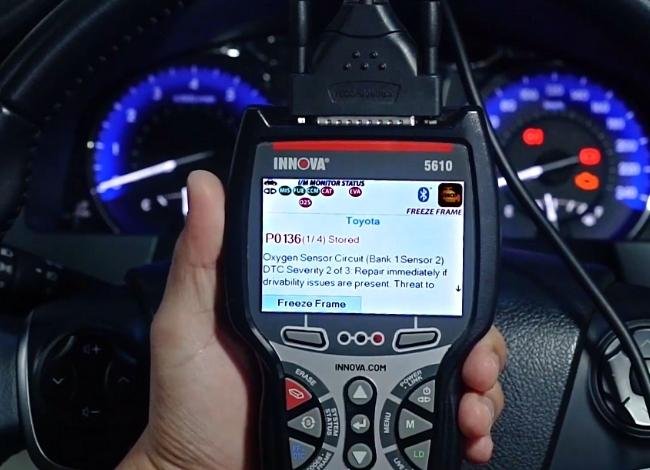
Freeze frame data provides a snapshot of certain operating conditions recorded when a qualifying trouble code was stored.
This information may include engine speed, vehicle speed, coolant temperature, fuel trim, and other supported parameters.
Suppose a vehicle stores a lean-condition fault during highway driving. Freeze frame data may help determine whether the problem occurred under heavy load, during acceleration, or at a steady cruising speed.
It’s worth noting that freeze frame availability varies. The vehicle may not save a complete snapshot for every code.
4. Battery and Charging System Check
The Innova 5610 also provides battery and charging system diagnostic functions.
These functions can help you review battery voltage and charging system behavior, making them useful when diagnosing starting or electrical problems.
For example, low charging voltage while the engine is running may point toward a charging system issue, although further testing is needed to confirm the cause.
Important: A scanner-based battery or charging system check should not be confused with a dedicated battery load test or conductance test.
The 5610 cannot reliably determine every battery’s remaining lifespan or actual amp-hour capacity from ordinary OBD2 data alone.
For a weak or unreliable battery, consider additional testing with appropriate battery diagnostic equipment.
5. Oil Reset and Oil Control Valve Diagnostics
Oil-related features are useful, but it’s important to distinguish between two different functions.
Oil maintenance reset: This function is used to reset the oil service reminder on supported vehicles after maintenance has been completed.
Oil Control Valve (OCV) testing: An OCV controls engine oil flow in certain variable valve timing systems. Where supported, diagnostic information or active testing may help identify an OCV-related problem.
These functions should not be treated as interchangeable. Resetting an oil maintenance reminder does not test an oil control valve or fix an engine timing problem.
How to Reset an Oil Maintenance Reminder
- Connect the scanner and identify the vehicle.
- Open the relevant maintenance or oil reset menu.
- Select the supported reset procedure.
- Follow the on-screen instructions carefully.
- Confirm that the service reminder has been reset.
Some vehicles require a manual dashboard procedure rather than a scanner-controlled reset.
6. Emissions Readiness Check
The Innova 5610 can check the vehicle’s OBD2 emissions readiness status before a state inspection or smog test.
This feature provides information such as:
- Malfunction Indicator Lamp (MIL) status
- Stored emissions-related diagnostic codes
- Supported readiness monitors
- Completed and incomplete readiness monitors
- Available OBD2 emissions data
Readiness information helps determine whether the vehicle has completed the required self-tests.
However, an emissions readiness check does not guarantee that a vehicle will pass an inspection. Local rules, warning lights, and other inspection requirements still apply.
For more information, read our guide on preparing for an OBD2 emissions test.
7. SRS and Airbag System Diagnostics
The Innova 5610 supports SRS diagnostics on compatible vehicles.
The Supplemental Restraint System (SRS) includes airbags and other safety-related components designed to help protect occupants during certain collisions.
SRS-related faults may involve:
- Airbag circuits
- Seat belt pretensioner circuits
- Impact sensor circuits
- Occupant detection components
- Airbag control module communication
The scanner can help identify supported SRS trouble codes, but repairs involving airbags require proper safety procedures and manufacturer guidance.
Never probe airbag circuits with ordinary test equipment unless the vehicle service information specifically permits the procedure.
8. Enhanced OEM Live Data
Basic OBD2 scanners mostly focus on standardized emissions-related information.
The Innova 5610 goes further by providing access to certain manufacturer-specific diagnostic information.
This may include supported live data from the engine, transmission, ABS, SRS, and TPMS systems.
For instance, monitoring transmission temperature while investigating a shifting complaint may provide information that a basic code reader cannot display.
Enhanced access is not the same as unrestricted access to every vehicle module. Available information depends on manufacturer coverage and the vehicle itself.
9. Bidirectional Controls and Active Tests
Bidirectional control is one of the main reasons to consider the Innova 5610.
Unlike a scanner that only receives information from a vehicle, a bidirectional scanner can also send supported commands to vehicle control modules.
Depending on compatibility, active tests may include:
- Commanding a cooling fan on or off
- Activating a fuel pump
- Testing certain relays and actuators
- Operating selected system components
- Running supported manufacturer-specific tests
Here’s a simple example. Suppose your engine begins overheating because the cooling fan isn’t operating.
If the vehicle supports a cooling fan active test, the scanner may allow you to command the fan to run. The result can help narrow down whether the problem is related to the fan circuit, the component, or its control.
This doesn’t automatically pinpoint the failed part, but it provides valuable diagnostic information.
For mechanics and experienced DIYers, this is a significant advantage over a basic scanner.
10. Special Functions, Resets, and Calibrations
The Innova 5610 offers more than ordinary code reading and active tests.
Depending on the vehicle, supported special functions may include:
- Steering angle sensor calibration
- Throttle body relearn
- Electronic parking brake service procedures
- ABS brake bleeding procedures
- Battery management system reset or initialization
- Diesel particulate filter service procedures
- Other manufacturer-specific maintenance functions
Not every function works on every vehicle. Some procedures may also require specific conditions or additional equipment.
Before purchasing, check whether the scanner supports the exact procedure you need for your vehicle.
11. TPMS Diagnostics
The Innova 5610 can access supported Tire Pressure Monitoring System (TPMS) information.
Depending on the vehicle, this may include tire pressure readings, system status, and diagnostic trouble codes.
However, reading TPMS information does not mean the scanner can program new tire pressure sensors or perform every TPMS relearn procedure.
If your main goal is replacing or programming TPMS sensors, a dedicated TPMS service tool may be necessary.
12. RepairSolutions2 App and Software Updates
The Innova 5610 is compatible with Innova’s RepairSolutions2 ecosystem.
The companion app can provide additional diagnostic reports, repair information, and access to supported vehicle-related resources.
Depending on the tool and app version, users may be able to save scan reports and review suggested repair information.
Innova also provides software updates for supported scanners without a recurring diagnostic software subscription.
It’s still important to keep the scanner updated and verify that the latest available software includes the features you need.
Innova 5610 Vehicle Compatibility: What Should You Check?
Vehicle compatibility deserves attention before purchasing any advanced OBD2 scanner.
The Innova 5610 is intended primarily for compatible vehicles sold in the United States and Canada.
For standardized OBD2 diagnostics, many US-market gasoline vehicles from 1996 onward are supported. However, emissions protocol compatibility does not guarantee enhanced diagnostics on every model.
Advanced system coverage can vary significantly based on the following:
- Vehicle year and model
- Vehicle manufacturer
- Engine and transmission configuration
- Installed control modules
- Regional vehicle specifications
- Scanner software version
OBD1 coverage is also more limited and may require compatible accessories.
Before buying, use Innova’s official vehicle coverage checker to confirm the functions available for your specific car.
Advantages of the Innova 5610 Scanner
After looking at its diagnostic capabilities, several advantages make the 5610 an appealing option for advanced home mechanics and smaller repair shops.
- Advanced diagnostics: Offers enhanced access to supported vehicle systems beyond standard engine codes.
- Bidirectional testing: Allows active component testing on compatible vehicles.
- Useful live data: Helps examine sensor readings while troubleshooting intermittent problems.
- Multiple service functions: Supports various resets, relearns, and maintenance procedures.
- Handheld design: Doesn’t require carrying a larger diagnostic tablet.
- Repair information: Works with RepairSolutions2 for additional diagnostic assistance.
- Free software updates: No recurring scanner update subscription is required for supported updates.
- OBD1 options: Select older vehicles may be supported with suitable accessories.
Compared with more basic models such as the Innova 3120RS and Innova 5410, the 5610 is aimed at users who need deeper diagnostic access.
Limitations You Should Know
Despite its impressive features, the Innova 5610 isn’t the right choice for everyone.
- Higher purchase price: It costs more than basic scanners designed mainly for check engine light diagnostics.
- Vehicle-specific functions: Advanced tests and resets are not universally supported.
- Learning curve: Understanding live data, active tests, and module diagnostics requires some automotive knowledge.
- Limited programming: It’s not a replacement for professional tools used for full ECU programming or manufacturer-specific coding.
- OBD1 restrictions: Older vehicle coverage may require extra accessories and is not universal.
- TPMS limitations: It should not be treated as a dedicated TPMS sensor programming tool.
For a driver who only wants to identify occasional check engine light codes, a less expensive scanner may be sufficient.
Troubleshooting Common Innova 5610 Scanner Problems
Even a capable diagnostic tool can occasionally have communication or setup problems.
The following table covers common situations and what to check first.
| Problem | Possible Cause | What to Check |
|---|---|---|
| Scanner will not power on | No power at the diagnostic connector or a damaged cable | Check the OBD2 connection, relevant fuses, and cable condition. |
| Cannot communicate with the vehicle | Incorrect ignition state, communication issue, or vehicle compatibility limitation | Turn the ignition on as instructed, verify vehicle selection, and inspect the connector. |
| Advanced features are missing | Incorrect vehicle identification, unsupported function, or outdated software | Re-enter vehicle information, check compatibility, and install available updates. |
| No live data displayed | Selected parameters are unsupported or operating conditions are incorrect | Choose supported PIDs and follow the scanner’s instructions for ignition or engine operation. |
| Oil service reset fails | Vehicle requires another reset procedure | Check the manufacturer’s procedure and follow the scanner’s available instructions. |
| Bidirectional test is unavailable | The vehicle or module does not support the selected active test | Confirm the function through Innova’s compatibility information. |
| Check engine light returns after clearing | Underlying fault remains or has occurred again | Read the new codes and perform further diagnosis before replacing parts. |
If the scanner still has problems after these checks, consult the Innova 5610 operating instructions or Innova technical support.
Innova 5610 vs 5160RS: Which Scanner Is Better?
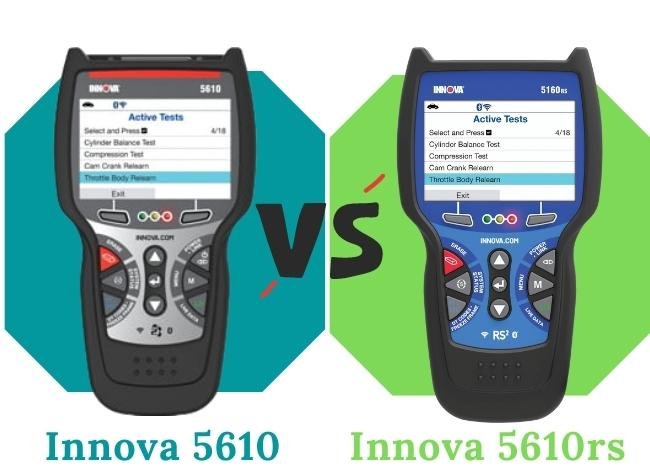
Both the Innova 5610 and Innova 5160RS are advanced handheld scanners intended for users who need more than basic OBD2 functionality.
They share several diagnostic capabilities, although their feature coverage and available service procedures may differ.
Similarities Between the 5610 and 5160RS
- Both support standard OBD2 engine diagnostics on compatible vehicles.
- Both offer enhanced diagnostic capabilities beyond basic code reading.
- Both provide live data and supported vehicle system information.
- Both are intended for more involved vehicle troubleshooting.
- Both require compatibility checks for manufacturer-specific functions.
What Makes the 5610 Different?
The Innova 5610 places particular emphasis on enhanced OEM data, bidirectional active tests, and special diagnostic functions.
These capabilities can make it more suitable for diagnosing difficult electrical or mechanical problems where simply reading a fault code isn’t enough.
The 5160RS is also a capable diagnostic scanner. However, the exact difference between the two models depends on the vehicle and the functions you intend to use.
Rather than choosing based only on model number or general feature lists, compare the supported tests for your specific vehicle.
Our detailed Innova 5610 vs 5160RS comparison provides additional information about these two scanners.
Innova 5610 vs 5510: Feature Comparison
The Innova 5510 is another popular choice for vehicle owners who want enhanced diagnostics without stepping up to the 5610.
Both scanners provide useful diagnostic functions, but the 5610 is designed for users who need more extensive active testing and manufacturer-specific diagnostic access.
| Feature | Innova 5610 | Innova 5510 |
|---|---|---|
| Manufacturer | Innova | Innova |
| Standard OBD2 Diagnostics | Yes | Yes |
| Read and Clear Engine Codes | Yes | Yes |
| Live Data Streaming | Yes | Yes |
| Freeze Frame Data | Yes | Yes |
| ABS Diagnostics | Supported vehicles | Supported vehicles |
| SRS Diagnostics | Supported vehicles | Supported vehicles |
| Transmission Diagnostics | Enhanced coverage on supported vehicles | Selected enhanced functions |
| Bidirectional Active Tests | Yes, supported functions | Not a primary advertised feature |
| Enhanced OEM Live Data | Extensive supported data | More limited coverage |
| Oil Maintenance Reset | Supported vehicles | Supported vehicles |
| Battery and Charging System Diagnostics | Yes | Yes |
| Steering Angle Calibration | Vehicle-dependent | Vehicle-dependent |
| Electronic Parking Brake Functions | Vehicle-dependent | Vehicle-dependent |
| TPMS Diagnostic Information | Supported vehicles | Check specific coverage |
| Special Relearn Procedures | More extensive support | Selected procedures |
| RepairSolutions2 | Supported | Supported |
| Software Updates | Free supported updates | Free supported updates |
| Best For | Experienced DIYers and technicians needing active tests | DIYers needing enhanced diagnostics and service features |
Which one should you choose?
Choose the Innova 5510 if you primarily need enhanced code reading, live data, and common maintenance features.
Choose the Innova 5610 if bidirectional tests, more extensive OEM data, and advanced troubleshooting functions are important to your work.
For a closer look at the differences, read our 5510 and 5610 comparison guide.
You can also check the individual Innova 5510 review before making your decision.
Who Should Buy the Innova 5610?
The Innova 5610 is a good fit for certain users, but not everyone needs its advanced capabilities.
Experienced DIY Mechanics
If you regularly diagnose and repair your own vehicles, the 5610 provides information and testing options that basic OBD2 readers cannot offer.
Its active tests can be especially helpful when diagnosing cooling system, fuel delivery, or electrical problems on supported vehicles.
Independent Mechanics
For technicians who need a portable scanner for everyday diagnostics, the 5610 offers a useful combination of code reading, live data, and supported active tests.
However, it won’t replace a comprehensive professional diagnostic platform for every vehicle or programming task.
Owners of Multiple Vehicles
If you maintain several vehicles, a scanner with broad diagnostic coverage may be more useful than buying a separate basic code reader for each car.
Still, verify compatibility with every vehicle you plan to service.
Who Should Consider a Cheaper Scanner?
If you only need to read check engine light codes, clear codes after repairs, or check emissions readiness, the extra features of the 5610 may not justify the price.
In that case, a simpler model could meet your needs.
Frequently Asked Questions About the Innova 5610
1. Is the Innova 5610 a bidirectional scanner?
Yes. The Innova 5610 supports bidirectional controls and active tests on compatible vehicles. These features allow users to command certain components and observe their responses. Available tests vary by vehicle.
2. Does the Innova 5610 work on all cars?
No. Although it supports a broad range of OBD2 vehicles, complete compatibility is not universal. Enhanced system coverage, active tests, and service functions depend on the specific vehicle. Check Innova’s coverage information before purchasing.
3. Can the Innova 5610 program TPMS sensors?
The scanner can access supported TPMS diagnostic information, including certain fault codes and tire pressure readings. However, it should not be assumed to program replacement TPMS sensors or perform every sensor relearn procedure. Those jobs may require a dedicated TPMS tool.
4. Does the Innova 5610 require a subscription?
Innova advertises free software updates for the 5610 without a recurring diagnostic software subscription. The scanner also works with RepairSolutions2. Check Innova’s current terms for any optional services or accessories.
5. Can the Innova 5610 perform ABS bleeding and service resets?
Yes, the scanner supports selected ABS bleeding procedures and service functions. However, these features are vehicle-dependent. Confirm the required procedure for your exact vehicle before buying.
6. Is the Innova 5610 worth buying for home use?
It can be worth buying if you perform your own repairs and need advanced features such as enhanced diagnostics, live data, and bidirectional testing. If you only scan occasional check engine light codes, a simpler scanner may offer better value.
Final Verdict: Is the Innova 5610 Scanner Worth It?
The Innova 5610 is a capable handheld diagnostic scanner that offers much more than basic trouble code reading.
Its strongest features are enhanced OEM live data, bidirectional controls, supported service procedures, and access to multiple vehicle systems.
These functions are valuable when you’re trying to diagnose a problem properly rather than replacing parts based on fault codes alone.
However, its advanced capabilities come with two important considerations: a higher purchase price and vehicle-specific feature coverage.
Before buying, confirm that the tests and service functions you actually need are supported on your vehicle.
Overall, this Innova 5610 review shows that the scanner offers a useful balance of advanced diagnostic features and straightforward operation, provided its vehicle coverage matches your needs.