
Last Updated on October 24, 2026
The Innova 3120RS is an updated version of the original Innova 3120 diagnostic scanner. If you’re searching for a reliable scan tool that combines ease of use, useful diagnostic features, and compatibility with older vehicles, the Innova 3120RS is worth considering in 2026.
The Innova 3120RS diagnostic scanner is designed for DIYers, car owners, and small repair shops that need more than a basic code reader. It can read and clear check engine codes, access supported ABS and SRS trouble codes, display live data, and diagnose compatible OBD1 vehicles.
Unlike many entry-level OBD2 scanners, the 3120RS also supports selected older vehicles through manufacturer-specific OBD1 adapters. This makes it useful if you maintain both modern and older cars.
However, the 3120RS is not a newly released 2026 scanner. It belongs to Innova’s earlier RS product lineup, and newer models offer additional service functions. Read this Innova 3120RS review to understand its actual capabilities, limitations, and whether it is still a good choice for your garage.
Related: Innova 3140 diagnostic scanner review.
If your main goal is to read error codes, check emissions readiness, inspect ABS faults, or view live engine data, this scanner offers several useful features. Its combination of OBD1 and OBD2 diagnostics is particularly helpful for owners of older vehicles.
Technical Specifications of the Innova 3120RS Scanner
| Feature | Innova 3120RS |
|---|---|
| Model | Innova 3120RS FixAssist |
| Vehicle Compatibility | Most US-market 1996 and newer OBD2-compliant vehicles |
| OBD1 Coverage | Selected older Ford, GM, Chrysler, Honda, and Toyota/Lexus vehicles with compatible adapters |
| Check Engine Codes | Yes, read and erase |
| ABS Code Reading | Yes, selected vehicles |
| SRS Airbag Codes | Yes, selected vehicles |
| OEM Enhanced Codes | Yes, where supported |
| Freeze Frame Data | Yes |
| Live Data | Yes, with recording and playback |
| Emissions Readiness | Yes |
| Battery/Alternator Test | Yes, charging-system assessment |
| Oil Maintenance Reset | Yes, selected vehicles |
| Diagnostic Severity Indicators | Yes, colored LEDs |
| RepairSolutions2 App | Supported |
| Wireless Connectivity | Bluetooth Low Energy for compatible app communication |
| Display | Color LCD |
| Vehicle Connection | Wired OBD2 cable |
| Advanced ECU Programming | No |
| Bi-Directional Actuator Testing | Not a standard 3120RS function |
| Price |  Check Price |
The Amazon link above is for the Innova 3020RS, not the 3120RS. These models have different diagnostic capabilities. Confirm the exact model before purchasing.
Innova 3120RS Review 2026: A Versatile OBD1 and OBD2 Scanner
The Innova 3120RS combines traditional handheld scanner operation with modern features such as Bluetooth connectivity and access to Innova’s RepairSolutions2 app.
Its color LCD screen displays diagnostic codes, test results, and live sensor readings. The scanner also includes colored status indicators to help users understand emissions readiness and potential vehicle problems.
Another advantage is the combination of OBD1 and OBD2 support. Owners of older Ford, GM, Chrysler, Honda, and Toyota vehicles may find this particularly useful, provided the required adapters are available.
Let’s look at the features in more detail.
Wide Range of Diagnostic Functions
The most important feature of an OBD2 scanner is its ability to retrieve diagnostic trouble codes. The Innova 3120RS can read and erase standard engine-related trouble codes from compatible vehicles.
It also supports enhanced diagnostic information for selected manufacturers, including ABS and airbag system codes.
Other useful functions include:
- Read and clear check engine codes
- Retrieve pending and stored trouble codes
- View freeze-frame data
- Check emissions monitor readiness
- Display live engine sensor readings
- Record and replay supported live data
- Retrieve selected ABS and SRS trouble codes
- Perform supported oil maintenance light resets
- Check battery and alternator charging conditions
- Access selected manufacturer-specific diagnostic codes
These features can help identify problems involving oxygen sensors, ignition systems, fuel delivery, and other monitored components.
However, remember that a trouble code doesn’t always identify the exact defective part. Additional testing may be needed before replacing components.
Extensive Vehicle Coverage
One of the strongest points of the Innova 3120RS is its compatibility with both older and newer vehicles.
For OBD2 diagnostics, it works with most compatible US-market vehicles manufactured from 1996 onward. These include many Ford, Chevrolet, Toyota, Honda, Nissan, Hyundai, and other popular brands.
For OBD1 diagnostics, it supports selected older vehicles using the appropriate manufacturer-specific adapters.
Unlike OBD2, OBD1 did not use a single standardized diagnostic connector across all manufacturers. Therefore, compatibility depends on the vehicle’s make, model, year, and engine-control system.
The 3120RS doesn’t automatically support every vehicle manufactured between 1982 and 1995.
Before purchasing, use Innova’s vehicle compatibility checker to confirm which features are available for your particular vehicle.
Related: Innova 3160RS scan tool review.
Bluetooth Connectivity
The Innova 3120RS supports Bluetooth connectivity for transferring compatible diagnostic data to Innova’s RepairSolutions2 mobile app.
This makes it easier to save vehicle reports, review suggested repairs, and access additional diagnostic information from a smartphone.
However, the scanner itself still connects to the vehicle through a physical OBD2 cable. Bluetooth is mainly used for communication with the mobile app.
When connecting the scanner to RepairSolutions2, select the tool inside the app rather than manually pairing it through your phone’s Bluetooth settings.
Software Updates
Innova provides software and firmware update resources for supported diagnostic tools. These updates may improve compatibility, correct software problems, or add supported vehicle information.
The 3120RS belongs to an older product generation, so you should verify the availability of updates for your exact hardware and firmware version.
Do not assume that every new model-year vehicle or electronic system will be covered automatically.
For the latest update instructions, check Innova’s official support resources before connecting the scanner to a computer.
 Check Price
Large Color LCD Screen
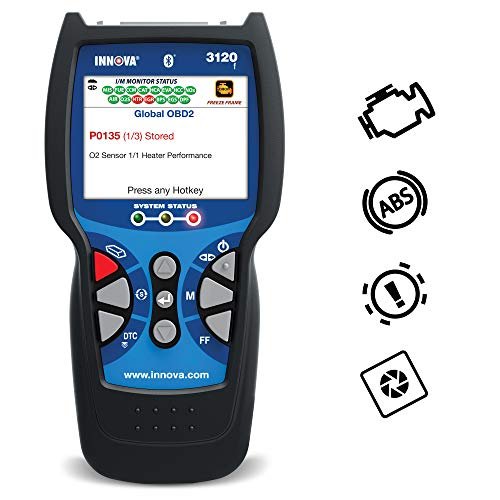
The Innova 3120RS features a color LCD screen that displays trouble codes, live data, and emissions monitor status.
Its interface is designed to be straightforward, with clearly labeled buttons and menu options.
The green, yellow, and red indicator LEDs also help users quickly understand basic diagnostic status.
Green generally indicates that required monitors have completed and no relevant trouble codes are present. Yellow may indicate pending codes or incomplete monitors, while red indicates a detected problem.
These indicators are useful, but they should not replace a full diagnosis of the vehicle.
Related: Innova 3100 diagnostic code reader review.
RepairSolutions2 App and Diagnostic Support
The RepairSolutions2 app is another useful feature of the Innova 3120RS.
After connecting the scanner, users can transfer supported diagnostic information to the app and review possible causes of detected problems.
Depending on the vehicle and available data, RepairSolutions2 can provide:
- Diagnostic trouble code explanations
- Suggested repairs based on vehicle information
- Repair cost estimates
- Vehicle diagnostic reports
- Maintenance information
- Parts recommendations
Innova also provides customer support and diagnostic assistance resources.
However, suggested repairs are not guaranteed diagnoses. Always confirm the underlying problem before purchasing replacement parts.
Summary: Why Buy the Innova 3120RS Code Reader?
The Innova 3120RS remains a practical diagnostic scanner for car owners who need OBD1 compatibility alongside common OBD2 functions.
It is more capable than a basic engine-code reader, but it doesn’t replace a modern professional diagnostic tablet.
Top Reasons to Choose the Innova 3120RS:
- Supports selected OBD1 vehicles with compatible adapters
- Reads and clears standard OBD2 trouble codes
- Retrieves ABS and SRS codes on supported vehicles
- Displays live sensor data and freeze-frame information
- Provides emissions readiness indicators
- Offers selected oil maintenance reset functions
- Supports battery and alternator charging-system testing
- Connects to the RepairSolutions2 mobile app
- Provides a readable color display with simple controls
Cons to Consider:
- Not designed for ECU programming or advanced bidirectional actuator tests
- Vehicle-specific coverage varies considerably
- OBD1 adapters must be compatible and available
- Its screen is smaller than modern professional diagnostic tablets
- The scanner requires a wired connection to the vehicle
- It may lack certain advanced functions available on newer Innova models
Innova 3120RS vs. Innova 3160RS: Which Is Better?
The Innova 3120RS and 3160RS both offer useful automotive diagnostics, but they are not identical.
The 3120RS is particularly useful for older vehicle diagnostics, while the 3160RS belongs to a more advanced RS scanner tier with additional supported maintenance functions.
| Feature | Innova 3120RS | Innova 3160RS |
|---|---|---|
| Check Engine Diagnostics | Yes | Yes |
| Emissions Readiness Check | Yes | Yes |
| ABS Code Reading | Supported vehicles | Supported vehicles |
| SRS Airbag Codes | Supported vehicles | Supported vehicles |
| Live Data | Yes | Yes |
| Battery/Alternator Test | Yes | Yes |
| Oil Maintenance Reset | Selected vehicles | Selected vehicles |
| OBD1 Compatibility | Selected vehicles with compatible adapters | Selected vehicles with optional adapter |
| BMS Reset | Not a standard feature | Supported vehicles |
| ABS Brake Bleeding | Not a standard feature | Supported vehicles |
| Electronic Parking Brake Service | Not a standard feature | Supported vehicles |
| Transmission Temperature | Depends on available standard live data | Supported vehicles |
| RepairSolutions2 App | Yes | Yes |
| Bluetooth Connectivity | Yes, for app communication | Yes, for app communication |
| Vehicle Diagnostic Connection | Wired | Wired |
| Price |  Check Alternative Price |
Check 3160RS Price |
Which should you choose? The 3120RS is worth considering if you need selected OBD1 diagnostics and common vehicle troubleshooting functions. The 3160RS is generally the better choice if you need additional maintenance and service functions on supported vehicles.
Before buying either scanner, confirm feature availability for your vehicle using the manufacturer’s compatibility checker.
How to Use the Innova 3120RS Scanner
The Innova 3120RS is relatively simple to operate. Here are the basic steps for reading OBD2 trouble codes.
- Locate the OBD2 port: Most compatible vehicles have a 16-pin diagnostic connector beneath the dashboard on the driver’s side.
- Connect the scanner: Plug the OBD2 cable into the vehicle’s diagnostic port.
- Turn on the ignition: Follow the scanner instructions. Most code-reading procedures require the ignition ON with the engine OFF.
- Start the scan: Allow the device to communicate with the vehicle’s computer.
- Read the trouble codes: Review stored and pending diagnostic codes and their descriptions.
- Check additional information: View freeze-frame data and relevant live sensor readings.
- Repair the problem: Diagnose and correct the actual fault before clearing the codes.
- Verify the repair: Clear codes when appropriate, complete the required drive cycle, and confirm that the problem does not return.
Clearing diagnostic codes can reset emissions readiness monitors. If your vehicle is due for an emissions inspection, do not erase codes immediately before testing.
Common Innova 3120RS Problems and Solutions
Even a reliable scan tool may occasionally develop connection or communication problems.
Scanner won’t turn on:
Check the vehicle’s diagnostic-port power, cable connection, and the scanner’s internal batteries or power source as directed by the owner’s manual.
Scanner cannot communicate with the vehicle:
Check the ignition position, OBD2 connector, damaged pins, and vehicle compatibility. A blown fuse supplying power to the diagnostic port may also cause communication problems.
Bluetooth won’t connect:
Enable Bluetooth on your phone and use RepairSolutions2 to establish the connection. Avoid pairing the scanner manually through your phone’s Bluetooth settings.
Scanner doesn’t display ABS codes:
Confirm that your vehicle supports ABS diagnostics through the 3120RS. Not every vehicle provides the same enhanced diagnostic access.
Live data is unavailable:
Check that the selected vehicle supports the requested data parameter and that the ignition or engine is operating as required.
Conclusion
The Innova 3120RS is a capable diagnostic scanner for drivers and DIY mechanics who want more than basic check engine code reading.
Its support for selected OBD1 vehicles, enhanced diagnostic trouble codes, live data, emissions readiness checks, and RepairSolutions2 connectivity makes it a useful tool for garage maintenance.
However, it is an older RS-series model rather than a newly released 2026 scanner. If you need advanced battery registration, electronic parking brake service, ABS bleeding, or other professional functions, a newer and more capable Innova scanner may be a better choice.
Overall, this Innova 3120RS review shows that the scanner still has practical value, particularly for owners maintaining both older and OBD2-compliant vehicles. Just make sure the specific functions you need are supported before purchasing.
FAQs
Does the Innova 3120RS scan tool come with a warranty?
Innova has offered limited warranty coverage on its handheld diagnostic tools. Warranty terms can vary by model, seller, and purchase date, so check the current warranty information before buying.
Is the Innova 3120RS compatible with OBD1 vehicles?
Yes. The scanner supports selected older Ford, GM, Chrysler, Honda, and Toyota/Lexus OBD1 systems using compatible adapters. However, it does not cover every OBD1 vehicle manufactured between 1982 and 1995.
Can I use the Innova 3120RS to reset the oil maintenance light?
Yes, the 3120RS provides an oil maintenance reset function for selected vehicles. Coverage depends on the year, make, and model.
Does the Innova 3120RS support battery registration?
It supports battery and alternator charging-system testing, but advanced battery management registration is not a standard feature of the 3120RS. These are different functions.
Is the Innova 3120RS compatible with RepairSolutions2?
Yes. Innova lists the 3120RS among the scanners compatible with its RepairSolutions2 mobile app. The app can display supported diagnostic reports and suggested repair information.
Can the Innova 3120RS read ABS and airbag trouble codes?
Yes. It can retrieve ABS and SRS trouble codes from supported vehicles. However, coverage varies by manufacturer and vehicle model.
Does the Innova 3120RS support bidirectional testing?
No. It is primarily a code-reading and diagnostic scanner. Advanced actuator commands and bidirectional testing require a compatible professional-level tool.
Can I use the Innova 3120RS on 2026 vehicles?
It may communicate with OBD2-compliant 2026 vehicles for standard diagnostic functions, but enhanced coverage is not guaranteed. Check Innova’s current compatibility information for your exact vehicle and scanner firmware.
Still have questions after reading this Innova 3120RS review? Comment below.