
Last Updated on October 24, 2026
The OTC 3893 Encore scanner is a professional automotive diagnostic tool designed for technicians and busy car repair shops. It combines an Android operating system with advanced vehicle diagnostics, making it easier to identify trouble codes, view live data, and perform system tests.
OTC Encore and OTC Evolve share several features, but the Evolve offers a larger screen and more advanced hardware. The Evolve also supports J2534 functionality through its compatible vehicle communication interface (VCI), which is not a standard feature of the Encore.
However, there is an important update for 2026. OTC officially discontinued the Encore platform on October 31, 2024. Software updates and technical support are no longer available for this model. Existing units may still perform supported onboard diagnostics, but they cannot receive new vehicle coverage or security updates.
This OTC Encore review explains the scanner’s features, vehicle coverage, advantages, limitations, and whether it is still worth using in 2026.
OTC is an established supplier of professional automotive diagnostic equipment, service tools, and repair solutions. The Encore was one of its earlier Android-based professional scan tools, offering a 7-inch touchscreen, Wi-Fi, Bluetooth, and bidirectional diagnostic controls.
Technical Specifications of the OTC Encore Scan Tool
| Features | OTC Encore 3893 |
|---|---|
| Model | OTC 3893 Encore |
| Operating System | Android 4.2.2 |
| Display | 7-inch capacitive touchscreen |
| Screen Resolution | 1024 × 600 pixels |
| Internal Storage | 8GB (official manufacturer specification) |
| Wireless Connectivity | Wi-Fi and Bluetooth |
| All-System DTC Scan | Supported vehicles and systems |
| Bidirectional Controls | Yes, where supported |
| OBD2 Functions | All 10 standard OBD2 modes |
| OBD1 Coverage | Selected domestic, Asian, and European vehicles |
| Live Data | Yes |
| Repair Information | On-tool information and supported repair resources |
| TPMS Functions | Selected functions using compatible equipment |
| Battery | Rechargeable lithium-ion |
| OBD2 Cable | 8 feet |
| Original Software Subscription | 12 months included |
| Software Support in 2026 | Discontinued |
| Current Manufacturer Support | No longer supported |
| Warranty | Original limited warranty; former lifetime program ended |
| Product Status | Discontinued October 31, 2024 |
| Price | 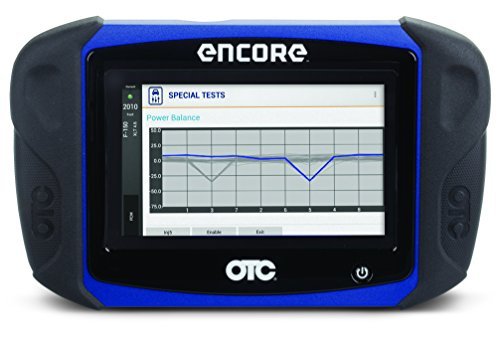 Check Today’s Price |
The Amazon listing may feature a different diagnostic product. Confirm the exact model, seller, and included accessories before purchasing.
Advanced OBD2 Scanner – OTC Encore 3893 Review
The OTC Encore 3893 was designed to diagnose many OBD2-compliant vehicles, including US-market cars manufactured from 1996 onward and compatible Asian and European vehicles.
Its Android interface, built-in Wi-Fi, and diagnostic shortcuts made it easier for technicians to access trouble codes and repair information without switching between multiple devices.
The scanner also supports enhanced diagnostics on selected vehicles, including engine, transmission, ABS, airbag, and other electronic systems.
However, vehicle compatibility depends on the installed software version. Because the Encore no longer receives updates, owners should not expect full coverage for newer vehicles or recently introduced electronic systems.
Sturdy Construction
The OTC 3893 Encore diagnostic scanner was built for daily use in automotive repair shops and garages.
It features a durable plastic housing with rubber overmolded grips that help protect the device during normal handling.
The original kit includes a sturdy carrying case, an 8-foot OBD2 cable, a USB cable, and an AC power adapter.
The touchscreen allows technicians to navigate diagnostic menus without relying entirely on physical buttons.
Although its construction is suitable for workshop use, the Encore is an older electronic device. If you’re purchasing a used unit, check the touchscreen, charging system, battery condition, and diagnostic cable carefully.
Related: Launch X431 diagnostic scanner review.
Extensive Vehicle Coverage
One of the biggest advantages of the OTC Encore scanner was its extensive vehicle coverage.
It supports standard OBD2 functions on compatible domestic, Asian, and European vehicles. Selected models also support enhanced manufacturer-specific diagnostics.
Depending on the vehicle and installed software, the scanner can access engine, transmission, ABS, airbag, and other control modules.
However, standard OBD2 compatibility does not guarantee access to every electronic system.
For example, some Audi, BMW, Mercedes-Benz, and newer vehicles use manufacturer-specific communication protocols or security gateways that may require newer diagnostic equipment.
If you mainly service modern vehicles, choose a scanner with current manufacturer coverage and supported software updates.
Intuitive User Interface
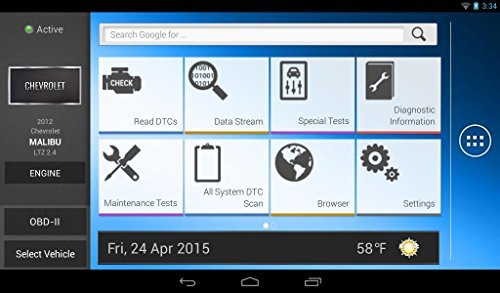
The OTC Encore has a 7-inch capacitive touchscreen with a resolution of 1024 × 600 pixels.
Its icons and menus are designed to make navigation straightforward. Users can select vehicle systems, read trouble codes, and review live sensor information through the touchscreen.
The original Encore software also provided shortcuts to repair information and diagnostic resources.
Compared with today’s tablets, the Android 4.2.2 operating system is outdated. Some internet-based features and websites may no longer function correctly because of compatibility and security limitations.
Easy to Use
The OTC 3893 Encore is relatively easy to operate for technicians familiar with automotive diagnostic scanners.
It has a built-in rechargeable battery, allowing users to navigate certain menus without connecting the device to a vehicle.
For actual vehicle diagnostics, connect the scanner through the supplied OBD2 cable and follow the on-screen instructions.
The touchscreen supports familiar gestures such as tapping, swiping, and scrolling.
However, beginners may need some experience to understand advanced diagnostic information. A scanner can identify trouble codes, but interpreting those codes correctly often requires additional testing.
For basic code reading, an entry-level scanner may be easier to use than a professional device like the Encore.
Diagnostic Functions
The OTC Encore scan tool supports several advanced diagnostic functions, depending on the vehicle and installed software.
- Read and clear diagnostic trouble codes
- View live engine and sensor data
- Display freeze-frame information
- Check emissions readiness monitors
- Perform supported bidirectional actuator tests
- Access selected ABS and airbag systems
- Perform certain service and maintenance functions
- Read manufacturer-specific diagnostic information
- Perform supported OBD1 diagnostics with appropriate adapters
Bidirectional controls are particularly useful because they allow technicians to command supported vehicle components during diagnosis.
For example, a technician may be able to activate a cooling fan or perform a supported actuator test to help isolate a problem.
However, available tests vary by make, model, year, and software coverage.
 Check Price
Android Applications and Connectivity
The OTC Encore uses Android, but it is not the same as a regular consumer Android tablet.
The scanner includes selected applications and internet-based diagnostic resources. However, the Google Play Store is not officially supported on the Encore.
Therefore, you cannot assume that modern Android applications can be installed or operated on this device.
Built-in Wi-Fi and Bluetooth remain useful hardware features, but compatibility with online services and third-party devices may be limited.
Related article: OTC Encore vs. Autel MaxiSys comparison.
Software Updates and Support in 2026
Software support is now the biggest limitation of the OTC Encore.
Originally, the scanner included a 12-month diagnostic software subscription. Owners could renew their subscriptions to receive additional vehicle coverage, diagnostic tests, and software improvements.
However, OTC discontinued the Encore platform on October 31, 2024. Its Diagnostics for Life program also ended, and OTC has confirmed that software and technical support for the Encore are no longer available.
Existing units can retain previously installed diagnostic coverage, but owners should not expect new vehicle updates or security patches.
This makes the scanner less suitable for workshops that regularly diagnose newer cars.
If you’re considering buying an OTC Encore in 2026, its discontinued support should be a major factor in your decision.
Pros: Why Buy the OTC Encore Scanner?
- Large 7-inch touchscreen for viewing diagnostic information
- Simple Android-based interface
- Enhanced diagnostics for many supported vehicles
- Bidirectional controls for compatible systems
- Live data and freeze-frame information
- Built-in Wi-Fi and Bluetooth
- Useful diagnostic coverage for many older vehicles
- Rechargeable internal battery
- Sturdy carrying case included with the original kit
- Can continue performing supported offline diagnostic functions with installed software
Setbacks of the OTC Encore Scanner
- The Encore platform was discontinued in October 2024.
- Manufacturer software updates and technical support are no longer available.
- Android 4.2.2 is outdated.
- Some online functions may no longer work reliably.
- Coverage for newer vehicles is limited by the last installed software version.
- It lacks standard J2534 pass-through programming support.
- Replacement batteries and accessories may be harder to obtain.
- It may not be a good investment for technicians who regularly service newer vehicles.
If you only need basic engine-code reading and clearing, a simpler device such as the ANCEL AD310 scanner may be more practical.
Why Is OTC Evolve More Advanced?
The OTC Evolve was introduced as a more advanced professional diagnostic platform with improved hardware and a larger display.
Compared with the Encore, the Evolve offered several additional features:
- J2534-compliant VCI: Support for compatible programming applications and procedures
- Display: 10.2-inch touchscreen compared with Encore’s 7-inch display
- Resolution: 1280 × 800 pixels compared with 1024 × 600
- Storage: 64GB compared with Encore’s 8GB manufacturer-listed storage
- HDMI Connectivity: Additional display connectivity
- Audio: Dual stereo speakers
- Microphone: Analog and digital microphone features
- Wi-Fi Direct: Additional wireless connectivity
- Cameras: Front and rear cameras
- Docking Station: Convenient charging and storage
However, OTC Evolve is also a legacy platform. Its software support ended on December 31, 2025, so it is not a fully supported alternative for professional diagnostics in 2026.
For technicians purchasing new equipment, a currently supported diagnostic platform is a better long-term choice.
OTC Encore Troubleshooting Guide
Here are some common OTC Encore problems and their possible solutions.
| Issue | Possible Cause | Solution |
|---|---|---|
| Device Won’t Power On | Low battery, faulty charger, or damaged power connection | Charge the device using the correct adapter. Inspect the charging connection and battery condition. |
| Scanner Freezes or Lags | Software problem or insufficient available storage | Restart the device and remove unnecessary saved files where supported. Avoid unsupported system modifications. |
| Unable to Connect to Vehicle | Damaged OBD2 cable, unsupported vehicle, or poor connection | Inspect the cable and connector pins. Check the vehicle’s diagnostic-port power and compatibility. |
| No Diagnostic Codes Displayed | Communication failure or incorrect system selection | Verify the vehicle selection and scan the appropriate modules again. |
| Wi-Fi or Update Issues | Network problems or discontinued manufacturer services | Check the Wi-Fi connection. Remember that Encore software and technical support have ended. |
| Touchscreen Not Responding | Software freeze or touchscreen hardware problem | Restart the scanner and clean the screen. If the problem continues, the hardware may need servicing. |
| Battery Drains Quickly | Aging lithium-ion battery | Check the battery condition and use only a compatible replacement approved for the device. |
Is the OTC Encore Scanner Worth Buying in 2026?
The OTC Encore 3893 was a capable professional diagnostic scanner when it was actively supported. Its touchscreen interface, vehicle coverage, bidirectional controls, and integrated repair resources made it useful for automotive technicians.
However, the situation is different in 2026.
Because the device no longer receives software updates, it may not support newer vehicle systems, modern security gateways, or recently introduced diagnostic functions.
If you already own an Encore and mainly work on older compatible vehicles, it may still be useful for reading codes, viewing live data, and performing supported tests.
But if you’re planning to purchase a professional diagnostic scanner for current and future vehicles, choosing a supported model makes more sense.
A scanner with active software updates, current manufacturer coverage, and available technical support will generally offer better long-term value.
Conclusion
The OTC 3893 Encore scan tool was designed for professional automotive technicians and busy repair shops. It offers a 7-inch touchscreen, Android operating system, Wi-Fi connectivity, enhanced diagnostics, and bidirectional controls.
Its diagnostic capabilities remain useful for many older supported vehicles. However, the Encore is now a discontinued product, with manufacturer support and software updates no longer available.
For existing owners, the scanner may still handle familiar diagnostic tasks. For new buyers in 2026, a currently supported professional scan tool is usually a safer investment.
Hopefully, this OTC Encore review has helped you understand its features, limitations, and whether it is still suitable for your automotive diagnostic needs.
FAQs
Do I need an internet connection to use the OTC Encore scanner?
No. The OTC Encore can perform supported onboard diagnostics without an internet connection. However, certain web-based repair resources require internet access and may no longer work because manufacturer support has ended.
Does the OTC 3893 Encore still receive free software updates?
No. Although the scanner originally included a 12-month software subscription, OTC discontinued the Encore platform on October 31, 2024. New software updates are no longer available.
Can the OTC Encore diagnose ABS and airbag problems?
Yes, the OTC Encore supports ABS, airbag, and other enhanced diagnostics on compatible vehicles. Available functions depend on the vehicle and installed software version.
Does the OTC Encore support bidirectional controls?
Yes. The scanner supports bidirectional actuator tests on selected vehicles and systems. However, not every component or manufacturer-specific test is available.
Can I use the OTC Encore on newer cars?
It may communicate with some newer vehicles through standard OBD2 functions, but enhanced diagnostics and manufacturer-specific coverage may be limited. No new coverage updates are available.
Is the OTC Encore compatible with Google Play Store applications?
No. Although it uses Android, the OTC Encore does not officially provide Google Play Store access like a regular Android tablet.
Does the OTC Encore support J2534 programming?
No. The standard Encore 3893 is not a J2534 pass-through programming device. The OTC Evolve offered J2534 functionality through compatible VCI hardware.
Does the OTC Encore still have a lifetime warranty?
The original Diagnostics for Life program offered a conditional lifetime hardware warranty to eligible owners who continuously maintained their subscriptions. That program has ended for the Encore. Check directly with OTC regarding any remaining individual warranty claims.
Is the OTC Encore suitable for professional mechanics in 2026?
It can still be useful for servicing older compatible vehicles, but it is not ideal as a primary professional diagnostic scanner in 2026 because software and technical support have ended.