
Last Updated on October 15, 2026
It’s a capable diagnostic tablet that goes beyond ordinary check engine light scanning. With system-wide diagnostics, live data, maintenance resets, and a 7-inch touchscreen, it provides features that basic code readers simply don’t offer.
However, there’s something important to consider before buying. Autel has introduced the newer MX808S, which offers improved hardware and additional diagnostic capabilities.
In this Autel MX808 review, we’ll look at the original scanner’s features, performance, advantages, limitations, and how it compares with the MX808S. This should help you decide whether the older MX808 is still worth your money.
Check Autel MX808 Price on Amazon
Autel MX808 Review: Key Features at a Glance
The Autel MaxiCheck MX808 is designed for users who need advanced diagnostic information without investing in a much more expensive professional workshop system.
It shares many features with the original Autel MaxiCOM MK808, although exact hardware specifications and available functions can vary by version and region.
- All-System Diagnostics: Reads and clears supported codes from engine, transmission, ABS, SRS, and other available modules.
- AutoVIN: Automatically identifies supported vehicle information to simplify setup.
- OBD2 Functions: Supports standard emissions-related diagnostics, readiness checks, freeze frame information, and live data.
- 7-Inch Touchscreen: Provides a larger display than basic handheld code readers.
- Live Data: Displays available sensor readings in text, graph, and other supported formats.
- Oil Service Reset: Resets maintenance reminders on compatible vehicles.
- EPB Service: Supports selected electronic parking brake maintenance procedures.
- SAS Calibration: Provides supported steering angle sensor calibration functions.
- BMS Service: Supports selected battery registration and reset procedures.
- DPF Service: Offers diesel particulate filter service functions on compatible vehicles.
- Wi-Fi Updates: Allows the scanner to download supported software updates.
- Active Tests: Selected versions and vehicle applications support bidirectional component testing.
While these features make the MX808 useful for serious DIYers, availability depends on the vehicle, installed modules, software version, and scanner variant.
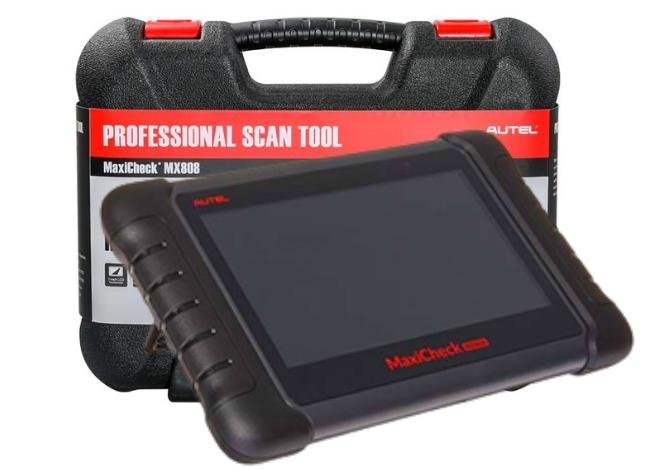
Autel MaxiCheck MX808 Technical Specifications
The original MX808 is an Android-based diagnostic tablet. Its hardware is noticeably older than the MX808S, but it still provides useful functions for compatible vehicles.
Some original MX808 units and regional versions have different storage, battery, and processor specifications. The following table summarizes commonly documented specifications without treating every version as identical.
| Specification | Original Autel MX808 |
|---|---|
| Operating System | Android 4.4.4 |
| Processor | Cortex-A9, approximately 1.5–1.6GHz depending on version |
| Display | 7-inch LCD capacitive touchscreen |
| Screen Resolution | 1024 × 600 pixels |
| Internal Storage | Varies by hardware version; commonly listed as 32GB or 64GB |
| Battery | Rechargeable lithium-polymer; capacity varies by version |
| Connectivity | Wired vehicle connection, Wi-Fi, and USB |
| Vehicle Connection | OBD diagnostic cable |
| AutoVIN | Yes, on supported vehicles |
| Read and Clear Codes | Yes |
| Live Data | Yes |
| Freeze Frame | Yes, when supported |
| ABS/SRS Diagnostics | Supported vehicles |
| Oil Reset | Vehicle-dependent |
| EPB/SAS/BMS | Selected supported functions |
| DPF Service | Vehicle-dependent |
| TPMS | Basic supported functions; not full sensor programming |
| IMMO | Limited supported functions |
| Software Updates | Update eligibility depends on the applicable software license |
| Warranty | Subject to seller, region, and manufacturer’s warranty terms |
| Price | 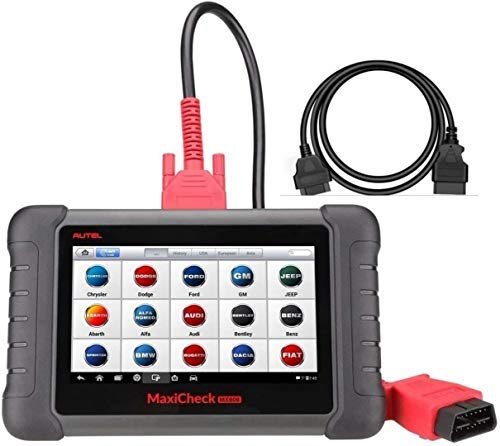 Check Today’s Amazon Price |
Autel MX808 vs MX808S: What’s Different?
If you’re shopping for an Autel scanner today, this comparison is particularly important.
The original MX808 was designed around older Android hardware. The newer MX808S provides a more modern operating system, updated processor, and improved memory configuration.
| Feature | MX808 | MX808S |
|---|---|---|
| Operating System | Android 4.4.4 | Android 11 |
| Processor | Cortex-A9 | Cortex-A55, 1.8GHz |
| Display | 7-inch touchscreen | 7-inch touchscreen |
| Resolution | 1024 × 600 | 1024 × 600 |
| Internal Storage | Version-dependent | 64GB |
| RAM | Varies by hardware version | 4GB |
| Battery | Version-dependent | 5000mAh |
| All-System Diagnostics | Yes | Yes |
| Active Tests | Selected support | Enhanced support |
| Service Functions | Supported functions | Broader updated coverage |
| Wi-Fi Updates | Yes | Yes |
| Best For | Budget-conscious buyers of older diagnostic tablets | DIY mechanics and workshops wanting newer hardware |
The biggest difference isn’t the display size. It’s the newer hardware and diagnostic software capabilities.
The MX808S should offer a more comfortable experience when moving between menus, loading diagnostic applications, and working with newer vehicle coverage.
For most people choosing between the two, I’d lean toward the MX808S unless the older MX808 is available at a substantially lower price and supports the required vehicle functions.
Autel MX808 Review 2026: Design, Performance, and Features
Compact and Portable Design
One reason I like the Autel MX808 is its practical tablet design.
It’s larger than a handheld code reader, but that extra screen space makes reviewing diagnostic information easier.
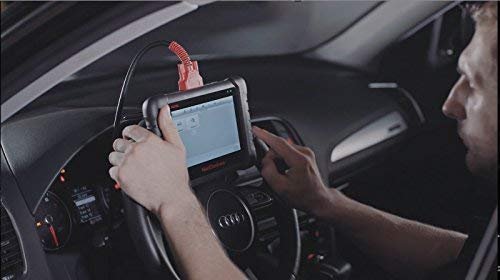
The protective housing is designed for garage use, and the scanner can be carried between vehicles without requiring a separate laptop.
Depending on the package, a protective carrying case may also be included.
If you’re buying a used or open-box unit, check whether the diagnostic cable, charger, and other accessories are included.
Large 7-Inch Touchscreen
The MX808 features a 7-inch capacitive touchscreen with a resolution of 1024 × 600 pixels.
This makes it easier to navigate diagnostic menus, review fault codes, and compare available sensor readings than on a basic two-line code reader.
You’ll especially appreciate the larger screen when working with live data graphs or checking multiple diagnostic parameters.
Although the screen isn’t as sharp as those on newer premium tablets, it remains practical for routine diagnostic work.
Processor and Overall Performance
The original MX808 runs Android 4.4.4 and uses Cortex-A9-based hardware.
It’s capable of performing its intended diagnostic functions, but you shouldn’t expect the same responsiveness as newer Android-based scanners.
For basic code reading and supported system scans, the hardware can still be useful.
However, the MX808S offers a noticeably more modern platform with a Cortex-A55 processor and Android 11.
That’s one reason the newer model makes more sense if you’re buying a scanner for frequent use.
All-System Diagnostic Coverage
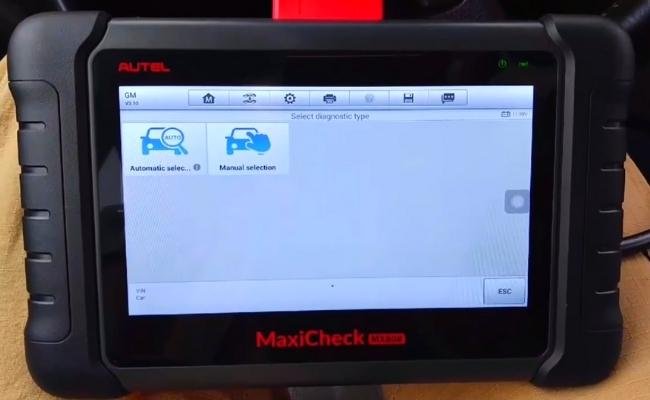
One of the biggest advantages of the MX808 is its ability to communicate with supported vehicle systems beyond the engine computer.
Depending on the vehicle, it may access modules associated with:
- Engine management
- Automatic transmission
- Anti-lock braking system (ABS)
- Supplemental restraint system (SRS)
- Body control electronics
- Electronic parking brake
- Other manufacturer-specific systems
Instead of reading only check engine light codes, you can retrieve information from multiple supported modules.
However, the scanner doesn’t automatically identify the failed component. Fault codes still need to be interpreted alongside live data, wiring checks, and manufacturer repair information.
Live Data and Freeze Frame Information
The MX808 can display live sensor readings in text and graph formats.
This helps when diagnosing problems that occur only under certain operating conditions.
For example, comparing fuel trim readings with engine load may help investigate a lean-running condition.
Freeze frame data provides additional context by showing certain operating conditions recorded when a qualifying trouble code was stored.
These features are particularly helpful when the vehicle doesn’t show obvious symptoms during a normal inspection.
Service and Maintenance Functions
The Autel MX808 offers a useful collection of service functions on compatible vehicles.
Depending on the installed software and vehicle coverage, supported procedures may include:
- Oil Reset: Resets maintenance reminders after an oil service.
- EPB Service: Helps perform supported electronic parking brake procedures.
- SAS Calibration: Calibrates the steering angle sensor when required.
- BMS Reset: Performs selected battery registration or battery management procedures.
- DPF Service: Supports applicable diesel particulate filter procedures.
- Injector Functions: Provides certain supported injector adjustment or coding procedures.
- IMMO Functions: Limited immobilizer-related service functions.
These features can be valuable for DIY mechanics and small repair shops.
However, don’t assume that every listed function works on your specific vehicle. Some procedures require manufacturer-specific conditions, additional tools, or higher-level diagnostic equipment.
TPMS Support: What Can the MX808 Actually Do?
The MX808 includes basic TPMS-related functions for supported vehicles.
However, there’s a major difference between reading TPMS information and programming replacement tire pressure sensors.
The original MX808 isn’t a complete TPMS programming solution.
If you frequently replace tire pressure sensors, a dedicated TPMS programming tool or a compatible Autel TPMS-focused scanner is more appropriate.
This is especially important for shop owners who want to perform complete tire pressure sensor services.
Wi-Fi Connectivity and Diagnostic Reports
The MX808 supports Wi-Fi connectivity for downloading updates and accessing supported online functions.
You can also save diagnostic information and review available records.
Depending on the software version and connected equipment, diagnostic reports may be transferred or printed using supported methods.
However, Wi-Fi support doesn’t mean the original MX808 uses a wireless Bluetooth vehicle communication interface. Its standard vehicle diagnostic connection is wired.
Battery and Storage
The MX808 has a rechargeable internal battery that allows you to review saved information away from the vehicle.
However, it still needs appropriate power during normal operation, and battery life depends on the hardware version, screen brightness, Wi-Fi activity, and battery condition.
Because the original MX808 has been available for several years, battery condition is especially important when buying a used unit.
The scanner also provides internal storage for diagnostic software and saved information.
Check the actual storage and battery specifications if you’re purchasing an older or refurbished device, since different versions have been sold.
If you’re considering a similar scanner, our Autel MX808 vs MK808 comparison explains the differences between these closely related models.
Software Updates and Subscription Costs
Software updates are an important consideration when buying an Autel diagnostic scanner.
The original MX808 was commonly sold with a limited period of free software updates rather than guaranteed free lifetime updates.
The newer MX808S is advertised by Autel with one year of free software updates.
After the included update period, additional software updates may require a paid renewal, depending on the seller, region, and applicable license.
The scanner may continue to run its installed diagnostic software without renewing, although access to new features and additional vehicle coverage can be affected.
If you’re purchasing a used MX808, check its software version and update eligibility before paying.
Advantages of the Autel MX808
- Multi-system diagnostics: Accesses supported vehicle modules beyond basic engine codes.
- Readable touchscreen: The 7-inch screen provides plenty of room for diagnostic information.
- Useful maintenance features: Supports selected oil, EPB, SAS, BMS, and DPF procedures.
- Live data graphing: Helps track sensor readings during troubleshooting.
- AutoVIN support: Simplifies identification of compatible vehicles.
- Diagnostic reporting: Allows users to save and review supported vehicle data.
- Portable design: Useful for DIY garages and small workshops.
Shortcomings of the Autel MX808
Despite its useful features, there are several reasons to think carefully before buying the original MX808.
Older Hardware and Operating System
Android 4.4.4 is significantly older than the software platform used in the MX808S.
The older hardware may be less responsive when running larger diagnostic applications.
Limited IMMO and Programming Functions
Some product descriptions mention IMMO support, but this doesn’t mean the scanner can program every replacement key or immobilizer system.
Advanced key programming, ECU programming, and manufacturer-specific coding may require specialized equipment.
TPMS Limitations
The MX808 provides basic supported TPMS functions but doesn’t replace a dedicated sensor programming tool.
Vehicle Compatibility Varies
Broad coverage doesn’t guarantee every feature works on every vehicle.
Before purchasing, confirm the exact vehicle model and required diagnostic functions with Autel.
Update and Registration Requirements
Registration and software update procedures can require extra setup.
For older scanners, the current software license and remaining update eligibility can also influence the overall value.
Autel MX808 vs XTOOL D8: Which Is Better?
The Autel MX808 and XTOOL D8 are both diagnostic tablets, but they target somewhat different buyers.
The original MX808 is an older wired diagnostic tablet with useful maintenance functions, while the XTOOL D8 family generally offers a newer hardware platform and broader active-testing features.
| Feature | Autel MX808 | XTOOL D8 Family |
|---|---|---|
| Screen | 7-inch touchscreen | 8-inch touchscreen on common versions |
| Operating System | Android 4.4.4 | Depends on D8 version |
| All-System Diagnostics | Supported vehicles | Supported vehicles |
| Live Data | Yes | Yes |
| Bidirectional Tests | Selected support | Broader support on applicable models |
| Service Functions | Multiple vehicle-specific functions | Multiple vehicle-specific functions |
| Hardware | Older Android platform | Newer hardware on current versions |
| Best For | Budget-conscious buyers needing Autel diagnostics | Users needing more advanced active testing |
If you want to learn about the newer XTOOL options, see our XTOOL D8S review.
For buyers considering the original MX808 today, I would also compare its price with the newer MX808S before making a decision.
Who Should Buy the Autel MX808?
The original MX808 can still make sense for certain users.
- Experienced DIY Mechanics: Owners who need more than engine-only diagnostics.
- Small Repair Shops: Workshops looking for an affordable additional diagnostic tablet.
- Used Scanner Buyers: People who can find a well-maintained unit at a significantly lower price.
- Multi-Vehicle Owners: Users maintaining several compatible vehicles.
However, if you plan to keep the scanner for several years, the newer MX808S may offer better long-term value.
Final Verdict: Is the Autel MX808 Still Worth Buying?
The original Autel MaxiCheck MX808 remains a useful diagnostic scanner for owners who need system-wide diagnostics, live data, and common maintenance functions.
Its large touchscreen, supported service procedures, and straightforward Android interface make it much more capable than a basic code reader.
However, its older hardware and software platform are important disadvantages when compared with newer scanners.
The Autel MX808S offers improved processing power, a newer operating system, and updated diagnostic capabilities, making it a better choice for many buyers.
Our recommendation: Buy the original MX808 only if the price is attractive, the software and battery are in good condition, and it supports your vehicles. Otherwise, the newer MX808S is the more sensible long-term investment.
Overall, this Autel MX808 review shows that the scanner still has value, but it’s important to compare the actual hardware version, software coverage, and total ownership cost before purchasing.
Frequently Asked Questions About the Autel MX808
1. Does the Autel MX808 include lifetime free software updates?
No. The original MX808 was generally offered with a limited free update period. Continued software updates may require a paid renewal, depending on the applicable license. Check the seller’s current update policy before buying.
2. Can the Autel MX808 perform SAS reset and DPF service?
Yes. The MX808 supports selected steering angle sensor calibration and diesel particulate filter service procedures. Availability depends on the vehicle and software coverage.
3. Does the Autel MX808 come with an extension cable?
The MX808 uses a wired diagnostic connection, and applicable packages include diagnostic cables. However, cable length and included accessories can vary by listing. Check the package contents before purchasing.
4. Can the Autel MX808 program car keys?
The MX808 supports limited immobilizer-related functions, but it isn’t a comprehensive key programming tool. Many vehicles require specialized programming equipment.
5. Is the Autel MX808 a bidirectional scanner?
Autel lists active testing support for certain MX808 versions and applications. However, supported component tests vary by vehicle. The newer MX808S offers a more modern active-testing platform.
6. Can the Autel MX808 program TPMS sensors?
It supports basic TPMS-related functions on selected vehicles but doesn’t provide the complete sensor activation and programming capabilities of dedicated TPMS tools.
7. What is the difference between the MX808 and MX808S?
The MX808S uses newer Android 11 hardware, a faster Cortex-A55 processor, 64GB storage, and a 5000mAh battery. It also offers updated diagnostic and service capabilities compared with the original MX808.
8. Can I use the Autel MX808 without renewing the software subscription?
Generally, the scanner can continue using its installed diagnostic software after the free update period ends. However, new software releases and additional vehicle coverage may require renewal.