
Last Updated on October 19, 2026
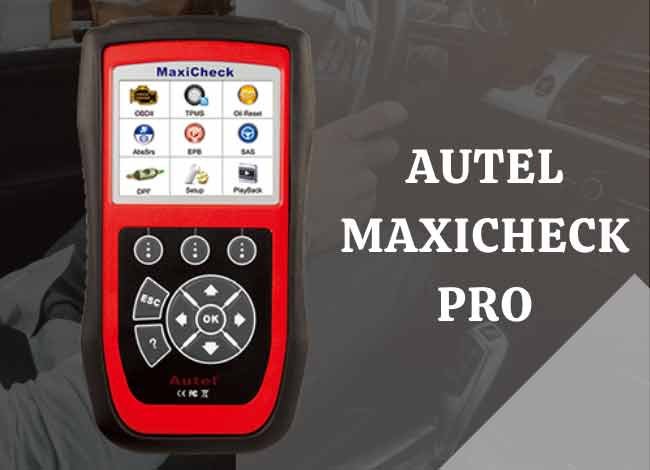
If you’re looking to upgrade from a basic scan tool to an entry-level professional automotive scanner, the Autel MaxiCheck Pro is worth checking out. This Autel scanner performs basic OBD2 functions and several advanced service functions that ordinary code readers cannot handle.
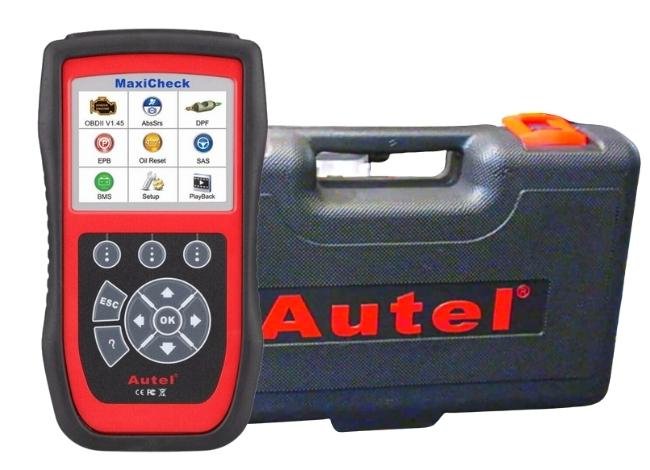
The Autel MaxiCheck Pro features a sleek, compact design that is easy to handle and store. It comes with a sturdy carrying case, an OBD2 connection cable, and a USB cable for connecting to a computer. Its TFT color screen makes reading diagnostic trouble codes (DTCs) and reviewing live data straightforward.
However, there is something important to know before buying this scanner in 2026. Autel lists the MaxiCheck Pro as a discontinued legacy product in its US product catalog. Although some retailers may still carry it, buyers should confirm software support and vehicle compatibility before purchasing.
Read this Autel MaxiCheck Pro review to know more about its features, capabilities, and limitations.
Related: Similar pricing – Autel MaxiDiag MD808 Pro Review
The rubberized sleeve helps protect the scanner from minor impacts while providing a firm grip. It also features a multilingual menu and clearly labeled buttons for easy navigation.
The MaxiCheck Pro is particularly useful for DIY enthusiasts and small repair shops that need functions such as ABS diagnostics, electronic parking brake servicing, oil resets, and steering angle sensor calibration.
Specifications of the Autel MaxiCheck Pro Car Diagnostic Tool
| Vehicle Compatibility: | OBD2/EOBD-compliant vehicles; advanced functions depend on vehicle make, model, year, and system |
| Display: | TFT color display (320 x 240 pixels) |
| ABS/EPB/SRS/SAS/DPF/BMS: | Supported on compatible vehicles |
| Electronic Brake Caliper Service: | Yes, on supported EPB systems |
| Oil Service Light Reset: | Yes, on supported vehicles |
| OBD2 Live Data: | View, graph, record, and play back supported data |
| Read and Clear Trouble Codes: | Yes, for supported systems |
| Steering Angle Sensor Reset: | Yes, where supported |
| ABS/SRS Coverage: | Coverage for approximately 50 vehicle makes, depending on the function and software version |
| Service Interval Reset: | Yes, on compatible vehicles |
| ABS Bi-Directional Functions: | Yes, including selected active tests and automated bleeding procedures |
| Dimensions: | 8.35 x 4.35 x 1.48 inches (212 x 110.5 x 37.5 mm) |
| Weight: | 280 g without cable; approximately 484 g with cable |
| Operating Temperature: | 0°C to 60°C (32°F to 140°F) |
| Storage Temperature: | -20°C to 70°C (-4°F to 158°F) |
| Multilingual Support: | Yes |
| External Power: | 12V to 18V through the vehicle or a compatible adapter |
| Software Updates: | USB-based updating; current availability and terms should be confirmed with Autel |
| Warranty: | Originally advertised with a limited one-year warranty; confirm coverage with the seller |
| Product Status: | Discontinued legacy model in Autel’s US catalog |
| Price: | 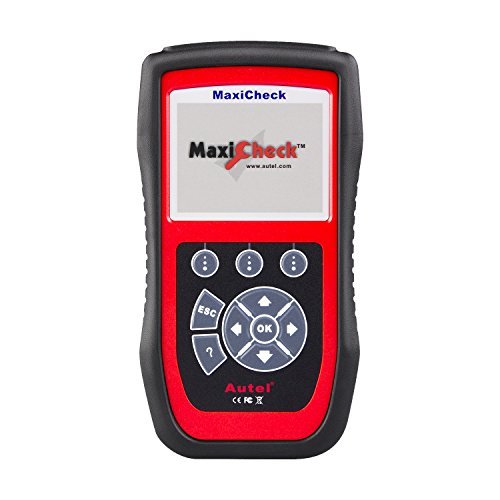 Check Today’s Price Check Today’s Price |
Autel MaxiCheck Pro Review in 2026
Sleek and Sturdy Construction
The Autel MaxiCheck Pro automotive diagnostic scanner is sturdily constructed for regular workshop use. Its durable plastic housing and rubberized protective sleeve make it suitable for handling everyday diagnostic tasks.
The sleeve provides a firm grip and helps protect the scanner against minor accidental bumps and drops. However, it should not be considered completely shockproof.
The MaxiCheck Pro also has an appealing red-and-black design. Its physical buttons are convenient when working in a garage, especially for technicians who prefer traditional handheld scanners over touchscreen devices.
Related (Affordable Choice): Autel AL619 Review: Engine, ABS, and SRS OBD2 Scanner
Ergonomic Design for Easy Use
Who doesn’t want a scanner that is easy to carry, handle, and use?
The Autel MaxiCheck Pro has a practical handheld design that allows users to navigate its diagnostic menus without much difficulty.
It weighs approximately 280 grams without the cable and measures 8.35 x 4.35 x 1.48 inches. This makes the scanner relatively lightweight and convenient to carry between vehicles.
Its compact design also means you can keep it in the supplied carrying case when it is not in use.
Intuitive User Interface
There is nothing better than having a diagnostic device that you can operate without unnecessary complications.
Whether you’re a beginner, DIY enthusiast, or experienced mechanic, the MaxiCheck Pro offers straightforward menu navigation.
The device features clearly labeled buttons and a TFT color screen with a resolution of 320 x 240 pixels.
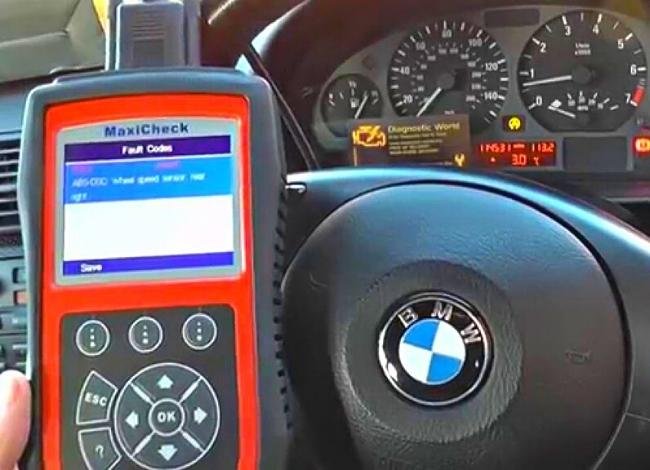
The display makes it easy to review trouble codes, service menus, and supported live data.
Although the screen is smaller than those on modern touchscreen scanners, it remains practical for basic diagnostics and routine service work.
Extensive Vehicle Coverage
If you work on different vehicle makes, you will appreciate the MaxiCheck Pro’s broad OBD2 coverage.
The scanner supports standard OBD2/EOBD diagnostics and provides selected ABS and SRS functions for approximately 50 vehicle makes.
These include various US domestic, European, and Asian manufacturers, such as Ford, GM, Toyota, Lexus, Volkswagen, BMW, Mercedes-Benz, Nissan, Mitsubishi, and Volvo.
However, OBD2 compatibility does not automatically mean every advanced service function will work on your vehicle.
For example, a vehicle might support engine code reading but not ABS bleeding, battery registration, or steering angle calibration through this scanner.
Standard OBD2 diagnostics generally cover 1996 and newer US-market cars and light trucks, while advanced functions have separate compatibility requirements.
This distinction is particularly important for newer vehicles. Some late-model cars use updated communication protocols or security gateways that older scanners may not support.
Related (Similar Pricing): Autel MaxiDiag Elite MD802 Review
A Wide Range of Diagnostic and Service Functions
This is where the Autel MaxiCheck Pro becomes more useful than a basic OBD2 code reader.
Besides reading and clearing engine trouble codes, it offers several specialized maintenance functions.
Some important capabilities include:
- OBD2 Diagnostics: Read and clear engine-related trouble codes, view freeze-frame data, check I/M readiness, and access supported live data.
- ABS Diagnostics: Read ABS trouble codes and perform selected active tests, including automated brake bleeding on compatible vehicles.
- SRS Diagnostics: Identify and clear supported airbag system trouble codes after the underlying problem has been repaired.
- Electronic Parking Brake (EPB): Open and close supported electronic brake calipers during servicing.
- Oil Service Reset: Reset oil maintenance reminders and supported service intervals.
- Steering Angle Sensor (SAS): Perform supported steering angle calibration procedures.
- Battery Management System (BMS): Perform battery registration or adaptation functions on compatible vehicles.
- Diesel Particulate Filter (DPF): Access supported DPF maintenance and service procedures.
The scanner also allows users to record and play back certain OBD2 live data.
However, these functions vary by vehicle. It is important to check compatibility before assuming a particular procedure is available.
Remember that clearing a trouble code does not repair the underlying fault. If the problem remains, the warning light may return.
Multilingual Menu
If English isn’t your preferred language, the MaxiCheck Pro offers multilingual support.
Available language options may include Spanish, French, German, Italian, and other supported languages.
However, language availability can depend on the installed software and regional version.
It is best to confirm your preferred language with the seller or Autel support before purchasing.
Sturdy Carrying Case
When the device is not in use, it is better to store it properly, especially if you work in a busy garage.
The MaxiCheck Pro comes with a hard carrying case designed to hold the scanner and its accessories.
The standard package includes the scanner, OBD2 cable, USB cable, and carrying case.
The case helps protect the equipment from ordinary dust, scratches, and minor impacts during transportation.
However, it should not be treated as waterproof.
Related: Autel AL519 Review: Enhanced OBD2 Scan Tool
USB Software Updates
Software updates are important because vehicle diagnostic coverage and service functions can change over time.
The Autel MaxiCheck Pro supports USB-based software updating using a compatible computer and Autel’s update software.
However, buyers should be cautious about older claims of guaranteed lifetime free updates.
As of 2026, Autel identifies the MaxiCheck Pro as a discontinued legacy product in its US catalog. This means you should not assume that new vehicle coverage or software improvements will continue indefinitely.
Before purchasing, confirm whether the required software files are still available and whether your vehicle is included in the supported coverage.
 Check Price
One-Year Limited Warranty
The MaxiCheck Pro was originally sold with a limited one-year manufacturer’s warranty covering qualifying defects in materials and workmanship.
However, warranty eligibility can depend on the purchase date, seller, country, and product condition.
Since the model is now listed as discontinued in Autel’s US catalog, buyers should verify the warranty terms before purchasing any remaining stock.
What Are the Shortcomings of the Autel MaxiCheck Pro Scan Tool?
Software Updates Can Be Inconvenient – Unlike modern wireless scanners, the MaxiCheck Pro uses a computer-based update process. Downloading and installing software may take time, and ongoing update availability is not guaranteed for this discontinued model.
Limited Professional Functions – Although the scanner performs standard OBD2 diagnostics and several advanced service functions, it is not a full-system professional diagnostic tool. It does not provide comprehensive transmission diagnostics, ECU programming, or advanced module coding.
Limited Support for Newer Vehicles – Newer models may use communication protocols and security systems that the scanner cannot access. Owners of recent vehicles should verify compatibility carefully before purchasing.
Requires an External Power Source – The scanner normally receives power through the vehicle’s diagnostic port. If the vehicle battery is completely discharged, you may need to restore sufficient vehicle power before performing diagnostics.
No Modern Touchscreen Interface – The small color display and physical buttons work well for ordinary diagnostics, but users accustomed to modern Android-based scanners may find the interface outdated.
Comparison: Autel MaxiCheck Pro vs MD806 vs MD808 OBD2 Scanner
The MaxiCheck Pro, MaxiDiag MD806, and MaxiDiag MD808 are all handheld diagnostic tools, but their available functions and system coverage differ.
| Features | MaxiCheck Pro | MD806 | MD808 |
|---|---|---|---|
| Display | 320 x 240 TFT color screen | Color display | Color display |
| Standard OBD2 Diagnostics | Yes | Yes | Yes |
| ABS/SRS Diagnostics | Supported vehicles | Depends on version and vehicle | Depends on version and vehicle |
| Oil Reset | Yes, where supported | Available on supported versions | Available on supported versions |
| EPB Service | Yes, where supported | Version-dependent | Version-dependent |
| Battery Management | Supported vehicles | Version-dependent | Version-dependent |
| Full-System Diagnostics | No | Depends on model variant | Depends on model variant |
| Best Suited For | Selected maintenance and service functions | General diagnostics and supported service tasks | Broader diagnostics, depending on version |
Which one should you choose?
The MaxiCheck Pro is a practical option if you mainly need specific functions such as electronic parking brake servicing, ABS diagnostics, or oil resets on an older compatible vehicle.
However, if you want broader system access, the MD806 or MD808 may be more suitable, depending on the exact model variant.
For newer vehicles, it may be better to consider a more recent scanner with updated vehicle coverage and ongoing manufacturer support.
Alternative to the MaxiCheck Pro: Foxwell NT630 OBD2 Scanner
The Foxwell NT630 series is another option for users who need more than basic engine code reading.
Depending on the exact model and software version, it offers several useful diagnostic capabilities.
- DTC Definitions: Displays supported diagnostic trouble codes and descriptions.
- Global OBD2: Supports standard OBD2 diagnostic functions.
- ABS Diagnostics: Reads and clears supported ABS trouble codes.
- ABS Active Tests: Available on compatible vehicles and supported scanner versions.
- Airbag Diagnostics: Supports selected SRS diagnostic functions.
- ESP System Data: Accesses supported electronic stability system information.
- Data Recording: Allows users to review supported diagnostic information.
- Steering Angle Sensor Calibration: Available on supported vehicles.
- Bi-Directional Tests: Selected functions, depending on the scanner version and vehicle.
- Software Updates: Uses Foxwell’s supported update software.
- Vehicle Coverage: Varies by manufacturer, model, year, and diagnostic function.
Before choosing a Foxwell NT630 model, check whether you are purchasing the original NT630 or a newer version such as the NT630 Plus. Features and compatibility are not necessarily identical.
Is the Autel MaxiCheck Pro Still Worth Buying in 2026?
The Autel MaxiCheck Pro remains useful for owners of older vehicles who need particular maintenance and diagnostic functions.
Its ABS, SRS, EPB, SAS, BMS, and DPF capabilities make it more versatile than an ordinary engine code reader.
However, its discontinued status is an important consideration in 2026.
If you already own this scanner and it supports your vehicle, there is no reason to replace it simply because it is an older model.
On the other hand, if you’re purchasing a scanner for the first time, compare its price and coverage with newer Autel models before making a decision.
A newer scanner may offer better compatibility with modern vehicles, additional diagnostic functions, and more convenient software updates.
Summary
The Autel MaxiCheck Pro is a capable diagnostic scanner for individuals looking to upgrade from a basic code reader to a more advanced service tool.
It is particularly suitable for DIY enthusiasts and small repair shops working on compatible older vehicles.
Its main advantages include easy navigation, a durable handheld design, standard OBD2 diagnostics, and several specialized maintenance functions.
However, it lacks comprehensive professional features such as advanced ECU coding and programming.
More importantly, Autel now identifies it as a discontinued legacy product.
Therefore, the MaxiCheck Pro can still be a reasonable purchase if its price is attractive and the required functions are confirmed to work on your vehicle. Otherwise, a newer diagnostic scanner may provide better long-term value.
FAQs
Can the Autel MaxiCheck Pro calibrate the steering angle sensor?
Yes. The MaxiCheck Pro supports steering angle sensor calibration on compatible vehicles. However, the function is not available for every make, model, and year. Check the manufacturer’s vehicle coverage before purchasing.
Does the Autel MaxiCheck Pro have a color screen?
Yes. The scanner features a 320 x 240 TFT full-color display. It allows users to review diagnostic codes, service menus, and supported live data.
Can the Autel MaxiCheck Pro perform ABS brake bleeding?
Yes, it supports automated ABS bleeding on selected vehicles. However, compatibility depends on the vehicle’s ABS system, model year, and installed software. The function should be confirmed before purchase.
Can the Autel MaxiCheck Pro diagnose transmission problems?
The scanner can read standard powertrain-related OBD2 codes, including some generic transmission-related codes. However, it does not offer comprehensive transmission module diagnostics like a full-system professional scanner.
Does the Autel MaxiCheck Pro support 2026 vehicles?
You should not assume that it does. Autel lists the MaxiCheck Pro as a discontinued legacy model, and support for newer vehicles may be limited. Verify compatibility with your exact vehicle before buying.
Does the Autel MaxiCheck Pro offer free lifetime updates?
The scanner supports USB-based software updates, but buyers should not assume that lifetime updates or new vehicle coverage are guaranteed. Contact Autel to confirm the current software availability and update terms for this discontinued product.