
Last Updated on October 8, 2026
Most of us rely on our cars every day, whether it’s driving to work, running errands, or taking a weekend trip. But when the Check Engine Light suddenly appears, figuring out what’s wrong can be frustrating.
That’s where OBD2 comes in.
If you’ve ever wondered what does OBD2 stand for, the answer is On-Board Diagnostics, Second Generation. It’s a built-in system that monitors certain engine and emissions-related components and helps identify problems when something isn’t working correctly.
With a compatible OBD2 scanner, you can read diagnostic trouble codes, check available sensor data, and understand why your vehicle may be showing a warning.
Let’s take a closer look at what OBD2 means, how it works, and why it matters for everyday car owners.
What Does OBD2 Stand For?
OBD2 stands for On-Board Diagnostics, Second Generation. You may also see it written as OBD-II or On-Board Diagnostics II.
It’s the standardized diagnostic system used in modern vehicles to monitor emissions-related performance and report certain malfunctions.
Your vehicle’s computer receives information from sensors and uses that data to manage engine operation and check whether supported systems are working properly.
When the computer detects a qualifying problem, it may store a Diagnostic Trouble Code (DTC) and turn on the Check Engine Light.
One of the biggest advantages of OBD2 is standardization. It allows compatible scanners to retrieve basic emissions-related diagnostic information from many different vehicle brands.
However, OBD2 doesn’t monitor every mechanical component, and a trouble code doesn’t always identify the exact part that needs replacing.
A Brief History of OBD Systems
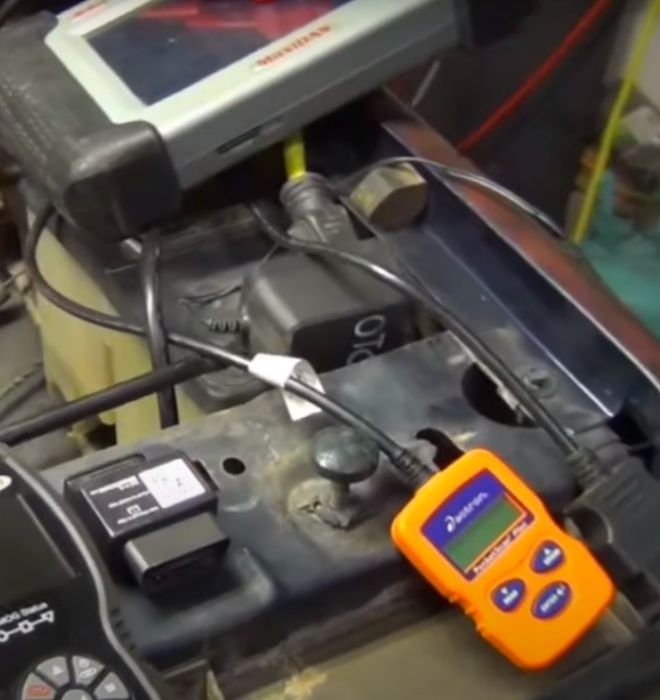
Onboard diagnostics didn’t appear overnight. Vehicle manufacturers gradually developed electronic monitoring systems as emissions regulations became stricter and engines became more computerized.
If you’re interested in the timeline, our guide explaining what year OBD2 started covers its development and introduction in U.S. vehicles.
1. Early Development
During the 1980s, manufacturers increasingly used electronic engine controls to improve fuel delivery, ignition timing, and emissions performance.
Early diagnostic systems could identify certain faults, but their capabilities varied between manufacturers.
Technicians often needed different procedures or equipment depending on the vehicle they were working on.
2. OBD1
OBD1 refers to the earlier generation of onboard diagnostic systems used before standardized OBD2 became widespread.
These systems had several limitations:
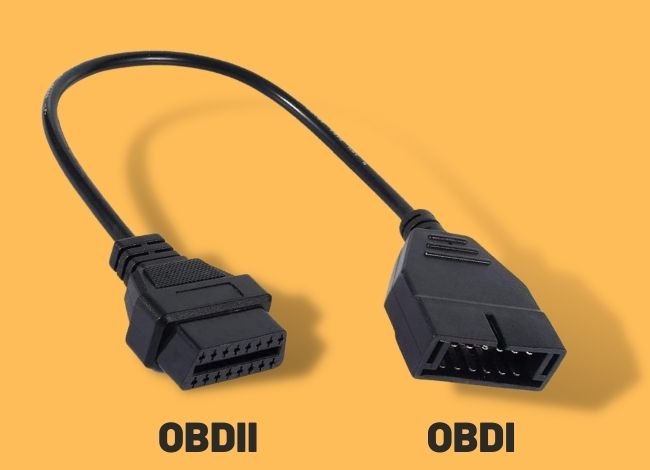
- Different diagnostic connectors between manufacturers.
- Manufacturer-specific trouble codes and procedures.
- Limited access to certain diagnostic information.
- Different scan tools or methods required for different vehicles.
Some older vehicles allowed drivers to retrieve codes using dashboard warning light flashes, while others required dedicated equipment.
For a closer comparison of the two generations, see our OBD1 vs. OBD2 guide.
3. OBD2
OBD2 introduced a more consistent way to monitor and access emissions-related vehicle information.
In the United States, full OBD2 compliance became required for covered gasoline passenger cars and light-duty trucks beginning with the 1996 model year. Other vehicle categories and fuel types followed different requirements.
OBD2 brought several important improvements:
- A standardized 16-pin diagnostic connector.
- Common emissions-related trouble code definitions.
- Access to supported live sensor data.
- Emissions readiness monitoring.
- Standardized communication between compatible vehicles and scanners.
These improvements made basic diagnostics much easier for independent mechanics and car owners.
How Does OBD2 Work?
The OBD2 system uses computers, sensors, and monitoring software to check certain vehicle functions.
Here’s how its main components work together.
1. Electronic Control Unit (ECU)
An Electronic Control Unit is a computer that controls or monitors specific vehicle functions.
For example, the Engine Control Module (ECM) uses sensor information to help manage fuel injection, ignition timing, and engine operation.
It also performs diagnostic checks and stores trouble codes when certain fault conditions are detected.
2. Vehicle Sensors
Sensors provide information about how the engine and related systems are operating.
Depending on the vehicle, this may include:
- Engine coolant temperature.
- Airflow entering the engine.
- Oxygen levels in the exhaust.
- Throttle position.
- Engine speed and other operating conditions.
The computer uses these signals to control engine operation and monitor for problems.
3. Diagnostic Trouble Codes (DTCs)
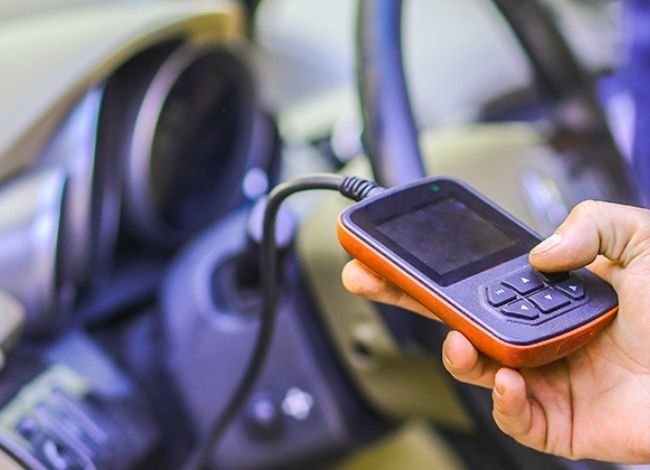
When a monitored system meets certain fault conditions, the computer may store a Diagnostic Trouble Code.
These codes are made up of letters and numbers.
For example, P0300 means the engine computer detected random or multiple-cylinder misfires.
However, the code doesn’t tell you whether the problem comes from spark plugs, ignition coils, fuel delivery, or another cause.
That’s why trouble codes should guide diagnosis rather than automatically determine which part to replace.
If you’re trying to understand a specific code, our OBD2 codes list and meanings explains common code definitions and possible causes.
4. Malfunction Indicator Light (MIL)
The Malfunction Indicator Light is commonly known as the Check Engine Light.
A steady light means the vehicle has detected a problem that needs attention. It may be minor or serious, depending on the fault.
A flashing Check Engine Light often indicates a severe misfire that could damage the catalytic converter.
If the light flashes, reduce engine load and stop somewhere safe as soon as possible. Avoid continuing to drive until the problem has been assessed.
5. Diagnostic Link Connector (DLC)
The Diagnostic Link Connector is the port where you connect an OBD2 scanner.
On most passenger vehicles, it’s located beneath the dashboard on the driver’s side.
The connector generally has 16 pin positions and allows compatible diagnostic equipment to communicate with supported vehicle systems.
If you’re unfamiliar with the connector, our article explaining what the OBDII port is and where to find it covers its location and purpose.
Types of OBD Scanners
Diagnostic scanners have changed considerably as vehicle electronics have become more advanced.
OBD1 Scanners
OBD1 scanners are intended for older diagnostic systems. Their compatibility and functions depend heavily on the vehicle manufacturer.
They may require special cables or manufacturer-specific diagnostic procedures.
OBD2 Scanners
OBD2 scanners use standardized diagnostic communication to retrieve supported vehicle information.
Basic scanners typically offer:
- Engine trouble code reading and clearing.
- Emissions readiness checks.
- Available live sensor readings.
- Freeze-frame information.
Advanced scanners may also support ABS, airbag, transmission, and other vehicle systems, depending on the scanner and vehicle.
Not every OBD2 scanner offers those advanced features.
Benefits of Using an OBD2 Scanner
1. Better Emissions Monitoring
OBD2 monitors supported components that can affect vehicle emissions.
It can identify certain problems involving oxygen sensors, catalytic converters, fuel control, and other emissions-related systems.
This information is also useful during emissions inspections where OBD-based testing is required.
If you’re preparing for an inspection, our guide on how to pass an OBDII emissions test explains readiness monitors and common inspection problems.
2. Potential Repair Cost Savings
Finding a problem early may prevent it from becoming more expensive.
For example, investigating an engine misfire promptly could help avoid further damage.
However, OBD2 cannot prevent every mechanical failure or eliminate the need for professional diagnosis.
3. More Informed Maintenance Decisions
Reading a trouble code gives you a starting point before approving repairs.
Instead of replacing parts based on guesswork, you can compare the code with symptoms and other diagnostic information.
4. DIY Diagnostics
With a compatible handheld or Bluetooth scanner, many car owners can perform basic diagnostic checks at home.
You may be able to read codes, review available live data, and check emissions readiness without immediately visiting a repair shop.
Commercial Applications of OBD2
OBD-based diagnostic information can also help businesses that maintain fleets of vehicles.
However, not all commercial vehicles use the same OBD2 system found in passenger cars. Many heavy-duty vehicles require different diagnostic standards and equipment.
1. Fleet Monitoring
Supported fleet systems can collect information such as mileage, engine faults, and certain operating conditions.
GPS tracking and driver behavior monitoring generally require additional telematics hardware or software.
2. Insurance Telematics
Some insurance programs use connected devices to collect driving-related information.
Depending on the program, this information may affect eligibility for discounts or how premiums are calculated.
3. Remote Diagnostics
Compatible telematics systems can transmit supported fault codes and operating data to remote platforms.
This helps maintenance teams identify vehicles that may need attention, although physical inspections and testing may still be necessary.
4. Reduced Vehicle Downtime
Access to diagnostic information can help fleet managers prioritize repairs and schedule maintenance more efficiently.
What Data Can an OBD2 Scanner Show?
An OBD2 scanner can display different information depending on the vehicle and scanner.
Common readings include:
- Engine RPM: How fast the engine is rotating.
- Vehicle Speed: Speed information reported by the vehicle.
- Fuel System Status: Available information about fuel control operation.
- Short- and Long-Term Fuel Trims: Adjustments the engine computer makes to fuel delivery.
- Coolant Temperature: The temperature reported by the engine coolant sensor.
- Oxygen Sensor Data: Available exhaust oxygen and related sensor information.
- Throttle Position: Reported throttle opening or position.
Not every vehicle supports every data item, and some values require additional knowledge to interpret correctly.
To better understand these readings, see our guide on how to read live data from OBD2 scanners.
How to Use an OBD2 Scanner
Using a basic OBD2 scanner is usually straightforward.
- Locate the OBD2 Port: Look beneath the dashboard, normally near the driver’s side.
- Connect the Scanner: Plug in a compatible diagnostic tool without forcing the connector.
- Turn On the Ignition: Follow the scanner instructions. Some tests require the engine to be running.
- Read Trouble Codes: Use the scanner menu to retrieve stored and pending codes.
- Record the Results: Save the codes and available freeze-frame information before clearing anything.
- Investigate the Problem: Compare the codes with symptoms and perform appropriate checks before replacing parts.
Don’t clear trouble codes simply to turn off the Check Engine Light.
Clearing codes may remove useful diagnostic information and reset emissions readiness monitors. If the actual problem remains, the warning may return.
If the scanner doesn’t power on or cannot communicate with your car, our guide on why an OBD2 port may stop working covers common power, fuse, connector, and communication issues.
Frequently Asked Questions About OBD2
What does OBD2 stand for in a car?
OBD2 stands for On-Board Diagnostics, Second Generation. It’s the standardized vehicle diagnostic system used to monitor and report certain engine and emissions-related problems.
How do I know if my car supports OBD2?
Most covered U.S.-market gasoline passenger cars and light-duty trucks from the 1996 model year onward support OBD2. You can check the emissions label under the hood, your owner’s manual, or the vehicle’s diagnostic specifications.
Is OBD2 mandatory in all vehicles?
No. OBD requirements depend on the vehicle category, fuel type, market, and model year. Many countries use OBD-related standards, but implementation requirements differ.
What should I do when the Check Engine Light comes on?
Check whether the light is steady or flashing and pay attention to how the vehicle is running. A steady light should be diagnosed promptly. If it flashes or the engine runs severely rough, stop safely and have the problem assessed.
Can I use a smartphone to scan my car?
Yes. Compatible Bluetooth or Wi-Fi OBD2 adapters can connect to supported smartphone apps for code reading and available live data.
Will an OBD2 scanner fix my car?
No. A scanner provides diagnostic information, but repairing the underlying cause usually requires additional testing and appropriate repairs.
Can an OBD2 scanner read ABS or airbag codes?
Some advanced scanners can access ABS and airbag systems, but basic OBD2 scanners generally focus on standardized emissions-related diagnostics. Check vehicle and scanner compatibility before buying.
Final Thoughts: What Does OBD2 Stand For and Why Does It Matter?
So, what does OBD2 stand for? It means On-Board Diagnostics, Second Generation—a system designed to monitor certain vehicle components and make diagnostic information easier to access.
From checking engine trouble codes to reviewing live sensor data and emissions readiness, OBD2 gives car owners a better understanding of what’s happening under the hood.
But remember that a scanner doesn’t diagnose every problem automatically. It’s a tool that helps you gather information and decide what to check next.
Whether you’re a DIY car owner or someone who wants to understand a repair recommendation, learning the basics of OBD2 can help you make more informed decisions and avoid unnecessary guesswork.