
Last Updated on November 7, 2026
A long drive can take an unexpected turn when the engine light comes on. The light tells you the car detected a fault. It does not say whether the cause is a loose connection, an air leak or a part that has failed. To find out what the car detected, you can plug in a code reader or a scan tool.
In this code reader vs scan tool comparison, you’ll learn about the OBD II system and see what each tool adds. A basic reader can be enough to retrieve and record a check engine code. A more capable tool can help you investigate why the fault occurred and reach other systems when it supports your vehicle.
What Is the OBD II System?
OBD II stands for On-Board Diagnostics, second generation. For most U.S. passenger cars and light trucks, it has been required since the 1996 model year. The standardized part of OBD II gives an external tool access to emissions-related information. The car’s computers monitor those systems and store diagnostic trouble codes when they detect a problem under the conditions defined for the monitor.
There are various OBD codes for a large number of issues. For example, P0301 indicates that the computer detected a misfire on cylinder 1. A spark plug, coil, injector, wiring issue or loss of compression could be involved. Use the code to choose the next test. Even when a code description names a component or a circuit, it cannot establish by itself which part caused the problem.
The check engine light is also called the malfunction indicator lamp, or MIL. The ABS and airbag warning lights represent different systems. Those systems may use the same diagnostic connector, but reading their information usually requires coverage beyond the generic OBD II functions. That difference matters more than whether the product box says “reader” or “scanner.”
Code Reader Vs Scan Tool: What Are the Differences?
Both devices communicate through the vehicle’s diagnostic port. In a code reader vs scan tool decision, start with the job you want to do and check the exact feature list. Some code readers show live data and a snapshot from when a fault occurred. Some handheld scan tools can access other modules without being able to run active tests. The names overlap, so compare features rather than relying on the label.
| Function | Basic code reader | More capable scan tool |
|---|---|---|
| Check engine codes | Reads and clears supported generic OBD II emissions codes | Includes generic OBD II and can add manufacturer-specific diagnostics |
| Freeze frame and readiness | Often available; check the model | Generally available, with more data or reports on some tools |
| Live data | Some models show standard engine data | May graph, record and compare more parameters |
| ABS, airbag and transmission modules | Check for separately listed system coverage | Available on covered modules; coverage varies by tool and vehicle |
| Active tests and service procedures | Usually limited or absent | May command components or carry out supported service procedures |
| Coding and firmware programming | Usually absent | Check each function separately; firmware flashing can require dedicated equipment and software |
The OBD II Code Reader: What It Does and How It Works
A code reader is a simple way to get the first clues when the check engine light comes on. Many are small handheld units that take power through the connector, with a screen and a few buttons. Once connected, the reader asks the vehicle for codes and displays what the vehicle reports. Some readers also give a short definition. If there are several codes, use the arrows to go through them and record each one.
Look for the OBD II port near the driver’s side of the dash and check the owner’s manual if you cannot find it. With the ignition off, plug in the tool. Follow its prompt to turn the ignition on. For a running data check, start the engine only when safe and called for by the test. Record the codes, any available freeze frame and readiness before clearing anything. 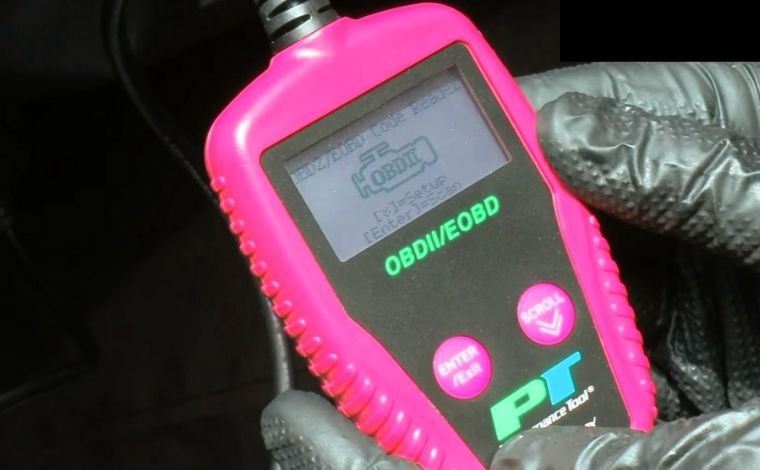
Depending on the vehicle and reader, you may see confirmed, pending and permanent codes. A pending code can help you catch an intermittent problem before the light stays on. A permanent emissions code may remain after repair until the vehicle runs its own checks. Erasing clearable codes can remove diagnostic clues and reset readiness monitors, which matter if an emissions inspection is coming up.
If the reader shows a lean code, check whether the freeze frame was captured at idle or under load. The conditions help you decide which checks to prioritize. You can take a picture of the screen if a basic reader lacks a save function. Record the code status too. A photo of the values and a note about how the car was behaving give you or a technician more to work with on the next scan.
Pros of the OBD Code Reader
- Simple to use. A dedicated screen and buttons make it easy to read a code, check readiness or save a photo of the results for a repair shop.
- Affordable. For occasional check engine checks, a basic reader can cover the tasks you need without paying for extra vehicle software. Check for freeze frame and live data if you want more than a code number.
Cons of the Code Reader
Most basic readers focus on generic emissions diagnostics. They may show a powertrain code connected to transmission control while being unable to enter the transmission module. Similarly, seeing “no codes” on a generic scan does not mean that the ABS or airbag system has no stored faults. Some readers add those systems for certain vehicles. The ABS coverage guide for basic OBD2 readers shows what to check if a brake warning light is the reason you are buying the tool.
Our Recommended OBD Code Reader Models:
These examples cover different needs. Ancel lists live data and freeze frame for the AD410. The Innova 3150F adds ABS and SRS code functions on supported vehicles. If you only want to read and clear check engine codes, compare the simpler readers first. If you need a second module, check coverage for that module on your year, make and model.
The OBD II Scan Tool: What It Does and How It Works
A scan tool with broader coverage can read more vehicle systems and give you more ways to investigate a code. For example, a generic reader may report P0700, which means the transmission controller requested the warning light. An enhanced scan can read the more specific codes from a supported transmission control module. The tool maker’s vehicle coverage list matters because two cars with the same connector may expose different data. 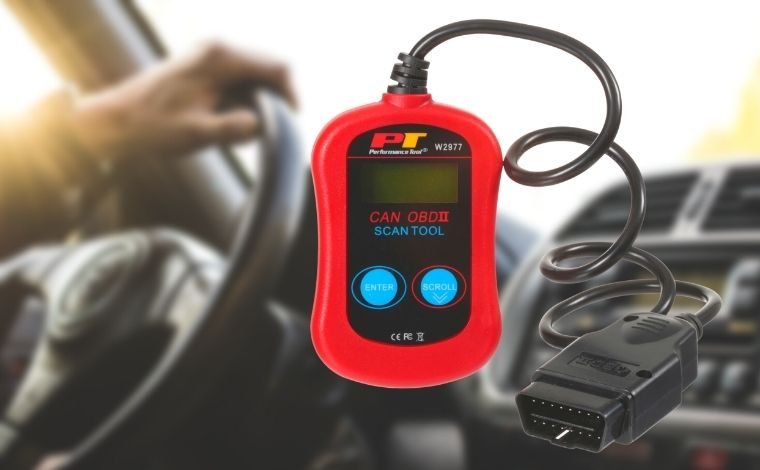
Many scan tools display live data and their meanings as numbers or graphs. Depending on the model, you can record a drive, play back the data, compare several values or save a report for a mechanic. If the fault appears only when the engine is warm, save the conditions from the freeze frame first. You can then compare what was happening when the code set with what the sensors show now. A freeze-frame and live-data comparison explains how to use each view.
Some scan tools also send a command, such as asking a supported radiator fan to turn on during a manufacturer-approved procedure. That is an active test. A guide to bidirectional scan tools explains when a command helps you separate an input fault from an output problem. An adaptation or relearn teaches a module a value or position. Coding changes a supported setting or configuration. Firmware programming writes software to a controller and can require a separate interface, software access and a regulated power supply. A tool that can do one of these jobs may leave the others to different equipment.
Pros of the OBD Scan Tools
- Broader diagnostics. Some professional scan tools can scan multiple modules and combine the results in one report. That helps when several warning lights come on together.
- Advanced features. Graphing and playback let you review a signal over time. Supported active tests can help confirm whether a component and its control circuit respond to a command.
- Useful for repair shops. Saved reports and repeatable tests can help a technician document a fault before repair and compare the results afterward. A DIY owner who regularly works on the same vehicle may benefit from those features too.
Setbacks of The Scan Tools
A scan tool with broader coverage generally costs more. Compare any update fees, account requirements and gateway access as well as the hardware. Some vehicles use a security gateway that allows a tool to read data but requires authorization for certain commands or clearing operations. Confirm the exact vehicle and function before paying for extra capabilities.
Our Recommended OBD Scanner Models:
For example, the original Autel MP808TS supports active tests, adaptations and dedicated TPMS service on covered vehicles. That does not tell you what a different MP808 generation or another listed scan tool can do. For the Foxwell and Launch tools, check the exact model name, installed software and supported systems. A general statement such as “all systems” gives little detail about a specific procedure on your car.
Which is Better: Scan Tool or Code Reader?
The practical code reader vs scan tool question is what you want to see after you plug in. If you mainly want a code number and basic emissions data, start with a reader. If you regularly diagnose problems across several modules or need to graph signals and run tests, choose a scan tool with verified coverage for those jobs.
Make a short list of the systems and functions you actually need. An occasional check engine diagnosis might require codes, readiness and freeze frame. An intermittent drivability complaint might benefit from recording two or three live readings together. A repair that ends with a relearn calls for checking that procedure by vehicle before you start. These are different uses, even though the same port is involved.
When comparing a code reader vs scan tool for multiple cars, check year, make, model and market for each one. Confirm whether coverage includes reading codes, reading live data, commanding components or completing the service procedure. If the tool needs a phone app, check the adapter and phone together. Make sure you can save the results in a form you can refer to again.
Final Thoughts
For the code reader vs scan tool choice, match the tool to the diagnostics you expect to do. A basic reader gives many car owners the information needed to start a check engine investigation. A scan tool makes sense for broader system access and specific tests on a supported vehicle. With either one, save the evidence first, test the likely causes and verify the repair before calling the job done.