
Last Updated on November 12, 2026

An OBD2 scan tool normally gives you a starting point when the check engine light comes on. But if your OBD2 scanner won’t turn on when you plug it in, the first job is getting power to the tool. A blown fuse can interrupt that supply. A loose cable, a damaged diagnostic port or a low vehicle battery can also leave the tool dark.
Most U.S. passenger cars and light trucks from model year 1996 onward use standard OBD2. The scanner plugs into the vehicle’s data link connector (DLC). On a port-powered scanner, one circuit in that connector supplies power and other terminals carry communication. Both have to work for the scanner to read the engine computer.
Why an OBD2 Scanner Won’t Turn On
- Dark screen or no adapter light: Check how your exact model gets power. Some handheld scanners use the diagnostic port, others have internal batteries, and some use either source. Look up which status light should come on when a wireless adapter has vehicle power.
- Tool starts, then goes dark: Check that the cable is seated at both ends. Note whether the screen goes dark only during engine cranking or when the cable moves. Those patterns can point to different problems.
- Screen lights up and shows a link error: The tool has some source of power. Check ignition mode and whether the tool can communicate with the vehicle. See what to check when the scanner powers up but won’t link to the ECU.
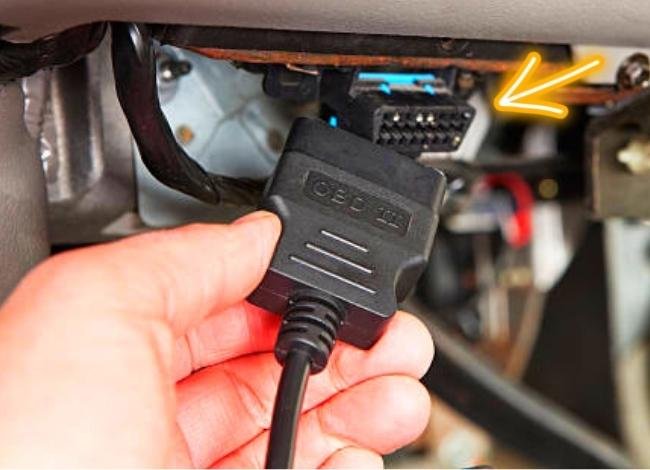
Before you open the fuse box, look at the scanner’s plug and cable in good light. Check for a loose connector on a detachable cable, a damaged latch, bent or recessed terminals, or a cable crushed under a seat. Seat the tool gently with the ignition in the position recommended by its manual. A connector that fits properly should stay in place without your hand holding it.
If the tool uses a removable cable, also check the tool end of the cable. A scan tool with a separate power button may need to be switched on after you connect it. Note exactly what happens during a second try. If you see a startup screen and then it restarts, write down whether that happened as you turned on the ignition, while cranking the engine, or with the car parked and the key untouched. A stable screen followed by a message about communication points to the next checks in the tool manual.
What Is the OBD2 Fuse and Why Does It Matter?
The fuse protects the circuit that supplies battery power to the DLC. A fuse may serve the port alone or share the circuit with another item, depending on the vehicle’s wiring. When that supply circuit opens, a port-powered scanner may stay dark even if the scanner itself works.
Why the OBD2 fuse is important:
- It protects the power feed from excessive current.
- It helps protect the wiring and connected equipment if a short or overload develops.
- A working fuse gives you one part of the power path. The DLC still needs an intact feed, a good ground, and terminals that make contact. The computer also needs its own power to communicate.
Common reasons the OBD2 fuse blows:
A wire can short to ground, a damaged adapter can draw too much current, or an accessory on a shared feed can cause an overload. For example, a faulty charger in a 12-volt socket can affect both the socket and the DLC if the wiring diagram shows they share a fuse. If the socket works, a separate DLC fuse or feed can still be faulty.
If your OBD2 scanner won’t turn on and the nearby socket stopped working at the same time, check the fuse chart to see whether those symptoms belong to the same circuit. Testing the outlet alone cannot tell you whether the DLC has a usable power and ground connection.
OBD2 Fuse Location
Start with the fuse chart for your vehicle’s model year and trim. It may be in the owner’s manual, on the inside of a fuse box cover, or in the vehicle wiring information. The location of the OBD2 port is a separate question from the location of its fuse.
Look at the passenger compartment panel, the engine compartment panel or, on some vehicles, a panel in the luggage area. A DLC under the steering column does not tell you which panel contains the fuse. The circuit may be labelled OBD, DLC or DIAG. Other vehicles list it under the circuit it shares. Use the diagram to verify the exact slot and rating instead of pulling every fuse that has an accessory label.
If you see several accessory outlets in the manual, check which one shares the port’s feed. The front socket and rear outlet can be on different fuses. If the owner’s chart doesn’t show a diagnostic fuse, the wiring diagram can trace the port’s power terminal back to the supplying fuse or junction. Leave high-current or service-only fuses to the procedure specified by the manufacturer.
For example, suppose your front power outlet and scanner both go dead after a plug-in charger fails. If the fuse chart shows one supply for both, unplug the charger and inspect the specified fuse. If the chart shows separate supplies, test the diagnostic circuit on its own. Which outlet failed and when it failed matter more than how close it sits to the diagnostic port.
How to Examine and Test an OBD2 Fuse
Park safely, switch off the ignition and electrical accessories, and follow the owner’s manual for access to the fuse panel. Locate the exact fuse before pulling it. A plastic fuse puller makes it easier to remove a blade fuse without damaging it or touching nearby terminals.

- Inspect the removed fuse. A split or melted strip inside a clear fuse usually shows that it opened. A strip that looks intact still needs a test if you’re unsure.
- Check continuity with the fuse removed. Set the multimeter to continuity or resistance, verify that touching the probes together produces a response, then touch one probe to each blade of the removed fuse. Low resistance or a beep indicates a continuous link. An open indication, often marked OL, means the link is broken.
- Confirm which side of the circuit needs attention. If the fuse tests good and your OBD2 scanner won’t turn on, inspect the connector and cable. A technician can measure the feed and ground at the DLC if the problem continues.
Pin 16 is the battery-positive feed and pin 4 is chassis ground on the standard light-duty diagnostic connector. A technician can use an appropriate breakout adapter and the vehicle procedure to compare DLC supply voltage with battery voltage. A meter in resistance mode belongs on an isolated, unpowered circuit. A probe slipped between terminals can short the feed, so use the correct test adapter or have the port tested.
A reading near battery voltage with the scanner unplugged may fall when the tool draws current. That can happen when a fuse terminal or wire has excess resistance or the ground is poor. A load or voltage-drop test done according to the vehicle’s wiring information can pinpoint the loss. The expected voltage depends on battery condition and the test conditions. Check the scanner’s operating range in its manual.
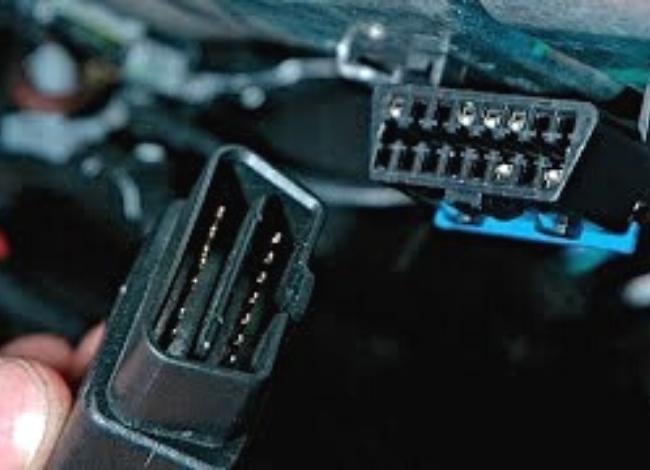
Look for corrosion, signs of water, a loose DLC housing, or terminals pushed back from the face of the connector. Empty positions are normal on many vehicles. Compare with the wiring information before treating an empty space as a missing terminal. If the connector or fuse holder is melted, discolored or smells burnt, have that circuit inspected before plugging the scanner in again.
How to Repair or Replace an OBD2 Blown Fuse
If the fuse is open, check the chart and replace it with the specified fuse type and amperage. Read the number on the replacement itself. A higher-rated fuse allows more current before opening and can leave the wiring unprotected. Use a replacement fuse, never a wire or foil across the slot.
With the ignition off and following the manual, seat the correct replacement and reinstall the cover. Reconnect the scan tool as instructed. If it powers up, follow the tool’s instructions to confirm it can communicate with the vehicle. If a tool that was completely dark now starts, the fuse was part of the problem. Consider what caused the fuse to open before you call the job finished.
If the replacement opens again, turn the ignition off and leave the circuit alone until the fault is traced. Tell the technician when it opened: with the scanner unplugged, when you plugged it in, or when another accessory on the same circuit was used. Those details help them focus on the port wiring, the tool or the shared circuit.
If the replacement holds but your OBD2 scanner won’t turn on, try a known-good tool that is rated for the vehicle. You can also try the suspect tool on another supported vehicle. If it works elsewhere and a second tool is dark on your vehicle, the vehicle-side feed, ground or connector deserves attention. If only the first tool fails, check its cable or ask the tool maker about service.
When the Fuse Is Good but the Scanner Is Still Dark
If your OBD2 scanner won’t turn on with a confirmed good fuse, keep the results in order. First, note whether the scanner uses internal power or vehicle power, then confirm whether a second compatible tool behaves the same way. A technician can use that information to check for power at both sides of the installed fuse and at the DLC. Power at the fuse but missing at the connector can indicate an open in the feed, while a feed that reads correctly under load can point toward the ground, terminal fit or the scanner itself.
Bring the fuse label and the scanner’s exact model to the shop if you need help. Mention any recent work under the dashboard and whether the failure occurs on a bumpy road or only when the cable is moved. An intermittent contact may pass a stationary check, so the conditions under which the scanner goes dark can help narrow it down.
Conclusion
When an OBD2 scanner won’t turn on, start with the cable and the tool’s power source. Then use the correct fuse chart and test the removed fuse. If the fuse and connector check out, compare a second tool or have the DLC feed and ground checked under load. That order helps you avoid replacing a scanner before you know whether the vehicle can power it.
FAQs
1. Why won’t my OBD2 scanner turn on?
Common causes include a loose or damaged cable, a blown fuse on the port supply circuit, low battery voltage, a poor ground or a fault in the scanner. A tool with internal batteries may also need a charge or new batteries.
2. Can a blown fuse stop my OBD2 scanner from working?
Yes. A port-powered scanner needs power through the DLC. If the supplying fuse is open, that scanner may stay dark. A fuse for the engine computer can cause a link error even when the tool powers up.
3. How do I check if the OBD2 port has power?
Start with the vehicle fuse chart and the scanner’s power indicator. With the right breakout adapter, a technician can compare the port’s supply and ground to battery voltage and check whether the circuit holds up under load.
4. What should I do if my OBD2 scanner cable is damaged?
Unplug it and check whether the cable is replaceable. Use the part specified for your scanner or contact the tool maker about repair. A connector that looks similar may have different wiring on the scanner end.
5. Can a weak car battery affect my OBD2 scanner?
Yes. A weak battery can pull voltage below the tool’s operating range, especially during starting. If the screen restarts while the engine cranks or other electronics dim, check the battery voltage readings and their limitations and have the battery and charging system tested as needed.
6. Why does my adapter light up but the phone app can’t find it?
A status light confirms the adapter has power, while discovery depends on the phone, app, adapter type and pairing procedure. Check the adapter manual for the correct Bluetooth or Wi-Fi method and close any second diagnostic app that might be using it.