
Last Updated on October 11, 2026
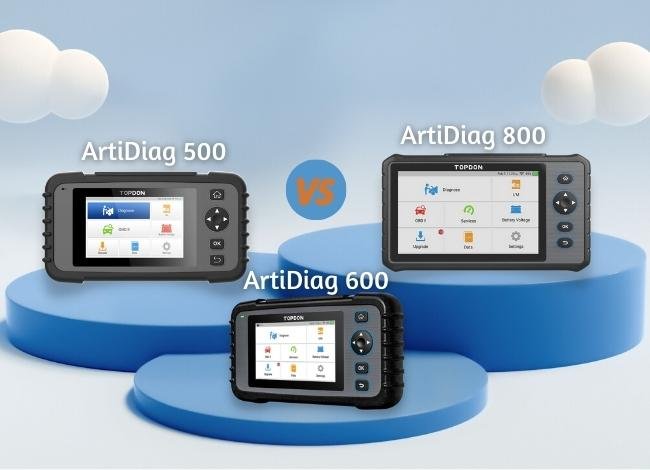
If you’re looking for an OBD2 scanner for your own car, TOPDON offers several models with useful diagnostic and maintenance features. But choosing between the ArtiDiag500, ArtiDiag600, and ArtiDiag800 can be confusing. They look similar, yet their system coverage and service functions are quite different.
The ArtiDiag500 focuses on everyday diagnostics, the ArtiDiag600 adds more maintenance capabilities, and the ArtiDiag800 offers broader access to vehicle systems.
In this TOPDON ArtiDiag500 vs 600 vs 800 comparison, we’ll explain the key differences, advantages, limitations, and which scanner makes the most sense for your needs.
This article focuses on the earlier ArtiDiag models. TOPDON has since released updated hardware and other scanners, so always confirm the exact version before purchasing.
TOPDON ArtiDiag500 vs 600 vs 800 Comparison Chart
Here is a side-by-side comparison of the three models. Certain specifications and available functions depend on the hardware generation and software package.
| Features | ArtiDiag500 | ArtiDiag600 | ArtiDiag800 |
|---|---|---|---|
| Screen Size | 5 inches | 5 inches | 7 inches |
| System Diagnostics | Engine, transmission, ABS, SRS | Engine, transmission, ABS, SRS | Broader full-system coverage |
| Maintenance Functions | 6 in documented ArtiDiag version | 8 in documented ArtiDiag version | Up to 26 advertised for earlier model |
| Read and Clear Codes | Yes | Yes | Yes |
| Live Data | Yes | Yes | Yes |
| Freeze-Frame Data | Yes | Yes | Yes |
| I/M Readiness | Yes | Yes | Yes |
| AutoVIN | Supported | Supported | Version dependent |
| Bidirectional Control | Not standard | Not standard | Verify exact version |
| Software Updates | Check model generation | Check package terms | Check renewal terms |
| Best For | Everyday DIY diagnostics | DIY maintenance | Broader vehicle diagnostics |
| Check Price |  Check Price Check Price |
 Check Price Check Price |
 Check Price Check Price |
Important: Check the seller’s product title and model number before ordering. Amazon listings can change or feature newer models with different specifications.
TOPDON ArtiDiag500 OBD2 Scanner Review
The TOPDON ArtiDiag500 is a practical option for drivers who want more information than a basic Check Engine Light reader provides.
It is designed to access four important vehicle systems: engine, transmission, ABS, and SRS. This makes it useful for checking several common warning lights without buying an expensive professional scanner.
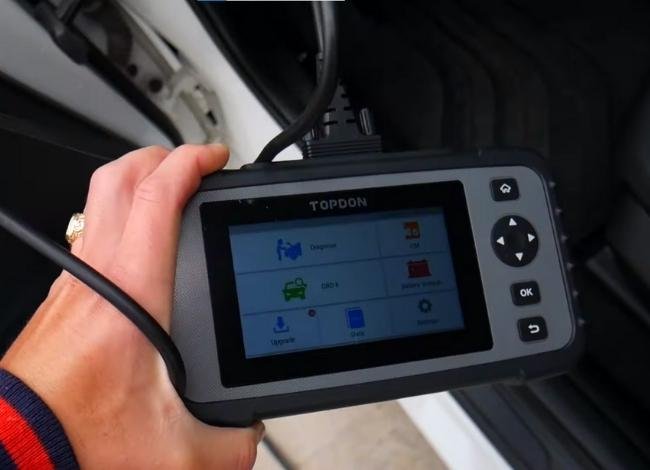
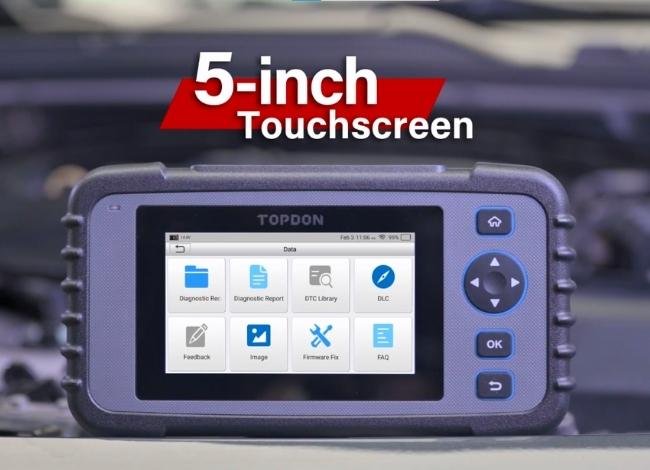
The 5-inch touchscreen makes navigation straightforward, and the scanner supports live data, diagnostic trouble codes, emissions readiness, and vehicle information.
What Can the ArtiDiag500 Do?
- Read and clear supported engine, transmission, ABS, and SRS codes
- Monitor available live sensor data
- Display freeze-frame information
- Check emissions readiness monitors
- Identify supported vehicles through AutoVIN
- Perform selected maintenance resets
TOPDON’s documented ArtiDiag500 version includes six maintenance functions: oil reset, throttle adaptation, electronic parking brake reset, steering angle reset, battery management reset, and TPMS reset.
Earlier product generations may differ. TOPDON also sells an updated second-generation ArtiDiag500, so don’t assume every unit has identical hardware.
Advantages: Simple operation, useful four-system diagnostics, compact screen, and practical functions for home maintenance.
Limitations: It doesn’t provide the same broad module coverage as the ArtiDiag800 and isn’t intended for advanced ECU programming.
For additional details, see our TOPDON ArtiDiag500 review.
TOPDON ArtiDiag600 Scanner Review
The TOPDON ArtiDiag600 offers a similar diagnostic approach to the ArtiDiag500 but adds more maintenance functions in the documented version.
It is designed for drivers who already understand basic code reading and want help with common post-repair procedures.
Like the ArtiDiag500, it focuses on engine, transmission, ABS, and airbag diagnostics rather than providing complete access to every electronic control module.
Maintenance Functions
A TOPDON ArtiDiag user manual lists eight maintenance functions for the ArtiDiag600:
- Oil service reset
- Throttle adaptation
- Electronic parking brake service
- Steering angle reset
- Battery management reset
- TPMS reset
- DPF regeneration
- Injector coding
These functions can help after oil changes, brake work, battery replacement, and other repairs.
However, availability depends on the specific vehicle. For example, injector coding isn’t available for every engine, and DPF regeneration requires the correct vehicle conditions and safety procedures.
Advantages: Useful service functions, four-system diagnostics, compact touchscreen, and a reasonable balance between features and simplicity.
Limitations: Restricted module coverage compared with higher-tier scanners and no standard full bidirectional testing capability.
Note: ArtiDiag600 and AD600S are different products. Don’t use specifications from an AD600S listing to determine the capabilities of an ArtiDiag600.
TOPDON ArtiDiag800 Full-System Scanner Review
If you need broader access to vehicle electronics, the TOPDON ArtiDiag800 offers more diagnostic capability than the 500 and 600 models.
Its larger 7-inch touchscreen is useful for reviewing diagnostic information, especially when checking several systems or reading live data graphs.
The earlier ArtiDiag800 was advertised with up to 26 maintenance and service functions. These cover more procedures than the smaller models.
What Makes ArtiDiag800 Different?
The main advantage is broader system coverage. In addition to engine and transmission diagnostics, it can access other supported electronic systems such as body control, steering, climate control, and related modules.
Depending on vehicle compatibility, maintenance functions may include:
- Oil reset and EPB service
- Steering angle calibration
- Throttle relearn
- Battery registration
- DPF regeneration
- Injector coding
- Selected gearbox adaptation
- Additional calibration and service procedures
Remember that service functions aren’t the same as universal ECU programming or key programming. A scanner can offer many maintenance procedures without supporting unrestricted control module coding.
Also, don’t confuse the original ArtiDiag800 with the newer ArtiDiag800 BT or ArtiDiag800 BT 2. These models have different hardware and software capabilities.
Advantages: Larger screen, broader diagnostic coverage, more service functions, and better suitability for users working on multiple vehicles.
Limitations: Higher purchase cost, a larger device, and possible software subscription expenses depending on the version.
Similarities Between TOPDON ArtiDiag500, 600, and 800
Despite their differences, all three scanners offer core OBD2 functions that help diagnose emissions-related engine faults.
Standard OBD2 Diagnostics
Supported functions include reading and clearing trouble codes, reviewing freeze-frame data, monitoring live sensor values, checking I/M readiness, retrieving vehicle information, and accessing supported onboard monitor tests.
These features help you understand why the Check Engine Light is on before deciding what to repair.
Live Data Monitoring
All three can display available sensor readings, such as engine RPM, coolant temperature, throttle position, and other supported parameters.
Live data can help identify changing conditions that a stored code alone doesn’t explain.
Emissions Readiness Checks
You can use these scanners to review whether the vehicle’s supported emissions monitors have completed.
For a practical explanation, see our guide to preparing for an OBD2 emissions test.
Vehicle Compatibility
These scanners support common OBD2 protocols, but that doesn’t mean they work with every vehicle ever manufactured.
Standard OBD2 diagnostics generally cover compliant U.S. passenger vehicles from model year 1996 onward. Advanced ABS, transmission, and service functions require separate vehicle-specific coverage.
Check the compatibility information for your exact make, model, year, and engine.
TOPDON ArtiDiag500 vs 600 vs 800: Main Differences
1. Diagnostic Coverage
The ArtiDiag500 and ArtiDiag600 are primarily four-system scanners. The ArtiDiag800 provides broader electronic system diagnostics.
If you frequently troubleshoot problems involving body modules, steering, or climate control, the ArtiDiag800 may be more suitable.
2. Maintenance Services
The documented ArtiDiag500 offers six maintenance functions, while the documented ArtiDiag600 adds two more. The original ArtiDiag800 was advertised with a wider selection of up to 26 service functions.
Still, the number of functions matters less than whether your specific car supports the procedure you need.
3. Display and Portability
The ArtiDiag500 and 600 have smaller 5-inch displays, making them convenient for occasional diagnostics.
The ArtiDiag800’s 7-inch display is better suited to reviewing detailed data, although the larger size makes it less compact.
4. Software Updates
Update terms are important, particularly when buying older diagnostic equipment.
TOPDON advertises lifetime updates for certain ArtiDiag500 generations, but update policies may differ across older models, regions, and sellers.
Confirm whether the scanner remains supported and whether continued updates require additional payment. Don’t assume a used scanner includes the same software benefits as a new unit.
5. Price and Long-Term Value
The ArtiDiag500 is typically the more basic choice, while the ArtiDiag800 targets users who need more diagnostic coverage.
However, prices for older scanners can change significantly with available inventory.
Before buying, compare the cost with newer TOPDON products that may offer better hardware, broader compatibility, or improved software terms.
Which TOPDON ArtiDiag Scanner Should You Buy in 2027?
For a car owner who mostly wants to diagnose engine, transmission, ABS, and airbag warnings, the ArtiDiag500 can be a sensible choice.
If you regularly perform maintenance and need additional service procedures, consider the ArtiDiag600.
For users who work on multiple vehicles and need wider module access, the ArtiDiag800 offers the strongest diagnostic coverage among these original models.
However, these scanners belong to an older product generation. Before spending money, compare them with current TOPDON models and confirm that updates, accessories, and vehicle coverage still meet your needs.
Frequently Asked Questions
1. Which is better: TOPDON ArtiDiag500, 600, or 800?
ArtiDiag800 offers broader system coverage, while ArtiDiag500 is suitable for basic diagnostics. ArtiDiag600 provides additional maintenance functions for DIY users.
2. Does the TOPDON ArtiDiag500 support maintenance resets?
Yes. A documented ArtiDiag500 version includes six maintenance functions. Earlier generations and different product revisions may vary.
3. Can the ArtiDiag600 perform bidirectional active tests?
The original ArtiDiag600 isn’t generally positioned as a full bidirectional diagnostic scanner. Check the exact model before purchasing if active testing is required.
4. Does the ArtiDiag800 support ECU programming?
Don’t assume full ECU programming support. It offers numerous diagnostic and service functions, but advanced programming capability depends on the exact version and vehicle.
5. Do these scanners receive free software updates?
Update terms differ by model generation and seller. Verify the current software entitlement, especially when purchasing older or used equipment.
6. Are these TOPDON scanners still worth buying in 2027?
They may be worth considering at a competitive price if they support your vehicle and required functions. However, newer TOPDON scanners may offer better long-term value.
Final Recommendation
After comparing TOPDON ArtiDiag500 vs 600 vs 800, there isn’t one perfect scanner for everyone.
Choose the ArtiDiag500 for straightforward diagnostics, the ArtiDiag600 for extra maintenance functions, and the ArtiDiag800 for broader electronic system coverage.
For most car owners, the best scanner isn’t necessarily the one with the longest feature list. It’s the one that supports the repairs and diagnostic work you actually need.
Before ordering, check the exact model generation, current selling price, vehicle compatibility, and software update terms. That simple step can help you avoid spending money on a scanner that doesn’t perform your required functions.
Affiliate Disclosure: We may earn a commission when you purchase through qualifying affiliate links, at no additional cost to you.