
Last Updated on October 20, 2026
If you’re looking for an affordable and reliable OBD2 scanner to diagnose car problems without spending too much, the Veepeak OBD2 scanner is worth considering. This compact Bluetooth adapter connects your vehicle to a smartphone, allowing you to read trouble codes, monitor live engine data, and check emissions readiness.
In this Veepeak OBD2 Review, we’ll explore its features, pros and cons, vehicle compatibility, setup process, and whether it’s worth buying in 2026. We’ll focus on the Veepeak OBDCheck BLE+ and explain what it can and cannot do so you can make the right decision before purchasing.
What Is the Veepeak OBD2 Scanner?
The Veepeak OBDCheck BLE+ is a compact Bluetooth-enabled diagnostic adapter that connects to your car’s OBD2 port and communicates with a smartphone or tablet. It is designed for car owners, weekend mechanics, and DIY enthusiasts who want a convenient way to understand their vehicle’s engine and emissions-related problems.
Unlike traditional handheld scanners, the Veepeak uses your mobile device as its display. Once plugged into the diagnostic port, it communicates through Bluetooth with a compatible third-party app.
Whether you’re trying to understand why your check engine light is on or want to monitor engine performance, this scanner provides useful diagnostic information without requiring an expensive standalone tool.
One important detail is that the adapter does not include its own diagnostic app. You must install a compatible application, and the available features depend on the app and your vehicle.
Technical Specifications of the Veepeak OBD2 Scanner
| Veepeak OBDCheck BLE+ – Technical Specifications | |
|---|---|
| Model Name | Veepeak OBDCheck BLE+ Plus |
| Connectivity | Bluetooth Low Energy (BLE) and Classic Bluetooth |
| Device Compatibility | iOS and Android smartphones/tablets; selected Windows and Mac applications |
| App Support | Car Scanner ELM OBD2, OBD Fusion, Torque, BimmerCode, BimmerLink, Carista, and others |
| Supported OBD2 Protocols | ISO 15765-4 CAN, ISO 9141-2, ISO 14230-4 KWP2000, SAE J1850 PWM, SAE J1850 VPW |
| Vehicle Compatibility | Most OBD2-compliant cars and light trucks, including U.S. models from 1996 onward |
| Functions | Read and clear engine codes, live sensor data, freeze-frame information, and emissions readiness |
| Enhanced Diagnostics | Selected vehicle-specific functions through compatible third-party apps |
| Power Source | Vehicle OBD2 port |
| Operating Voltage | 9V–16V |
| Operating Current | Maximum 45 mA |
| Dimensions | Approximately 1.97 × 1.61 × 0.87 inches |
| Weight | Approximately 2.12 ounces |
| Included Accessories | OBDCheck BLE+ adapter, carrying case, and user manual |
| Check Price | 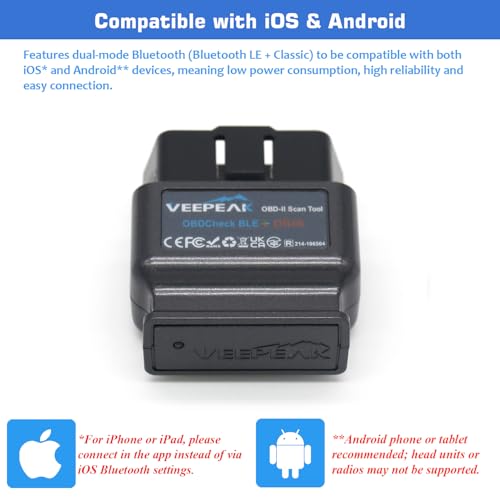 Check Today’s Price on Amazon Check Today’s Price on Amazon |
Veepeak OBD2 Review 2026: Key Features
The Veepeak OBD2 scanner remains a practical option for budget-conscious drivers in 2026. Its Bluetooth connectivity, third-party app compatibility, and simple plug-and-play design make it suitable for everyday engine diagnostics.
This Veepeak OBD2 Review explains its most important features and how they can help you identify common vehicle problems.
Bluetooth Connectivity for iOS and Android
The Veepeak OBDCheck BLE+ supports both Bluetooth Low Energy and Classic Bluetooth, allowing it to communicate with compatible Android and iOS devices.
This means you do not need a separate Wi-Fi connection or a special cable between the adapter and your phone.
For iPhone users, the adapter connects directly through a compatible app using Bluetooth Low Energy. Android users can connect through BLE or traditional Bluetooth pairing, depending on the application.

Wide App Compatibility
One of the biggest advantages of the Veepeak scanner is that you are not locked into one application.
It supports several popular diagnostic apps, including:
- Car Scanner ELM OBD2: Available for iOS and Android, with free basic diagnostic features.
- OBD Fusion: Supports live data, dashboards, and selected enhanced diagnostics.
- Torque Lite/Pro: A popular Android-only diagnostic application.
- BimmerCode and BimmerLink: Offer selected BMW and MINI coding or diagnostic features on compatible models.
- Carista: Provides vehicle-specific diagnostics, customization, and selected service functions.
- Dr. Prius: Useful for supported Toyota and Lexus hybrid battery information.
Some applications are free, while others require a one-time payment, an in-app purchase, or a subscription.
The BLE+ adapter supports additional AT commands compared with the standard BLE model, but this does not guarantee that every advanced app function will work on your vehicle.
Code Reading and Clearing
One of its main functions is reading and clearing diagnostic trouble codes (DTCs) associated with the engine and emissions system.
For example, if your check engine light comes on, a compatible app can display the stored code and provide information about its possible meaning.
However, a trouble code does not always identify the exact faulty component. You may need additional testing before replacing anything.
After completing the repair, you can clear the code and check whether it returns. Clearing codes also resets certain emissions readiness monitors, so avoid doing this immediately before an emissions inspection.
Live Data Monitoring
The scanner provides real-time vehicle data through supported diagnostic applications.
Depending on your vehicle, you may be able to monitor:
- Engine RPM
- Coolant temperature
- Short-term and long-term fuel trims
- Oxygen sensor readings
- Throttle position
- Vehicle speed
- Intake air temperature
- Calculated engine load
This information is useful for identifying unusual engine behavior. For example, fuel trim readings can provide clues about air-fuel mixture problems, although further checks are necessary to confirm the cause.
The amount of available live data depends on your vehicle and the app you use.
Power Consumption
The Veepeak receives power directly from the vehicle’s OBD2 port. Its maximum operating current is relatively low, but the adapter can still consume battery power while connected.
Veepeak advises that leaving it plugged in for a few days is generally acceptable when the car battery is healthy and the vehicle is driven regularly.
However, if your vehicle will remain parked for more than a week, removing the adapter is recommended. This is especially important for older batteries or vehicles that already have a parasitic battery drain problem.
Vehicle Compatibility
The Veepeak OBDCheck BLE+ supports most OBD2-compliant passenger vehicles and light trucks.
For standard engine and emissions diagnostics, general compatibility includes:
- United States: 1996 and newer
- Canada: 1998 and newer
- European Union gasoline vehicles: 2001 and newer
- European Union diesel vehicles: 2004 and newer
- Australia gasoline vehicles: 2006 and newer
- Australia diesel vehicles: 2007 and newer
These dates apply to general OBD2 compatibility, not every advanced diagnostic feature.
Some hybrid and electric vehicles can also work with specialized apps, but coverage depends on the vehicle and supported connection profile. Heavy-duty commercial vehicles using J1939 are not supported.
How to Set Up the Veepeak OBD2 Scanner
Getting started with the Veepeak OBD2 scanner is straightforward. You only need the adapter, a compatible smartphone, and a suitable diagnostic app.
- Install an app: Download Car Scanner ELM OBD2, OBD Fusion, or another compatible application.
- Locate the OBD2 port: It is usually under the dashboard near the steering column.
- Connect the adapter: Plug the Veepeak into the vehicle’s diagnostic port.
- Turn on the ignition: Switch the ignition to ON. Some diagnostic functions require the engine to be running.
- Enable Bluetooth: On iPhone, do not pair through the phone’s Bluetooth settings. Connect directly inside the app. Android users can follow the app’s Bluetooth or BLE connection instructions.
- Start scanning: Select VEEPEAK in the application, establish communication with the vehicle, and open the diagnostic functions.
If the scanner does not connect, check the app’s Bluetooth permissions, select the correct connection method, and make sure another diagnostic app is not already using the adapter.
Real-World Performance
For basic engine diagnostics, the BLE+ has the features most everyday drivers need. It can retrieve standard trouble codes, display supported live data, and check emissions readiness without a separate handheld screen.
Connection speed and data refresh rates depend on the vehicle’s communication protocol, smartphone, and selected app. Newer CAN-based vehicles may provide more available data than older models.
It is particularly useful for identifying check engine codes before visiting a mechanic or checking emissions readiness before an inspection.
However, the adapter cannot determine whether a repair was successful simply because a warning light has been cleared. The vehicle may need additional driving cycles and diagnostic checks.
Veepeak OBD2 Scanner Pros and Cons
Pros:
- Affordable compared with many standalone diagnostic scanners.
- Compatible with both iOS and Android.
- Supports a wide selection of third-party applications.
- Reads and clears standard engine and emissions trouble codes.
- Provides live data and emissions readiness information.
- Compact design with no separate screen required.
- Selected enhanced diagnostics available through compatible apps.
- Simple setup for beginners.
Cons:
- Requires a smartphone or other compatible device.
- Does not include a dedicated Veepeak diagnostic app.
- Some applications require payment or subscriptions.
- ABS, airbag, and transmission diagnostics are vehicle- and app-dependent.
- No general support for oil resets, EPB service, or advanced relearning procedures.
- Should be unplugged during extended vehicle storage.
These limitations are reasonable for a compact Bluetooth adapter. However, users who need extensive service functions or bidirectional controls should consider a more advanced diagnostic scanner.
Veepeak vs. Other Popular OBD2 Scanners
Before buying, it helps to compare the Veepeak OBDCheck BLE+ with other popular Bluetooth scanners.
| Feature | Veepeak BLE+ | BlueDriver | FIXD | BAFX Bluetooth |
|---|---|---|---|---|
| iOS and Android | Yes | Yes | Yes | Android (traditional Bluetooth model) |
| Engine Code Reading | Yes | Yes | Yes | Yes |
| Live Data | Yes | Yes | App-dependent | Yes |
| Enhanced Diagnostics | Supported apps and vehicles | Selected vehicles | Limited | App-dependent |
| Included App | No | Yes | Yes | No |
| Best For | Flexible app selection | Integrated diagnostic experience | Simple engine diagnostics | Budget Android users |
Compared with BlueDriver, Veepeak offers greater flexibility in choosing your diagnostic app. BlueDriver provides its own application and supports enhanced diagnostics on selected vehicles.
FIXD focuses on making engine fault information easier for everyday drivers to understand, while the traditional BAFX Bluetooth adapter is a straightforward choice for Android users.
If you prefer choosing your own software, Veepeak is attractive. If you want an integrated app and scanner package, BlueDriver may be more convenient.
Who Should Buy the Veepeak OBD2 Scanner?

The Veepeak scanner is suitable for:
- DIY enthusiasts who regularly work on their vehicles.
- Car owners who want to understand check engine lights before visiting a shop.
- Used car buyers who want to inspect available trouble codes and readiness information.
- Drivers who want to monitor engine sensor readings.
- Automotive students learning basic OBD2 diagnostics.
- BMW, MINI, and other supported vehicle owners who need compatible third-party diagnostic applications.
It is less suitable for professional workshops that require extensive bidirectional testing, module programming, or broad manufacturer-specific service coverage.
Also, used car buyers should remember that a clean code scan does not guarantee a problem-free vehicle. Pending codes, recently reset readiness monitors, and mechanical issues may still require inspection.
Common Questions About the Veepeak OBD2 Scanner
Is the Veepeak OBD2 scanner compatible with iPhones?
Yes. The OBDCheck BLE+ works with compatible iPhones and iPads through Bluetooth Low Energy. You should connect from inside the diagnostic app rather than pairing through iOS Bluetooth settings.
Does the Veepeak scanner come with an app?
No. You must download a compatible third-party app, such as Car Scanner ELM OBD2 or OBD Fusion. Some applications have free features, while others require payment.
Can Veepeak diagnose ABS or airbag problems?
Standard OBD2 applications focus on engine and emissions diagnostics. However, selected third-party apps can provide enhanced ABS, airbag, or transmission diagnostics on supported vehicles. Compatibility must be checked separately.
Does the Veepeak OBDCheck BLE+ work on diesel vehicles?
Yes, provided the vehicle meets a supported OBD2 or EOBD standard. For example, most U.S. OBD2-compliant diesel passenger vehicles and European diesel vehicles from 2004 onward are supported for generic diagnostics.
Can I leave the Veepeak plugged in all the time?
It can remain connected for short periods when the vehicle is driven regularly and the battery is healthy. However, Veepeak recommends removing the adapter if the vehicle will remain parked for more than a week.
Can Veepeak reset oil service lights?
Generally, no. The adapter is primarily designed for OBD2 diagnostics, not dedicated maintenance resets. Certain manufacturer-specific functions may be available through supported apps, but oil service resets and electronic parking brake service are not general BLE+ capabilities.
Where to Buy the Veepeak OBD2 Scanner
The Veepeak OBDCheck BLE+ is available from the official Veepeak website and online retailers such as Amazon.
As of 2026, the official Veepeak listing places the BLE+ in the low-$40 price range, although promotions, retailer prices, and availability may change.
Before ordering, check the exact model name. The standard OBDCheck BLE and the BLE+ Plus are different versions. The BLE+ supports additional AT commands and may be preferable for users who need broader third-party app compatibility.
You can compare current availability using the product link in the specifications table above or visit the official Veepeak BLE+ product page.
Final Verdict: Is the Veepeak OBD2 Scanner Worth It in 2026?
The Veepeak OBDCheck BLE+ combines useful diagnostic functions, broad app compatibility, and a compact design at an accessible price.
Its biggest strengths are the ability to read standard engine trouble codes, monitor live sensor data, check emissions readiness, and work with different diagnostic applications on iOS and Android.
Its limitations are equally important. It requires a separate app, some advanced features cost extra, and vehicle-specific functions are not guaranteed. It also cannot replace a professional full-system scanner for complex repairs.
For everyday drivers, DIY enthusiasts, and students who want affordable Bluetooth diagnostics, the Veepeak is a practical choice. If your main goal is to understand check engine lights and monitor engine performance, it offers much of what you need without paying for expensive hardware.
Overall, this Veepeak OBD2 Review shows that the BLE+ remains a worthwhile option in 2026, especially for drivers who prefer using their smartphones and choosing their own diagnostic software.
Still have a question after reading this Veepeak OBD2 Review? Comment below.