
Your ABS warning light comes on, so you connect the same code reader that previously diagnosed your check engine light. The scanner communicates with the vehicle, searches for trouble codes, and reports that no codes were found. Yet the ABS light remains illuminated.
This situation is confusing because both systems can be accessed through the vehicle’s diagnostic connector. However, sharing the same connector does not mean they use the same diagnostic functions. It raises an important question: Can a Basic OBD2 Scanner Read ABS Codes, or is a different type of scanner required?
The answer depends on more than whether the tool fits the OBD2 port. The scanner, its software, the exact vehicle, and the diagnostic function you need must all be compatible.
Quick Answer: Can a Basic OBD2 Scanner Read ABS Codes?
Usually, no. Most basic OBD2 scanners are designed to read standardized engine and emissions-related trouble codes. ABS faults are generally stored inside a separate anti-lock brake control module and require enhanced or manufacturer-specific diagnostic access.
Some affordable tools advertised as OBD2 scanners do include ABS code reading, but that feature may work only with certain vehicle makes, models, and years. Therefore, the term “OBD2 compatible” alone does not confirm ABS support. The scanner’s official coverage information must specifically list ABS diagnostics for the vehicle being checked.
It is also important to separate four different abilities: reading ABS codes, clearing them, viewing live ABS data, and performing active tests. A tool that reads a code may not support the other functions.
Why Standard OBD2 and ABS Diagnostics Are Different
OBD2 was primarily standardized to monitor engine performance and emissions-related systems. A basic code reader can normally access the powertrain control module to retrieve generic and some manufacturer-specific P-codes, display emissions readiness information, and clear check engine light codes.
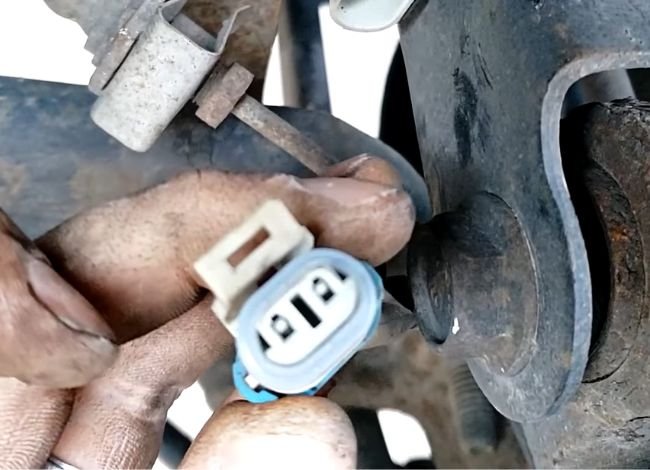
The ABS operates through a different control module. It receives information from wheel-speed sensors and monitors electrical circuits, communication signals, and hydraulic-control components related to anti-lock braking. Depending on the vehicle and fault, its diagnostic information may include chassis codes, network codes, and manufacturer-specific definitions.
This is why an ABS warning light can be illuminated without triggering the check engine light. The engine computer may have no relevant faults stored, while the ABS module has its own diagnostic code. If a scanner checks only the engine module, its “No Codes Found” message does not prove that the ABS system has no stored fault.
The Four Compatibility Gates
Think of the OBD2 connector as one entrance leading to several locked rooms. Connecting to the entrance is only the first step. To reach the ABS module, the tool must pass four compatibility gates: the physical connection, scanner capability, vehicle coverage, and requested diagnostic function.
Compatibility Gate 1: The Scanner Connects, but to Which Module?
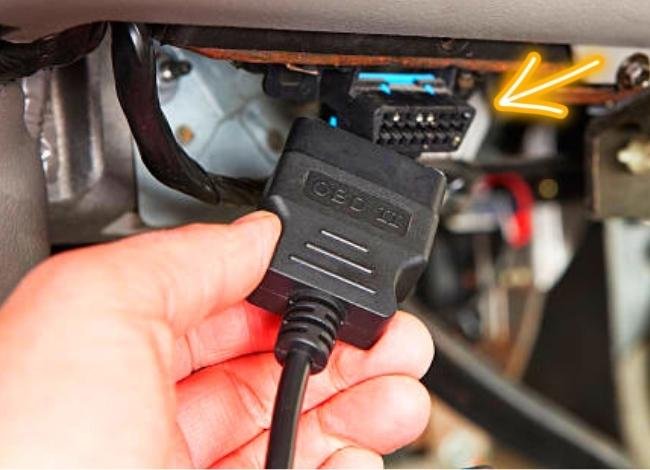
Most modern diagnostic tools connect through the 16-pin OBD2 data link connector. That connector may provide access to several vehicle computers, including the engine, transmission, ABS, airbag, body-control, and tire-pressure modules.
A basic scanner, however, may be programmed to communicate only with the engine computer through standardized OBD2 modes. It can receive power from the connector, identify the vehicle, and successfully read engine data without having permission or software support to communicate with the ABS module.
This distinction explains several common results:
- The scanner powers on but has no ABS option.
- It reads engine codes while reporting no other modules.
- It displays “No Codes” even though the ABS light is on.
- It attempts an ABS scan but reports a communication or unsupported-vehicle message.
In these cases, the diagnostic connector may be working normally. The limitation can exist inside the scanner or its software rather than the vehicle.
Compatibility Gate 2: Does the Scanner Include Enhanced ABS Support?
Standard OBD2 capability and enhanced diagnostics are different feature levels. Enhanced diagnostics allow a compatible tool to communicate with additional manufacturer-specific modules that are not covered by the basic emissions standard.
Before assuming that a scanner supports ABS, look for clear terms such as “ABS diagnostics,” “read and clear ABS codes,” “enhanced codes,” or “multi-system scanning.” Descriptions such as “full OBD2 functions,” “works with 1996 and newer vehicles,” or “reads all check engine codes” may refer only to standardized engine diagnostics.
Bluetooth adapters introduce another layer. Their available functions depend on the adapter, the connected app, installed vehicle software, and sometimes a paid add-on. One app may provide only generic engine information, while another app using the same adapter may offer enhanced ABS coverage for selected vehicles.
Firmware also matters. A scanner that lacks support for a particular model may gain coverage through an update, while an older or discontinued tool may never receive the required software. For this reason, the product name and purchase price alone cannot confirm capability. The exact ABS coverage must be verified rather than assumed.
Compatibility Gate 3: Is Your Exact Vehicle Supported?
ABS diagnostics are not universally identical across all OBD2-equipped vehicles. Manufacturers can use different modules, communication protocols, code definitions, and network arrangements. Coverage can therefore vary by model year, make, model, platform, engine, trim, and country of sale.
For example, a scanner may support ABS diagnostics on newer models from one manufacturer but not earlier models. It may cover a vehicle sold in the United States while offering limited support for the same model sold in another market. A mid-generation software or control-module change can also affect compatibility.
This is why a general statement such as “supports most 1996 and newer vehicles” is not enough. That wording often confirms standard engine-code coverage rather than enhanced ABS access.
Before relying on a scanner’s ABS feature, its official compatibility checker or coverage document should confirm all three of the following:
- The exact vehicle year, make, and model
- Access to the ABS or electronic brake control module
- The specific function required, such as code reading or live data
Wireless scanners may have additional requirements. The adapter can be compatible with the vehicle while the selected app or installed software package lacks ABS support. Some manufacturers include enhanced coverage, while others sell it as a separate vehicle-specific add-on or subscription.
Compatibility Gate 4: What ABS Function Do You Actually Need?
“ABS support” can describe several very different abilities. The most basic function is retrieving stored diagnostic trouble codes from the ABS module. The next level allows those codes to be cleared after the underlying fault has been addressed.
More capable tools may display live wheel-speed sensor readings, brake-switch status, system voltage, and other ABS parameters. Professional or bidirectional scanners may also command certain components or support an automated brake-bleeding procedure on compatible vehicles.
These functions are not interchangeable. A scanner that reads and clears ABS codes may not display live wheel-speed data. A tool that shows live data may not perform active tests. Even when a feature is available, coverage can remain vehicle-specific.
Basic vs. ABS-Capable Scanners
This responsive table shows the practical differences between the main scanner levels.
| Scanner Level | Engine Codes | ABS Codes | ABS Live Data | Active Tests |
|---|---|---|---|---|
| Basic generic code reader | Usually supported | Usually not supported | No | No |
| ABS-capable code reader | Supported | Selected vehicles | Sometimes | Usually not |
| Enhanced multi-system scanner | Supported | Broad but vehicle-specific | Often supported | Model-dependent |
| Professional bidirectional tool | Supported | Broad coverage | Often supported | Often, with limitations |
Terms such as “advanced” and “professional” are marketing descriptions rather than universal technical categories. The feature list and vehicle-coverage database provide more useful information than the label printed on the scanner.
Why Does the Scanner Say “No Codes” While the ABS Light Is On?
The most common explanation is that the scanner searched the engine computer instead of the ABS module. Its “No Codes” result may be accurate for the engine system while an ABS fault remains stored elsewhere.
The same message can appear if the ABS software is not installed, the selected vehicle profile is incorrect, or the scanner does not support that model’s communication protocol. Outdated firmware, a limited app subscription, network faults, and security restrictions on some newer vehicles may also prevent module access.
Pay attention to the exact wording displayed. “No engine codes,” “ABS not supported,” and “Unable to communicate with module” describe different situations. Only the first indicates that a successful scan found no codes in the module that was actually checked.
If a compatible scanner reaches the ABS module but finds no code, professional diagnosis may still be necessary. An intermittent communication problem, instrument-cluster issue, voltage fault, or another brake-related module could be involved.
This is why the question Can a Basic OBD2 Scanner Read ABS Codes cannot be answered by checking the connector alone. All four gates—the connection, scanner capability, vehicle coverage, and required function—must match.
What an ABS Code Can—and Cannot—Tell You
An ABS trouble code identifies the system, circuit, or condition that the control module detected. It may point toward a particular wheel-speed signal, pump circuit, valve circuit, voltage problem, or communication failure.
However, the code does not automatically identify the failed part. A wheel-speed sensor code, for example, may result from damaged wiring, corrosion inside a connector, a contaminated or damaged tone ring, excessive wheel-bearing movement, or an interruption between the sensor and ABS module.
Not every chassis code is an ABS code, either. The scanner must access the correct module and provide a definition that matches the vehicle. The code should be treated as diagnostic evidence—not permission to replace the first component mentioned in its description.
What to Check Before Buying an ABS Scanner
Before buying, do not rely on the question Can a Basic OBD2 Scanner Read ABS Codes alone. Confirm whether the tool supports the exact vehicle and the level of diagnosis required.
Check the manufacturer’s official coverage information for:
- Exact year, make, model, and sales market
- ABS module code reading and clearing
- Live wheel-speed data, if needed
- Software updates, subscriptions, or paid add-ons
- Compatibility with the selected phone and app
- Secure-gateway requirements on supported newer vehicles
- Return policy if the advertised coverage does not work
If the compatibility page says “most vehicles,” ask the manufacturer to confirm coverage using the vehicle identification information before purchasing. Avoid assuming that a newer or more expensive scanner automatically supports every ABS system.
Can Clearing an ABS Code Turn Off the Warning Light?
A compatible scanner may turn off the ABS warning light by clearing its stored code, but only if the system no longer detects the fault. If the underlying problem remains, the code and warning light may return immediately or after the next system self-check.
Some faults become history codes after an intermittent problem disappears. Others remain current until a wiring, sensor, voltage, communication, or hydraulic-control issue is repaired. Clearing a code does not repair the condition, confirm safe operation, or prove that a replaced component solved the problem.
Save the code number, description, and status before it is cleared. Erasing that information too early can remove useful evidence and make an intermittent problem more difficult to diagnose.
What to Do If Your Scanner Cannot Access the ABS Module
First, distinguish between “No Codes Found,” “ABS Not Supported,” and “Unable to Communicate.” Check the tool’s official coverage information and confirm that the correct vehicle profile and ABS module are available.
If an update or supported software package does not provide access, use a confirmed ABS-capable tool or arrange a professional scan. Avoid replacing a wheel-speed sensor or ABS module simply because a generic engine scanner found nothing.
ABS Warning-Light Safety
An illuminated ABS warning means the anti-lock function—and sometimes related traction or stability-control assistance—may be unavailable. Normal brake behavior cannot be assumed without considering the exact warning combination and vehicle manufacturer’s guidance.
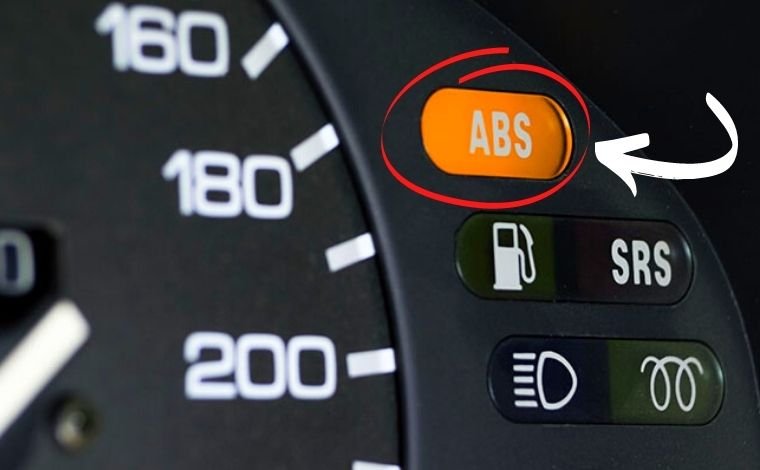
If a red brake warning appears, braking response feels different, fluid is visibly leaking, or stopping performance is reduced, do not continue using the vehicle. Arrange professional inspection or towing. Clearing the light should never be used as a substitute for diagnosing a braking-system fault.
Frequently Asked Questions
Can a Basic OBD2 Scanner Read ABS Codes?
Most basic engine-code readers cannot. A scanner must specifically include enhanced ABS access for the exact vehicle. Some entry-level tools offer that feature, but the words “OBD2 compatible” do not guarantee it.
Are ABS trouble codes always C-codes?
Many are chassis codes beginning with “C,” but code format and definitions vary. ABS modules can also store network-related codes, and not every C-code belongs to the ABS system.
Can a Bluetooth OBD2 adapter read ABS codes?
It can if the adapter, app, installed software, and vehicle are all compatible with enhanced ABS diagnostics. Changing apps may change available coverage, but the adapter’s limitations still apply.
Can an ABS scanner identify the exact failed wheel sensor?
It may identify which wheel-speed circuit reported a fault and, on supported vehicles, display live sensor data. That information does not prove the sensor itself failed because wiring, connectors, tone rings, bearings, or module problems can create similar results.
Is ABS code reading the same as automated brake bleeding?
No. Reading codes is a diagnostic function. Automated bleeding requires separate active-control capability and vehicle-specific support. A tool offering ABS codes may not provide that service function.
Conclusion
The practical answer to Can a Basic OBD2 Scanner Read ABS Codes is usually no—but the word “basic” does not tell the entire story. Some affordable scanners provide enhanced ABS access, while other tools remain limited to engine and emissions diagnostics.
Successful ABS scanning requires all four compatibility gates to match: the connector, scanner capability, exact vehicle coverage, and required function. Verify those details before purchasing a tool, and remember that retrieving a code is the beginning of diagnosis rather than confirmation that a particular part has failed.