
Last Updated on October 8, 2026
Most people connect an OBD2 scanner after the Check Engine Light comes on. But your vehicle’s computer does more than store trouble codes. It also runs internal tests on emissions-related systems and records the results.
Mode 6 lets you access many of those results.
It can show whether a monitored system passed or failed a test, and how close the measured result was to its programmed limit. In some cases, this information can help you investigate a problem before a confirmed trouble code appears.
But Mode 6 isn’t always easy to understand. Test names, units, and limits vary between vehicles, and some scanners display only raw numbers.
So, what is Mode 6 on an OBD2 scanner? Think of it as a detailed report of the tests your car’s computer has already performed.
What Is Mode 6 on an OBD2 Scanner?
Mode 6, also called Mode $06 or Service $06, is a standardized OBD2 diagnostic function that retrieves results from supported onboard monitoring tests.
These tests may involve:
- Catalytic converter efficiency
- Oxygen sensors and their heaters
- Evaporative emissions (EVAP) systems
- Exhaust gas recirculation (EGR)
- Variable valve timing (VVT)
- Engine misfire monitoring on supported vehicles
The exact tests available depend on your vehicle and scanner.
Unlike live data, Mode 6 normally displays results recorded when a test last ran. It doesn’t continuously show current sensor readings or command the computer to perform a new test.
It also doesn’t tell you which part needs replacing. That’s something you determine through further diagnosis.
Think of Mode 6 as a Diagnostic Report Card
A readiness monitor gives you a broad answer about whether a required emissions-related self-test has completed.
Mode 6 can provide more detailed information about individual tests associated with those monitoring systems.
Think of a readiness monitor as a school subject and a Mode 6 result as the score from an individual exam.
A simplified report might look like this:
| Monitor | Test Value | Programmed Limit | Result |
|---|---|---|---|
| Example catalyst test | 75 | Maximum 100 | Pass |
| Example sensor test | 115 | Maximum 100 | Fail |
These numbers are only examples, not actual readings from a vehicle.
Some tests fail when a value exceeds the maximum limit. Others fail when the result drops below the minimum. The correct units and scaling also matter.
Not every scanner displays a clear Pass or Fail label. Some simply show the measured value and its limits.
This is why Mode 6 on an OBD2 scanner should be interpreted as test evidence rather than a simple vehicle health score.
What Does Mode 6 Actually Mean?
OBD2 organizes standardized diagnostic functions into services, often called modes.
SAE J1979 identifies Mode $06 as the service for retrieving onboard monitoring test results. It was originally associated mainly with non-continuously monitored systems.
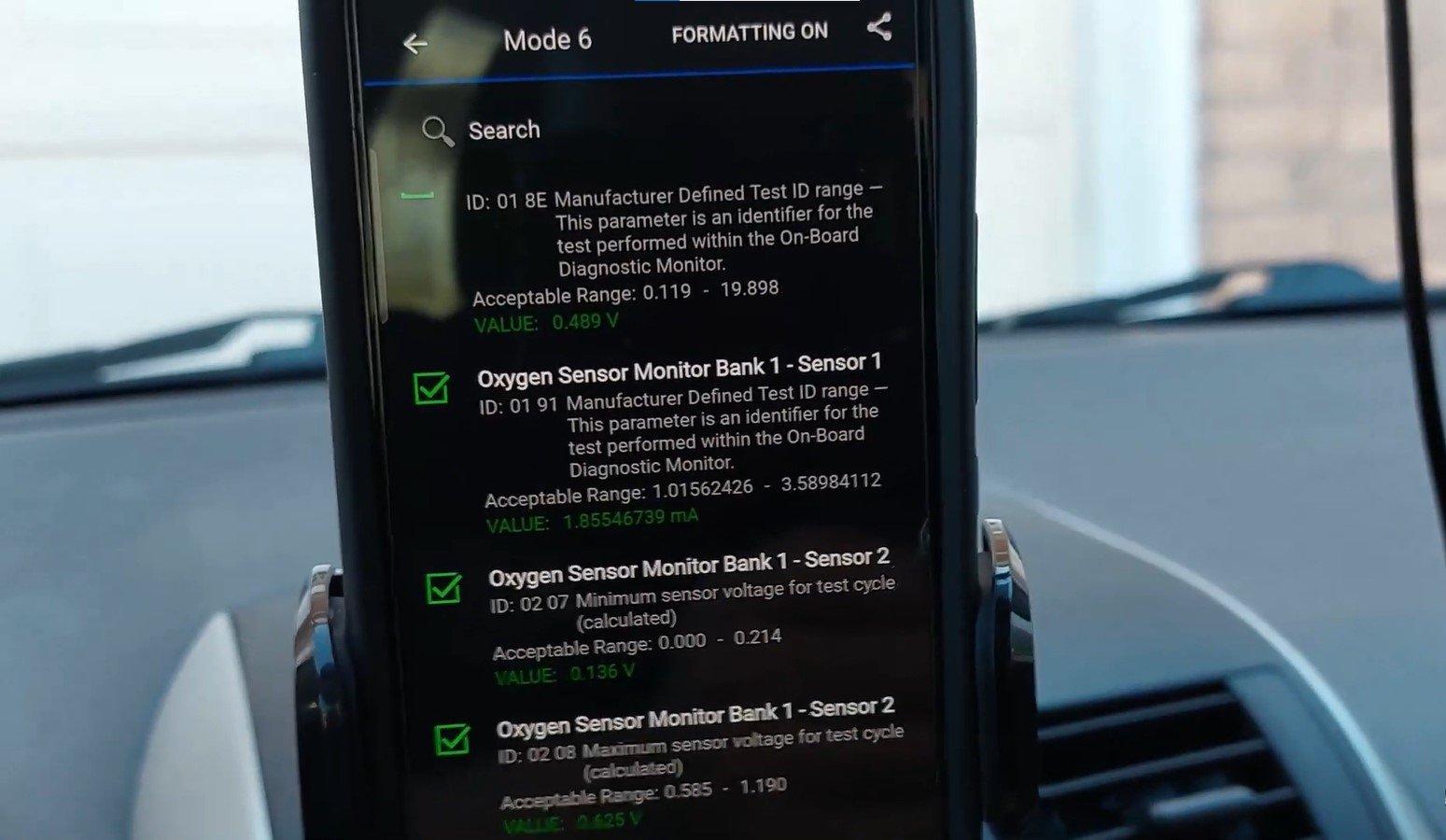
A non-continuous monitor runs only when certain conditions are met.
For example, a catalyst or EVAP monitor may need a particular engine temperature, vehicle speed, fuel level, or driving condition before its test can run.
If those conditions haven’t occurred, the monitor may remain incomplete, and an updated Mode 6 result may not be available.
Some vehicles also report Mode 6 information for continuously monitored systems. Coverage depends on the vehicle and diagnostic equipment.
Mode 6 vs. Other Common OBD2 Modes
Mode 6 makes more sense when you compare it with other scanner functions.
| OBD2 Mode | What It Does |
|---|---|
| Mode 1 | Displays current diagnostic data, MIL status, and readiness information |
| Mode 2 | Retrieves freeze-frame data recorded around a fault |
| Mode 3 | Retrieves confirmed emissions-related trouble codes |
| Mode 4 | Clears or resets supported emissions-related diagnostic information |
| Mode 6 | Retrieves onboard monitoring test results |
| Mode 7 | Retrieves pending emissions-related trouble codes |
| Mode 9 | Retrieves supported vehicle identification information |
For example, Mode 1 may show an oxygen sensor reading changing while the engine runs.
Mode 6 may show the result of a completed onboard test that evaluated some aspect of that sensor’s performance.
Neither function replaces the other. Trouble codes, live readings, readiness status, and Mode 6 results are more useful when considered together.
Freeze-frame data provides another useful piece of the picture. Our guide on how to read OBD2 freeze-frame data explains how to review the operating conditions recorded around a detected fault.
What Does Mode 6 Data Look Like on a Scanner?
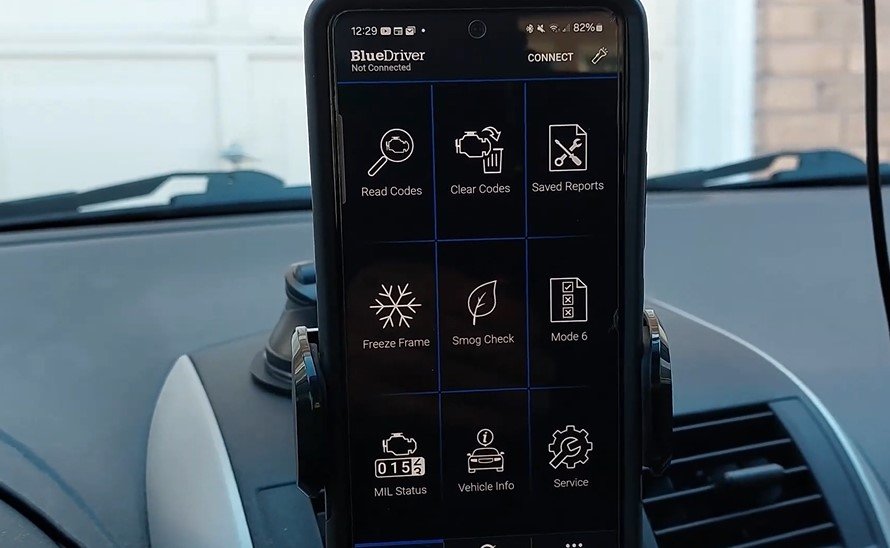
Depending on the tool, the Mode 6 screen may show familiar descriptions such as “Catalyst Monitor” or “Oxygen Sensor Test.”
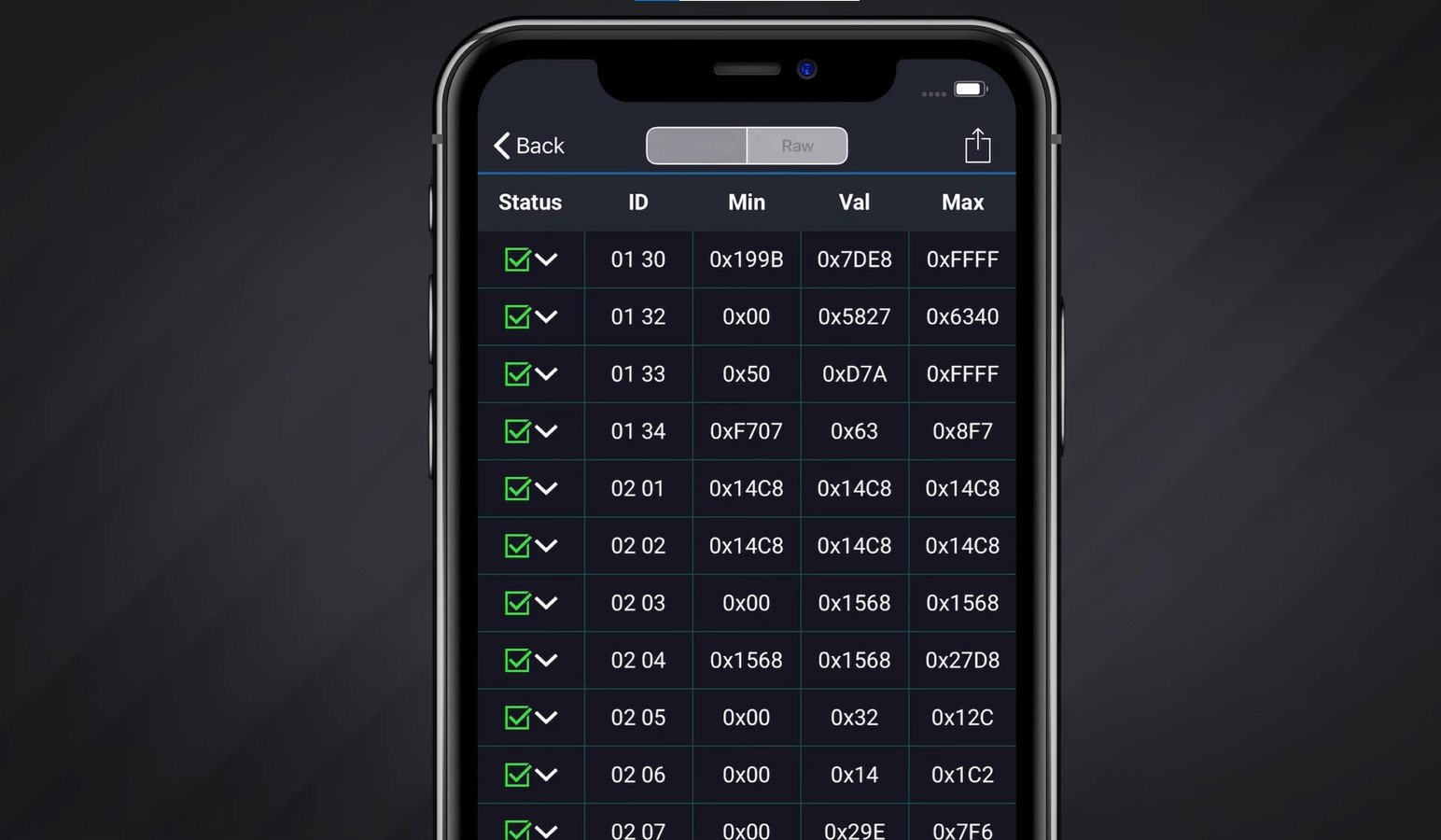
Other scanners display identifiers and hexadecimal values that aren’t immediately understandable.
Most useful records answer three questions:
- What system or component was tested?
- What result did the computer measure?
- Was the measured result within the programmed limits?
Before making a repair decision, you need to understand what the specific test measures.
How Mode 6 Data Is Organized
Mode 6 records contain identifiers that help a scanner recognize individual tests.
| Field | Meaning |
|---|---|
| MID / OBDMID | Monitor identifier used in supported systems |
| TID | Test identifier |
| CID | Component identifier in older or certain scanner formats |
| Test Value | Measured result of the monitored test |
| Minimum / Maximum | Programmed acceptable test limits |
| Unit / Scaling | Information needed to interpret the raw result |
The identifiers and record formats differ between older diagnostic protocols and CAN-based OBD2 systems.
For example, a scanner might show MID $21 and TID $01 without explaining what they represent.
Those identifiers shouldn’t be interpreted using a generic description unless it matches the vehicle’s protocol and test definition.
Manufacturer service information or a scanner with accurate vehicle-specific translations may be necessary.
How to Read Mode 6 Test Results
You don’t need to understand every hexadecimal number to make useful observations. Start with these five checks.
- Identify the Monitor: Find the system being tested, such as the catalyst, oxygen sensor, or EVAP system.
- Check Monitor Status: Determine whether the relevant readiness monitor has completed. Remember that this alone doesn’t prove every displayed result is recent.
- Verify the Test: Confirm the test description, units, and scaling for your specific vehicle.
- Compare the Limits: Check whether the measured value falls within the programmed minimum and maximum.
- Compare Other Evidence: Review related codes, freeze-frame data, live readings, and vehicle symptoms.
A failed test tells you that the computer recorded an unacceptable result. It doesn’t automatically prove that the component named by the scanner caused the failure.
If your scanner also displays a DTC, look up its meaning and possible causes in our OBD2 trouble codes reference before deciding which system to inspect.
Seven Practical Uses of Mode 6
1. Finding Problems Before a Confirmed Code Appears
Some monitoring tests may produce useful results before a fault meets the conditions required for a confirmed trouble code.
For example, a test may pass but produce a result close to its failure threshold.
That can justify further investigation, although it doesn’t mean a component is about to fail.
2. Investigating an Intermittent Misfire
On supported vehicles, Mode 6 may provide cylinder-specific misfire information.
If one cylinder shows unusual results, you can focus further checks on that cylinder.
However, a misfire may result from ignition problems, fuel delivery, compression, wiring, or air leaks. Mode 6 alone cannot distinguish between these causes.
3. Evaluating Catalytic Converter Tests
Catalyst-related results may show how a completed efficiency test compared with its programmed limits.
This can help when investigating a catalyst-related trouble code or checking whether a monitor completed after a repair.
But a failed result doesn’t automatically mean the catalytic converter is defective. Exhaust leaks, misfires, fuel control problems, and sensor issues may affect the test.
4. Checking Oxygen Sensor Performance
Depending on the vehicle, Mode 6 may include oxygen sensor response, heater, or other performance test results.
These results help show whether the onboard computer accepted the measured behavior during a completed test.
Live data is still useful because it lets you observe available sensor readings under current operating conditions.
If you need to investigate the sensor itself, our guide on testing an oxygen sensor with an OBD2 scanner covers additional checks using diagnostic information.
5. Investigating EVAP, EGR, and VVT Problems
Mode 6 may provide results for evaporative emissions leak detection, EGR flow, variable valve timing, and other supported systems.
A failed result can narrow your investigation, but it may not identify the specific hose, valve, sensor, or wiring fault involved.
6. Checking a Repair
After repairing a confirmed fault, you can use Mode 6 to see whether the relevant onboard test has run again and produced an acceptable result.
This is stronger evidence than relying only on the Check Engine Light being off.
However, a passed test doesn’t guarantee the entire system is healthy. Check for returning codes, symptoms, and other related results.
7. Understanding an Incomplete Readiness Monitor
An incomplete readiness monitor means the required self-test hasn’t finished under the necessary conditions.
It doesn’t automatically mean the system failed.
A failed Mode 6 test, on the other hand, means a completed test produced a result outside its acceptable limits.
Understanding this difference can prevent unnecessary parts replacement.
Readiness status also matters when preparing for an inspection. Our guide on passing an OBDII emissions test explains why incomplete monitors can affect the result.
Can Mode 6 Predict a Problem Before the Check Engine Light?
Sometimes, but it isn’t a reliable failure prediction tool.
A test may pass while its measured value sits close to the programmed limit. This can be useful when investigating a developing or intermittent problem.

However, test results can change with engine temperature, load, fuel quality, and driving conditions.
A near-limit value doesn’t tell you how long a component will last or whether it will fail soon.
Use it as a reason to collect more information, not as permission to replace parts without testing.
If the Check Engine Light comes on but your scanner finds nothing, our article on why the Check Engine Light may be on with no codes explains possible scanner limitations and communication problems.
Important Limitations of Mode 6
Although Mode 6 on an OBD2 scanner can provide useful diagnostic evidence, it has several limitations.
| Limitation | Why It Matters |
|---|---|
| Vehicle coverage varies | Not every vehicle supports the same onboard tests |
| Scanner translations differ | Some tools display raw or incorrectly labeled results |
| Results aren’t usually live | The displayed value may come from an earlier test |
| Monitors may be incomplete | An updated result may not be available |
| Units and limits vary | Incorrect scaling can lead to misleading conclusions |
| Pass/fail isn’t a parts diagnosis | Other faults may influence the measured result |
| Limited historical information | One test result may not show a long-term trend |
| No active control | Mode 6 retrieves results rather than commanding components |
Also, clearing diagnostic codes can reset readiness monitors and remove useful test information.
Record your codes, freeze-frame information, readiness status, and Mode 6 results before clearing anything.
A Practical Mode 6 Diagnostic Workflow
If you’re diagnosing a vehicle, start with the stored trouble codes and symptoms.
Next, check readiness status and locate the Mode 6 test related to the suspected system.
Verify the test description, units, scaling, and programmed limits using accurate vehicle-specific information.
Compare the result with available live data and perform the necessary physical checks before replacing a component.
If you’re unsure which live readings matter, our guide on how to interpret OBD2 live data explains common sensor readings and why their patterns matter.
After repairing the confirmed cause, allow the onboard monitor to run under the manufacturer’s recommended conditions. Then review the updated result and check whether any codes or symptoms return.
Always follow safe and legal driving conditions when completing required monitor tests.
Common Mistakes When Interpreting Mode 6
One common mistake is assuming that the largest test value represents the worst problem.
That’s not always true. Some tests fail above a maximum limit, while others fail below a minimum.
Another mistake is treating an incomplete monitor as a failed component.
Drivers may also assume a green Pass label proves the entire system is working correctly. In reality, it only confirms that a particular test satisfied its programmed criteria during that test.
Finally, don’t treat stored Mode 6 results as current live measurements without checking when the relevant monitor ran.
Frequently Asked Questions About Mode 6
Is Mode 6 available on every OBD2 scanner?
No. Not every scanner displays Mode 6 results. Some tools provide translated test descriptions, while others display raw identifiers. Check scanner features and vehicle coverage.
Is Mode 6 the same as live data?
No. Live data shows current sensor information, while Mode 6 generally retrieves results from completed onboard monitoring tests.
Can Mode 6 turn on the Check Engine Light?
No. Mode 6 only retrieves diagnostic results. The vehicle’s onboard diagnostic system decides when fault criteria have been met and whether the warning light should turn on.
Can Mode 6 run an EVAP or catalyst test?
No. Mode 6 retrieves available results from onboard tests. Commanding an active test requires other diagnostic functions and vehicle support.
Can Mode 6 help diagnose a misfire?
Yes, on supported vehicles. Cylinder-specific information may help narrow the investigation, but additional ignition, fuel, wiring, or mechanical testing may still be necessary.
Why does my scanner show hexadecimal values?
The scanner may not have the information needed to translate the test identifiers into readable descriptions. Manufacturer service information or a more capable scanner may be required.
Conclusion: Is Mode 6 Useful for Car Diagnostics?
The simplest answer to what is Mode 6 on an OBD2 scanner is that it’s a report of your vehicle computer’s onboard monitoring tests.
It can help you investigate intermittent problems, evaluate emissions-related test results, and check whether a monitor has passed after a repair.
However, Mode 6 results aren’t always current or easy to interpret. A failed test doesn’t automatically identify the faulty part, and a passing test doesn’t guarantee the entire system is healthy.
For reliable diagnosis, use Mode 6 alongside trouble codes, readiness status, freeze-frame data, live readings, and appropriate vehicle-specific testing.
That approach gives you a better chance of finding the actual problem without replacing parts unnecessarily.