
You plug a scanner into the diagnostic port, select the vehicle, and expect to see a menu for adding a replacement key. Instead, the tool offers engine codes, live data, and emissions monitors—but nothing related to the immobilizer.
That is normal for a basic OBD2 scanner.
Some advanced diagnostic scanners and dedicated key programmers can add transponder keys, pair remotes, or enroll smart keys through the vehicle’s diagnostic connector. However, connecting through the OBD2 port does not automatically give a tool key-programming capability.
Before buying a scanner or replacement key, it helps to think of the process as passing five separate gates:
Tool capability → Vehicle coverage → Correct key hardware → Existing-key status → Security authorization
If any one of these requirements is missing, programming may be unavailable even when the tool connects to the vehicle successfully.
Can an OBD2 Scanner Program Keys?
A basic OBD2 scanner generally cannot program keys. Its primary purpose is to read and clear emissions-related diagnostic trouble codes, display standardized powertrain data, and check emissions-monitor readiness.
Key programming requires communication with an immobilizer, body control module, smart-key control unit, or another manufacturer-specific security system. Generic code readers are not designed to access or modify those systems.
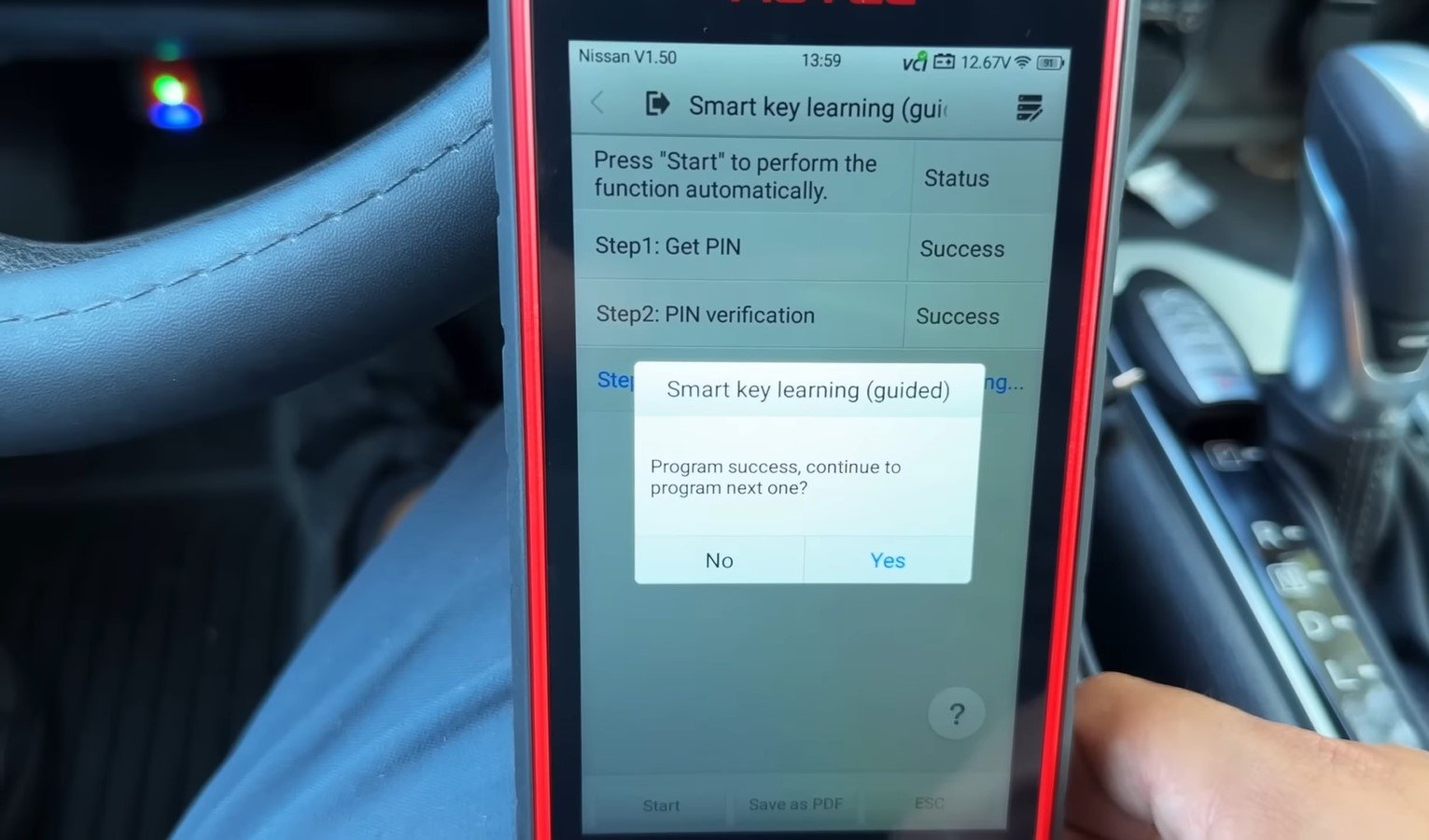
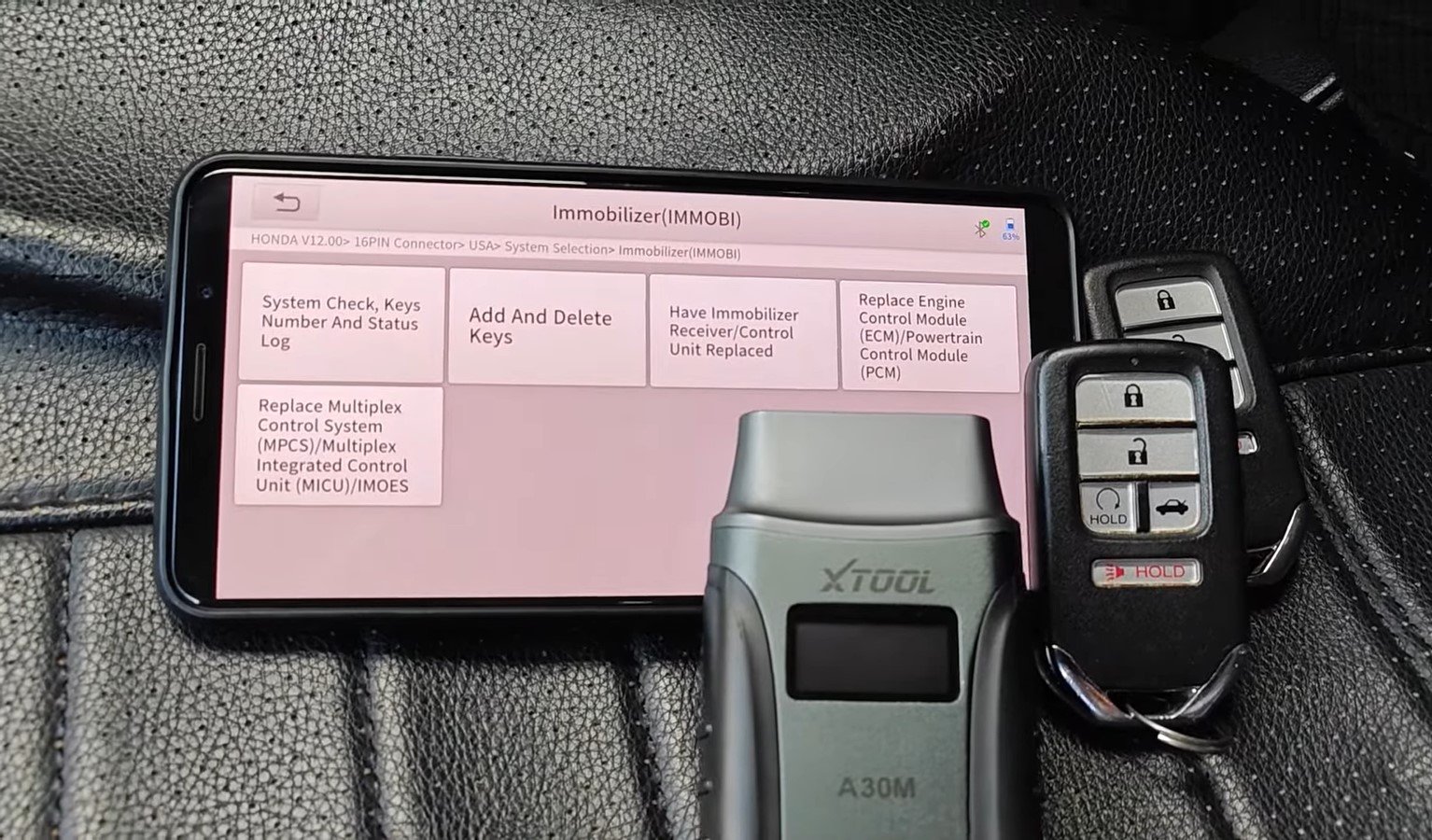
The answer changes when the term “OBD2 scanner” is used for an advanced diagnostic tablet. Some professional scanners connect through the same diagnostic port but include manufacturer-specific immobilizer software. Depending on the tool and vehicle, they may support functions such as:
- Adding a spare transponder key
- Learning a new remote
- Enrolling a smart or proximity key
- Viewing the number of registered keys
- Removing missing keys from the vehicle’s memory
- Performing certain immobilizer resets
Even then, support is not universal. A tool may program keys on one model year but offer only diagnostic access on another. It may support adding a key when a working key is present but not support an all-keys-lost situation.
Gate 1: Does the Scanner Have an IMMO or Key-Learning Function?
The first requirement is specific key or immobilizer capability. Product descriptions may use terms such as:
IMMO, Key Learning, Key Matching, Add Key, Remote Learning, Smart-Key Learning, or All Keys Lost
The presence of full-system diagnostics or bidirectional controls does not automatically confirm these functions. A bidirectional scanner may activate a fuel pump, command a cooling fan, or perform an electronic parking-brake service while still lacking permission or software to access the immobilizer.
Before purchasing a tool, its coverage database should show the exact key function for the vehicle’s make, model, year, key type, and market. A broad statement such as “supports key programming” is not enough.
Why the OBD2 Port Does Not Guarantee Key Programming
The diagnostic connector is only the physical entry point. What the scanner can do after connecting depends on its hardware, installed software, vehicle communication protocols, and security authorization.
A basic scanner normally communicates using standardized OBD2 modes intended for emissions-related diagnosis. An advanced key programmer may use the same connector while communicating through manufacturer-specific protocols with the body control or immobilizer system.
This distinction is similar to entering the lobby of a secure building. Reaching the lobby does not give you access to every room. The correct authorization and credentials are still required.
That is why two scanners connected to the same vehicle can have completely different capabilities. One may display only generic engine codes, while another can access dozens of modules and display an immobilizer menu. A third may require an additional programmer, adapter, paid software license, or verified security login before the key functions become available.
OBD2 Scanner vs. Key Programmer: What’s the Difference?
The name of the tool does not always reveal its actual capability. The following comparison provides a more useful starting point.
| Tool Type | Typical Functions | Can It Program Keys? | Important Limitation |
|---|---|---|---|
| Basic OBD2 code reader | Generic engine codes, readiness monitors, and limited live data | No, in most cases | Does not access immobilizer programming functions |
| Bluetooth OBD2 adapter | Functions depend on the adapter and mobile app | Usually no | A generic app cannot create missing hardware or security access |
| Full-system diagnostic scanner | Reads multiple control modules and performs service resets | Sometimes | Key learning may be limited to certain vehicles or procedures |
| Bidirectional scan tool | Sends commands and performs active tests | Only if specific IMMO support is included | Bidirectional control alone does not guarantee key programming |
| Dedicated IMMO or key programmer | Key learning, chip functions, remote learning, and security-system service | Often, for supported vehicles | May require adapters, subscriptions, credentials, or additional hardware |
| OEM diagnostic system | Manufacturer-specific diagnosis and programming | For approved applications | May require paid access, ownership verification, and professional credentials |
Some vehicles also provide an approved owner-programming procedure that does not require a scanner. These procedures are model-specific and may require one or two already-programmed keys. They should not be assumed to work on a different year or key system.
What Does “Programming a Key” Actually Mean?
The phrase “programming a key” is often used for several separate jobs. A tool that performs one job may not perform the others.
Cutting the Mechanical Blade
A scanner cannot physically cut a metal key blade. Cutting requires the correct key blank and suitable key-cutting equipment. Even if the electronic portion is programmed, an uncut or incorrectly cut blade may not operate the door or ignition lock.
Pairing the Remote Buttons
Remote learning allows the lock, unlock, trunk, or panic buttons to communicate with the vehicle. On some older vehicles, remote pairing is separate from immobilizer programming.
This means the buttons can work while the key still cannot start the engine.
Registering the Transponder Chip
A transponder key contains an electronic chip that the immobilizer must recognize. Key learning registers an approved transponder with the vehicle so the immobilizer can authorize engine starting.
A correctly cut blade without a recognized transponder may turn the ignition cylinder but leave the engine disabled.
Enrolling a Smart or Proximity Key
Push-button-start vehicles use smart keys that communicate with the vehicle electronically. Enrollment may involve the immobilizer, smart-key module, body control module, and other security functions. Correct frequency, part number, region, and key configuration can all matter.
Generating or Preparing a Replacement Key
Some dedicated programmers can prepare compatible universal keys or transponder chips before they are learned to the vehicle. This is a different capability from simply telling the vehicle to accept a ready-to-use key.
Removing a Lost or Stolen Key
In some cases, the vehicle’s key list can be updated so a missing key no longer starts the engine. This may require erasing and relearning the remaining keys rather than deleting only one entry. Because an incorrect procedure could disable valid keys, it should be performed only with verified ownership and confirmed vehicle-specific instructions.
Passing the first gate confirms only that the scanner has an immobilizer or key-learning function. It does not confirm that the function will work on a particular vehicle or with a particular replacement key.
This is why the question Can an OBD2 Scanner Program Keys cannot be answered by looking at the tool’s name or price alone. The exact vehicle, key hardware, and existing-key situation can completely change the result.
Gate 2: Does the Tool Support Your Exact Vehicle?
Key-programming coverage is highly vehicle-specific. A scanner may support a manufacturer without supporting every model, model year, immobilizer generation, or key type produced by that manufacturer.
For example, a tool might offer Add Key support for an older blade-key system but not support the newer smart-key system used by a later version of the same model. Coverage can also differ between vehicles sold in the United States, Europe, Asia, and other markets.
Compatibility may depend on:
- Make, model, and model year
- Vehicle market or region
- Immobilizer-system generation
- Ignition key or push-button start
- Transponder or smart-key type
- Scanner software version
- Active software subscription
- Required adapter or programmer
- Manufacturer security-gateway requirements
- Add Key or All Keys Lost procedure
A manufacturer’s general product page may say that a scanner supports key programming for dozens of vehicle brands. That statement does not guarantee every function on every vehicle.
The more useful source is a function-level coverage database. Look for the exact vehicle and the exact operation required. An entry that says “Key Learning” may still be less specific than separate listings for Add Key, Remote Learning, Smart-Key Learning, Key Erase, and All Keys Lost.
Software version matters as well. A function may be added, changed, restricted, or moved behind a paid update. Coverage found in a recent online database may not exist on a scanner running older software.
Why Vehicle Identification Alone Is Not Always Enough
Entering the VIN may allow the scanner to identify the vehicle automatically, but successful identification does not prove key-programming support.
The VIN identifies the vehicle configuration, while the scanner still needs compatible software and access to the correct security module. Some models also use different immobilizer systems within the same production year, depending on trim level, build date, market, or key type.
Before buying a scanner, confirm compatibility using the complete vehicle details and ask the manufacturer or seller to verify the specific function in writing. A claim such as “works on Toyota” or “supports Ford keys” is too broad to rely on.
Gate 3: Is the Replacement Key Compatible?
The scanner can initiate a valid learning procedure and still fail if the replacement key is incorrect.
Modern keys may look identical on the outside while using different electronic components. The vehicle may require a specific transponder chip, radio frequency, circuit-board design, or smart-key protocol.
Important details may include:
- OEM or compatible part number
- Transponder-chip type
- Radio frequency
- Number and layout of buttons
- Vehicle market
- Blade type
- Proximity or push-button-start support
- New or previously programmed condition
A key sold for the correct model year may still be incompatible if it was designed for another trim, region, or immobilizer version. Visual appearance is therefore not a reliable compatibility test.
Can a Used Key Fob Be Programmed to Another Car?
Sometimes—but not always.
Some remote controls can be paired with another compatible vehicle after being removed from the original one. Other transponders and smart keys become locked once programmed and cannot be reused through a normal Add Key procedure.
A professional tool may be able to reset or renew certain supported keys, but that capability is separate from vehicle key learning. Many used smart keys cannot be safely assumed to be reusable.
Even if the remote buttons can be paired, the immobilizer transponder may remain locked to the original vehicle. This can produce a confusing situation where the doors lock and unlock but the engine will not start.
Before purchasing a used key, verify whether that exact part number can be renewed and enrolled in the intended vehicle. A new compatible key is often the safer option when reliable reuse cannot be confirmed.
Key Cutting and Electronic Programming Are Different Jobs
A scanner cannot cut the mechanical blade. Key cutting shapes the metal blade so it can operate the door or ignition lock, while electronic programming teaches the vehicle to recognize the transponder or smart key.
The order depends on the vehicle and service procedure. Some keys may be electronically enrolled before cutting, while others need a correctly cut blade to operate the ignition during an approved learning sequence.
Either way, both jobs may be necessary. A programmed but uncut key may start a push-button vehicle yet leave the owner without a working emergency blade. A correctly cut transponder key may turn the ignition but fail to start the engine until its chip is registered.
Gate 4: Are You Adding a Spare Key or Are All Keys Lost?
The existing-key situation is one of the biggest factors in programming difficulty.
Adding a spare while at least one valid key remains available is usually less complicated. Some vehicles allow an approved owner-programming procedure when one or two programmed keys are present. Others still require a capable scan tool.
An All Keys Lost situation is different. With no recognized key available, the vehicle may require additional security access, ownership verification, specialized hardware, or an OEM-level procedure.
A scanner that supports Add Key should never be assumed to support All Keys Lost.
Can You Program a Key Without the Original Key?
Some vehicles and professional tools support programming when every original key is missing. This is generally described as an All Keys Lost function.
The presence of that menu does not guarantee automatic success. The procedure may require access to protected security information, an online connection, a manufacturer account, additional hardware, or professional credentials. Proof that the person requesting the service owns or is authorized to service the vehicle may also be required.
All Keys Lost work carries greater risk because there may be no functioning key available if the procedure is interrupted or unsupported. Selecting an erase function without confirmed recovery capability could remove valid keys and leave the vehicle unable to start.
For this reason, owners should not experiment with key-erasure or immobilizer-reset functions. When no working key remains, a qualified automotive locksmith or authorized dealer is usually safer than purchasing a scanner based only on a broad marketing claim.
What If a Key Was Lost or Stolen?
Adding a replacement key does not necessarily disable the missing one. If theft or unauthorized access is a concern, the service may need to remove old key IDs from the immobilizer memory and relearn the keys that should remain authorized.
Electronic removal can prevent the missing transponder or smart key from starting the engine. However, if the lost key contains a mechanical blade, that blade may still operate a matching physical lock unless the lock cylinder is changed or rekeyed.
The correct response depends on the vehicle, the type of key that was lost, and the level of security risk. A locksmith or dealer can explain which electronic and mechanical protections are available.
Gate 5: Does the Procedure Require Security Authorization?
Security requirements vary by manufacturer, vehicle age, market, and procedure. Adding a spare key to an older vehicle may require little more than a compatible tool and working key. Programming a newer smart key or recovering from an All Keys Lost situation may require considerably more.
Depending on the application, the process may require:
- Proof of vehicle ownership or service authorization
- A manufacturer security account
- Professional locksmith or technician credentials
- A security PIN or other protected information
- Online authentication
- A paid programming subscription
- Secure-gateway access
- Multi-factor login verification
- Additional vehicle-specific hardware
In the United States and Canada, certain security-related services may require an approved professional to use the National Automotive Service Task Force Vehicle Security Professional system. This helps restrict access to key codes, immobilizer resets, and other protected functions.
Not every key-programming operation requires those credentials. However, owners should not assume that purchasing a capable scanner automatically includes access to every security function shown in its menus.
Security Gateway Access and Immobilizer Access Are Not the Same
Some newer vehicles use a secure gateway to restrict commands sent through the diagnostic connector. A scanner may need an active subscription or authorized account to perform service functions beyond basic code reading.
Passing through that gateway does not necessarily provide immobilizer authorization. Key programming may use a separate layer of security controlled by the manufacturer, aftermarket-tool provider, or regional credentialing system.
A tool may therefore pass one security check but still be unable to perform the requested key operation.
What Features Should a Key-Programming Scanner Have?
Do not choose a scanner simply because its product page includes the words “key programming.” Check whether it provides the specific functions and supporting services required for the intended vehicle.
Useful capabilities may include:
- IMMO or immobilizer-system access
- Add Key
- All Keys Lost, if required
- Transponder-key learning
- Remote-control learning
- Smart or proximity-key learning
- Number-of-keys display
- Missing-key removal or key erasure
- Vehicle-specific PIN or security-access support through authorized methods
- Secure-gateway compatibility
- Required communication protocols
- Compatibility with external programmers or adapters
- Function-level vehicle coverage
- Current software updates
- Reliable technical support
A full-system or bidirectional scanner is not automatically a key programmer. The coverage database must identify the immobilizer function separately.
How to Check Compatibility Before Buying a Scanner
A careful pre-purchase check can prevent an expensive tool from becoming a basic code reader for the one vehicle you intended to service.
1. Identify the Exact Vehicle
Record the make, model, year, engine, trim, market, and key type. When available, use the VIN and production date to help confirm the configuration.
2. Define the Exact Job
Determine whether you need to pair remote buttons, add a transponder key, enroll a smart key, remove a lost key, or perform an All Keys Lost recovery. These are not interchangeable functions.
3. Check Function-Level Coverage
Use the manufacturer’s current coverage database rather than relying only on a marketplace description. Look for the exact operation under the exact vehicle.
4. Confirm the Required Hardware
Find out whether the scanner works by itself or needs a key programmer, adapter, cable, smart-key emulator, or other approved accessory.
5. Review Subscription Requirements
Some functions may remain available after the included update period, while others require an active subscription or online server connection. Confirm both the initial price and ongoing access requirements.
6. Verify Security Requirements
Ask whether the procedure requires professional credentials, proof of ownership, an OEM account, or secure-gateway authorization. A tool cannot legally or technically bypass requirements that the automaker enforces.
7. Confirm the Replacement Key
Verify the part number, chip type, frequency, button configuration, region, and whether the key must be new. Do not assume that a visually identical used key can be reused.
8. Obtain Written Confirmation
When possible, ask the manufacturer or authorized seller to confirm support in writing. Include the vehicle details, scanner model, software version, key type, and intended operation.
Why Key Programming Fails
A failed programming attempt does not automatically mean that the scanner is defective. The vehicle may reject the key for several different reasons.
Common causes include:
- The tool supports diagnosis but not key learning
- Add Key is supported, but All Keys Lost is not
- The immobilizer version is not covered
- The replacement key has the wrong chip or frequency
- A used smart key is locked to another vehicle
- The scanner software is outdated
- A required adapter is missing
- Security authorization is unavailable
- The vehicle’s battery voltage becomes unstable
- The internet or diagnostic connection is interrupted
- The immobilizer antenna or key reader is faulty
- A body control or immobilizer module has an existing fault
- The maximum number of registered keys has been reached
- Module replacement requires synchronization beyond ordinary key learning
Reading diagnostic codes from the immobilizer, body control, and related modules may be necessary before blaming the key. A vehicle with a damaged antenna, communication fault, low-voltage problem, or failed control module may not accept any replacement key until the underlying problem is repaired.
Why Stable Power Matters
Key learning may involve writing information to a security module. A weak vehicle battery or interrupted connection can stop the procedure before it finishes.
Professional technicians often use an appropriate battery-support unit when the manufacturer requires stable voltage. This is different from connecting an uncontrolled high-current charger. The support equipment and voltage setting must be suitable for the vehicle and procedure.
If a programming attempt stops unexpectedly, do not repeatedly erase keys or reset modules. Record any messages displayed by the tool and contact qualified technical support.
What Can Go Wrong During an Unsuccessful Attempt?
The most common result is simply that the new key remains unrecognized. However, certain procedures can create more serious inconvenience.
Possible outcomes include:
- Remote buttons work, but the engine does not start
- The new key is rejected
- Previously working keys become unrecognized
- The immobilizer warning remains illuminated
- The vehicle enters a temporary security delay
- Module synchronization becomes necessary
- The vehicle cannot be started until professional recovery is performed
Erase Keys and All Keys Lost functions deserve particular caution. They should not be selected merely to test whether a scanner supports the vehicle. If the tool cannot complete the relearning process, the remaining keys may no longer start the engine.
DIY, Automotive Locksmith, or Dealer?
The right choice depends on the key situation and the vehicle’s security requirements.
DIY Programming May Be Reasonable When
An owner-approved procedure appears in the correct vehicle manual, the required working keys are available, and the replacement key has been verified as compatible. Following the official procedure is different from attempting to bypass the immobilizer.
A scanner-assisted DIY attempt may also be reasonable when the tool manufacturer clearly confirms support, the process does not require restricted credentials, and there is a safe recovery option if programming fails.
An Automotive Locksmith Is Often the Practical Choice When
All keys are lost, a mechanical blade must be cut, a mobile service is needed, or a missing key must be removed from memory. Automotive locksmiths commonly work with multiple key types and may have dedicated programming, cutting, and security-authentication equipment.
Verify that the locksmith is properly qualified for the vehicle and can provide the required ownership checks.
A Dealer or Manufacturer-Qualified Specialist May Be Required When
The vehicle uses a newer encrypted smart-key system, OEM online authorization is mandatory, a security module has been replaced, or aftermarket coverage is unavailable. Manufacturer-specific tools and service information may also be necessary when key learning must be combined with module initialization.
Frequently Asked Questions
Can a Basic OBD2 Scanner Program a Key Fob?
Usually not. Basic scanners are designed for generic emissions-related codes and data. Remote or immobilizer programming requires vehicle-specific functions that ordinary code readers do not include.
Can a Bluetooth OBD2 Adapter Program Keys?
Most generic Bluetooth adapters cannot program keys. Their capabilities depend on both the adapter and the app, but inexpensive code-reading combinations normally lack protected immobilizer access. A Bluetooth connection by itself does not add key-programming capability.
Can a Bidirectional Scanner Program Keys?
Sometimes. A bidirectional scanner can send commands to vehicle modules, but key programming requires separate IMMO software and exact vehicle coverage. Never assume that active tests automatically include immobilizer functions.
Can an OBD2 Scanner Program Keys Without the Original?
Certain professional tools can perform an All Keys Lost procedure on supported vehicles. This may require additional hardware, online authorization, ownership verification, or professional credentials. A scanner that only supports Add Key cannot be relied on when no working key remains.
Can a Scanner Program a Smart Key?
An advanced IMMO tool may enroll a compatible smart key if it supports the vehicle’s exact system. The replacement key must have the correct electronics, frequency, part number, region, and configuration.
Can a Scanner Remove a Lost or Stolen Key?
Some tools can erase or relearn the vehicle’s authorized key list. This may prevent a missing electronic key from starting the engine. It does not necessarily prevent a matching mechanical blade from unlocking a physical door lock.
Final Takeaway
So, Can an OBD2 Scanner Program Keys? A basic code reader usually cannot, while certain advanced diagnostic scanners and dedicated IMMO programmers can program keys on specifically supported vehicles.
Success depends on all five gates:
Correct tool → Confirmed vehicle coverage → Compatible key → Appropriate key situation → Authorized security access
Check the precise function before buying a scanner, and do not confuse OBD2-port access with universal key-programming capability. When all keys are lost, security credentials are required, or module synchronization is involved, a qualified automotive locksmith or authorized dealer is usually the safer and more economical choice.